

Don't miss your chance to take exam DP-600 or DP-700 on us!
Request nowLearn from the best! Meet the four finalists headed to the FINALS of the Power BI Dataviz World Championships! Register now
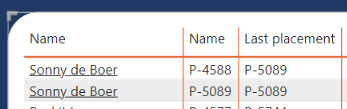
Does anybody know how I only show the last/biggets value in a column, grouped by name. My table looks like this:
I only want to see the sonny de boer with the name p-5089 in this table. Now I see him 2 times.
Solved! Go to Solution.
Hi,
Difficult to work out exactly how to Group correctly as I dont know the full data set, but you could try the below (used the sample data you gave above)
From this...
To this...
= Table.Group(#"Changed Type", {"Name"}, {{"Name2", each List.Max([Name2]), type nullable text}, {"Last Placement", each List.Max([Last Placement]), type nullable text}})
Hope that helps.
Hi,
Difficult to work out exactly how to Group correctly as I dont know the full data set, but you could try the below (used the sample data you gave above)
From this...
To this...
= Table.Group(#"Changed Type", {"Name"}, {{"Name2", each List.Max([Name2]), type nullable text}, {"Last Placement", each List.Max([Last Placement]), type nullable text}})
Hope that helps.
Share feedback directly with Fabric product managers, participate in targeted research studies and influence the Fabric roadmap.
Check out the February 2026 Power BI update to learn about new features.