Share feedback directly with Fabric product managers, participate in targeted research studies and influence the Fabric roadmap.
Sign up nowGet Fabric certified for FREE! Don't miss your chance! Learn more
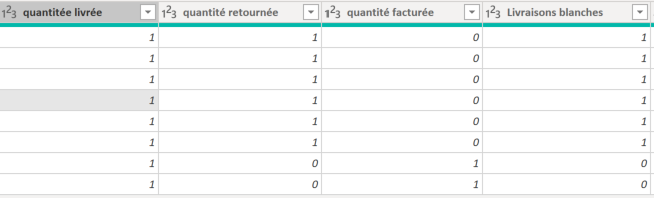
In PowerQuery I try to sum the `quantité livrée`by `BL 2` (i have several rows with the same BL2 number but i can't delete doublons, regarding of details of the data)
The data looks like:
I tried:
=Table.Group(#"Somme quantité livrée", {"BL 2"},{{"quantité livrée", each List.Sum([#"quantitée livrée"]), type number}}
but the function doesnt work, have the same error message "`RightParen token excepted"` but i don't see what should i do here (or even if its the right function to do what i except)
Basically i want to obtain the sum of the `quantité livrée`, `quantité retournée`, `quantité facturée` by distinct `BL 2`
Any idea?
Solved! Go to Solution.
Hey @Anonymous ,
Looks like you're missing the right parenthesis at the end of the function.
= Table.Group(#"Changed Type", {"BL 2"},{{"quantité livrée", each List.Sum([#"quantité livrée"]), type number}})
Proud to be a Super User!
Hey @Anonymous ,
Looks like you're missing the right parenthesis at the end of the function.
= Table.Group(#"Changed Type", {"BL 2"},{{"quantité livrée", each List.Sum([#"quantité livrée"]), type number}})
Proud to be a Super User!
Share feedback directly with Fabric product managers, participate in targeted research studies and influence the Fabric roadmap.
| User | Count |
|---|---|
| 12 | |
| 11 | |
| 11 | |
| 7 | |
| 6 |