Join us in Barcelona for FabCon and SQLCon, September 28 - October 1, 2026.
This is best Fabric, Power BI, SQL and AI community event. How do we know? The last event sold out! Save €200 with code FABCMTY200.
Register now- Power BI forums
- Get Help with Power BI
- Desktop
- Service
- Report Server
- Power Query
- Mobile Apps
- Developer
- DAX Commands and Tips
- Custom Visuals Development Discussion
- Health and Life Sciences
- Power BI Spanish forums
- Translated Spanish Desktop
- Training and Consulting
- Instructor Led Training
- Dashboard in a Day for Women, by Women
- Galleries
- Data Stories Gallery
- Themes Gallery
- Contests Gallery
- QuickViz Gallery
- Quick Measures Gallery
- Visual Calculations Gallery
- Fabric Apps Gallery
- Notebook Gallery
- Translytical Task Flow Gallery
- TMDL Gallery
- R Script Showcase
- Webinars and Video Gallery
- Ideas
- Custom Visuals Ideas (read-only)
- Issues
- Issues
- Events
- Upcoming Events
The Fabric community is upgrading! Read all of the details including the timeline and what you can expect. Learn more
- Power BI forums
- Forums
- Get Help with Power BI
- Power Query
- Re: GraphQL query in Power BI?
- Subscribe to RSS Feed
- Mark Topic as New
- Mark Topic as Read
- Float this Topic for Current User
- Bookmark
- Subscribe
- Printer Friendly Page


- Mark as New
- Bookmark
- Subscribe
- Mute
- Subscribe to RSS Feed
- Permalink
- Report Inappropriate Content
GraphQL query in Power BI?
Hello,
I am trying to connect to a GraphQL api through Power BI and could use some advice. In the Postman API tool I have written a working query, like this:
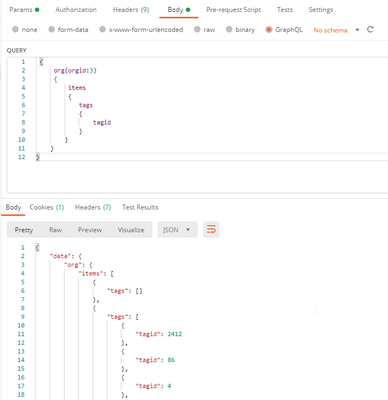
The query is above, and part of the response is below. The URL is a https web address with a single subscription-key parameter.
How do I implement this in Power Query?
Cheers, and thanks in advance, Mike
- Mark as New
- Bookmark
- Subscribe
- Mute
- Subscribe to RSS Feed
- Permalink
- Report Inappropriate Content
Solução funcional 2024:
let
Source = Web.Contents(
"URL",
[
Headers=[
#"Method"="POST",
#"Content-Type"="application/json",
#"Authorization"= "Bearer xxxxxxxx"
],
Content=Text.ToBinary("{""query"": ""{ cards(pipe_id:xxxxxx){ edges{ node{ id title uuid url phases_history { phase { name created_at } } } } } }""}")
]
),
#"JSON" = Json.Document(Source)

- Mark as New
- Bookmark
- Subscribe
- Mute
- Subscribe to RSS Feed
- Permalink
- Report Inappropriate Content
Have you guys ever tried pagination in this code. Need help for using pagination for retrieving all pages.


- Mark as New
- Bookmark
- Subscribe
- Mute
- Subscribe to RSS Feed
- Permalink
- Report Inappropriate Content
i found a tool that is really helpful from me: "PowerBI Query Generator for GitHub GraphQL API v4" :
https://jsfiddle.net/rockyintel/1sqm7dpf/
i entered my graphQL query
and got the following Power Query M formula which works ! in my query i am using x-api-key as the key name.
this is the output from the generator tool:
let
Source = Web.Contents(
"https://myURL",
[
Headers=[
#"Method"="POST",
#"Content-Type"="application/json",
#"x-api-key"="putMyKeyHere"
],
Content=Text.ToBinary("{""query"": ""{ list{ items{ id name } } }""}")
]
),
#"JSON" = Json.Document(Source),
data = JSON[data]
in
data
- Mark as New
- Bookmark
- Subscribe
- Mute
- Subscribe to RSS Feed
- Permalink
- Report Inappropriate Content
Hello, i need the same, but i am a begginner. you can explain me how to connect Graph Ql to Power BI??
- Mark as New
- Bookmark
- Subscribe
- Mute
- Subscribe to RSS Feed
- Permalink
- Report Inappropriate Content
For me the following code works:
Source = Web.Contents(
"http://localhost/HOPEXGraphQL/api/ITPM",
[
Headers=[
#"Method"="POST",
#"Content-Type"="application/json",
#"Authorization"="Bearer " & gottoken,
#"X-Hopex-Context" = "{""EnvironmentId"":""M6LC(Gp3VzSP"",""RepositoryId"":""ihd7)1IVRXR9"",""ProfileId"":""757wuc(SGjpJ""}"
],
// Notice the quote escaping here
Content=Text.ToBinary("{""query"":""query{ application{ id name applicationType businessProcess{ id name} applicationOwner_PersonSystem{ id name } sentApplicationFlow_ApplicationParticipant{ id name } receivedApplicationFlow_ApplicationParticipant{ id name }} }""}")
]
),
#"JSON" = Json.Document(Source),
data = JSON[data]
- Mark as New
- Bookmark
- Subscribe
- Mute
- Subscribe to RSS Feed
- Permalink
- Report Inappropriate Content
Hello,
Would like to ask if you are still using Power BI and GraphQL? Does it still work after 2 years with the new verision of Hopex V5. We are trying to do the same thing that you are doing and coincidentally we are using Hopex GraphQL as well. Still did not manage to make it work. Would really appreciate it if you would send the code you are using to connect them.
Thank you!


- Mark as New
- Bookmark
- Subscribe
- Mute
- Subscribe to RSS Feed
- Permalink
- Report Inappropriate Content
Hi. You can try this. Assuming the response is a json. Imagine this is your URL: "https://swapi.dev/api/people/?search=Skywalker" and the body is a simple json with two params.
Then the code might be like this:
let
Json_body = Json.FromValue("{ ""first_param"": ""AAAAA"",  ""second_param"": ""BBBBBB""}",),
Source = Json.Document(Web.Contents("https://swapi.dev/api/", [
    RelativePath="people/",
    Query=[search="Skywalker"],
    Headers=[#"Content-Type"="application/json"],
    Content=Json_body
]))
in
Source
Hope it helps.
Happy to help!


- Mark as New
- Bookmark
- Subscribe
- Mute
- Subscribe to RSS Feed
- Permalink
- Report Inappropriate Content
Follow on LinkedIn
@ me in replies or I'll lose your thread!!!
Instead of a Kudo, please vote for this idea
Become an expert!: Enterprise DNA
External Tools: MSHGQM
YouTube Channel!: Microsoft Hates Greg
Latest book!: DAX For Humans
DAX is easy, CALCULATE makes DAX hard...
Helpful resources

FabCon & SQLCon – Barcelona 2026
Join us in Barcelona for FabCon and SQLCon, the Fabric, Power BI, SQL, and AI community event. Save €200 with code FABCMTY200.

Power BI DataViz World Championships - June 2026
A new Power BI DataViz World Championship is coming this June! Don't miss out on submitting your entry.


