cancel
Showing results for 
Search instead for 
Did you mean: 

The Power BI Data Visualization World Championships is back! Get ahead of the game and start preparing now! Learn more

Reply
shinney
Helper I
Helper I

Grabbing data with API, unable to convert datetime column to a date

Hello,

I'm trying to build a timeline chart based on count of tickets vs. date. We are recording the dates of when our report tickets come in on a datetime basis. 

First step would be to convert the datetime column to a date. However, we I did this on PowerBI, it simply just hid the time components; PowerBI was still not rolling-up my dates. Upon further inspection, I found out it was because the column type was still a datetime. When I tried to change this in M-query, it just gave me an "Error" for every record in the column. 


I tried making a second table that summed up the # of tickets per day, but I had difficulties joining the new table, and thus, I had issues with getting filters to work visuals.


Easiest fix would be to change the datetime to date, but keep running into that "Error" road-block.


Any suggestions on what to do?


Thanks!

1 ACCEPTED SOLUTION
v-jingzhang
Community Support
Community Support

Hi @shinney 

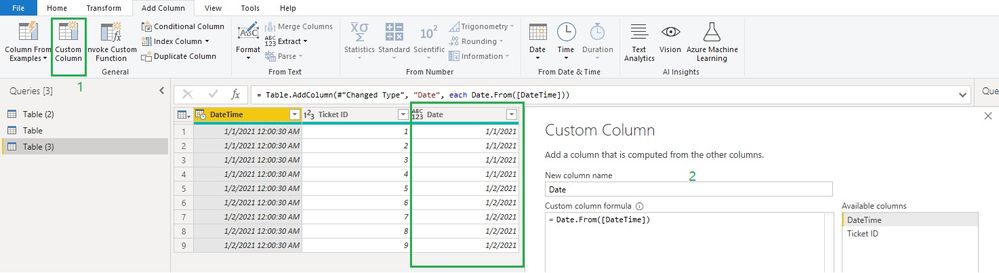
You can add a custom column to contain only date values from the original datetime column. Just like below.

= Date.From([Old DateTime column])

042302.jpg

This date column is able to be changed into Date type. You can remove the old datetime column and use this new date column later.


Regards,
Community Support Team _ Jing
If this post helps, please Accept it as the solution to help other members find it.

View solution in original post

1 REPLY 1
v-jingzhang
Community Support
Community Support

Hi @shinney 

You can add a custom column to contain only date values from the original datetime column. Just like below.

= Date.From([Old DateTime column])

042302.jpg

This date column is able to be changed into Date type. You can remove the old datetime column and use this new date column later.


Regards,
Community Support Team _ Jing
If this post helps, please Accept it as the solution to help other members find it.

Helpful resources

Announcements
Power BI DataViz World Championships

Power BI Dataviz World Championships

The Power BI Data Visualization World Championships is back! Get ahead of the game and start preparing now!

December 2025 Power BI Update Carousel

Power BI Monthly Update - December 2025

Check out the December 2025 Power BI Holiday Recap!

FabCon Atlanta 2026 carousel

FabCon Atlanta 2026

Join us at FabCon Atlanta, March 16-20, for the ultimate Fabric, Power BI, AI and SQL community-led event. Save $200 with code FABCOMM.