cancel
Showing results for 
Search instead for 
Did you mean: 

Try your skills in the Power BI Dataviz World Championship! Round one ends June 26. Join now

Reply
Anonymous
Not applicable

Getting the partition name

In the context of an Azure SSAS Tabular model table split into month partions for the purposes of refreshing, is it possible for the Power Query (in M language?) to determine the name of the partition it is in?

 
1 ACCEPTED SOLUTION

Hi @Anonymous 

Incremental refresh works for which data source is from SSAS.

Direct query or live connect seems impossible to apply incremental refresh in Power BI.


If my previous suggestions are not helpful,

Please check if the two articles help you.

Creating A Partitioned Table In SSAS Tabular 2017 And SSDT Using M Functions

SQL or M? – SSAS Partitions in Power Query/M


Best Regards
Maggie
Community Support Team _ Maggie Li
If this post helps, then please consider Accept it as the solution to help the other members find it more quickly.

View solution in original post

5 REPLIES 5
Anonymous
Not applicable

Capture.PNG

Hi @Anonymous 

"Incremental refresh" in Power BI has the similar features with "partition" in ssas.

Please check links below how to create and apply it.

https://docs.microsoft.com/en-us/power-bi/service-premium-incremental-refresh


Best Regards
Maggie
Community Support Team _ Maggie Li
If this post helps, then please consider Accept it as the solution to help the other members find it more quickly.

Anonymous
Not applicable

Interesting, but not helpful as we are using Azure SSAS, as I think I mentioned in my post.

Hi @Anonymous 

Incremental refresh works for which data source is from SSAS.

Direct query or live connect seems impossible to apply incremental refresh in Power BI.


If my previous suggestions are not helpful,

Please check if the two articles help you.

Creating A Partitioned Table In SSAS Tabular 2017 And SSDT Using M Functions

SQL or M? – SSAS Partitions in Power Query/M


Best Regards
Maggie
Community Support Team _ Maggie Li
If this post helps, then please consider Accept it as the solution to help the other members find it more quickly.

Anonymous
Not applicable

Sweet, Maggie. Thanks.

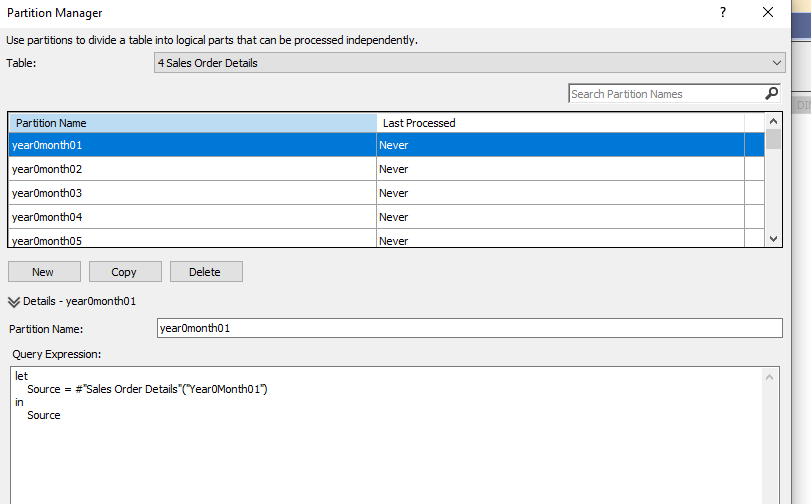
Although not able to get the name of the partition, after several cups of coffee to get my head round the article you linked, all the partitions looks like this. A vast improvement.Capture.PNG

Helpful resources

Announcements
Fabric Data Days is here Carousel

Fabric Data Days 2026

Don't miss out on Data Days, June 15 through August 7. Learn Fabric, Power BI, SQL, AI and more.

May Power BI Update Carousel

Power BI Monthly Update - May 2026

Check out the May 2026 Power BI update to learn about new features.

Power BI DataViz World Championships carousel

Power BI DataViz World Championships - June 2026

A new Power BI DataViz World Championship is coming this June! Don't miss out on submitting your entry.