This is best Fabric, Power BI, SQL and AI community event. How do we know? The last event sold out! Save €200 with code FABCMTY200.
Register nowA new Data Days event is coming soon! This time we’re going bigger than ever. Fabric, Power BI, SQL, AI and more. Don't miss out.
Hello there,
I hope you can help me with the following problem as I have no single experience in working with JSON body in the script editor.
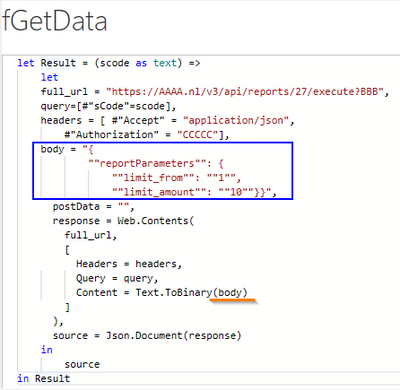
Below code worked all fine, but lately I've been receiving an error that an 'scode' exceeds the maximum file size.
To resolve this problem, I have added the marked lines (in blue) to the code and put 'body' in the code instead of 'postData' (highlighted in orange).
The code is working in Postman, but Power BI gives an 500 Internal Server Error.
Can you tell me what I'm doing wrong?
I have tried several adjustments (like working with Json.FromValue), but no luck.
Thanks in advance.
Please follow the documentation
Web.Contents - PowerQuery M | Microsoft Learn
Json.FromValue and Text.ToBinary use different syntax.
Thanks for the response.
I've already looked into the documentation and understand the difference in syntax with using different functions. However, the documentation doesn't give me new insights in solving the problem. Frankly, I was surprised the above code results in an error.
content = Json.FromValue([reportParameters=[limit_from = 1, limit_amount = 10]])
Tried that before as well, but still the 500 error shows up.
As you can imagine it is nearly impossible to help with API related issues without access to said API. Do they have a demo key?
Unfortunately there's no demo key.
I'll just keep trying to sort this out. Learning by doing 😉
Check out the May 2026 Power BI update to learn about new features.
Sign up to receive a private message when registration opens and key events begin.
If you have recently started exploring Fabric, we'd love to hear how it's going. Your feedback can help with product improvements.