FabCon is coming to Atlanta
Join us at FabCon Atlanta from March 16 - 20, 2026, for the ultimate Fabric, Power BI, AI and SQL community-led event. Save $200 with code FABCOMM.
Register now!- Power BI forums
- Get Help with Power BI
- Desktop
- Service
- Report Server
- Power Query
- Mobile Apps
- Developer
- DAX Commands and Tips
- Custom Visuals Development Discussion
- Health and Life Sciences
- Power BI Spanish forums
- Translated Spanish Desktop
- Training and Consulting
- Instructor Led Training
- Dashboard in a Day for Women, by Women
- Galleries
- Data Stories Gallery
- Themes Gallery
- Contests Gallery
- QuickViz Gallery
- Quick Measures Gallery
- Visual Calculations Gallery
- Notebook Gallery
- Translytical Task Flow Gallery
- TMDL Gallery
- R Script Showcase
- Webinars and Video Gallery
- Ideas
- Custom Visuals Ideas (read-only)
- Issues
- Issues
- Events
- Upcoming Events
The Power BI Data Visualization World Championships is back! Get ahead of the game and start preparing now! Learn more
- Power BI forums
- Forums
- Get Help with Power BI
- Power Query
- Getting a list of all columns in all tables in the...
- Subscribe to RSS Feed
- Mark Topic as New
- Mark Topic as Read
- Float this Topic for Current User
- Bookmark
- Subscribe
- Printer Friendly Page


- Mark as New
- Bookmark
- Subscribe
- Mute
- Subscribe to RSS Feed
- Permalink
- Report Inappropriate Content
Getting a list of all columns in all tables in the data model
Hi folks,
I am looking to get all the names of the columns of all the tables in a data model. No data, just the column names in a simple table like this:
Table       ColumnName
-------     ----------
Table1      id
Table1      CustCode
Table1      Amount
Table2      id
.....       .....
I created a list of all the tables TableList but not sure how to iterate that list when column names are unknown?
Thanks for your hints.
Solved! Go to Solution.


- Mark as New
- Bookmark
- Subscribe
- Mute
- Subscribe to RSS Feed
- Permalink
- Report Inappropriate Content
you could use #shared for this, but then you have to manually filter the queries
let
    Source = #shared,
    #"Converted to Table" = Record.ToTable(Source),
    #"Filtered Rows" = Table.SelectRows(#"Converted to Table", each ([Name] = "Query")),
    #"Added Custom" = Table.AddColumn(#"Filtered Rows", "Column", each Table.ColumnNames([Value])),
    #"Removed Columns" = Table.RemoveColumns(#"Added Custom",{"Value"}),
    #"Expanded Column" = Table.ExpandListColumn(#"Removed Columns", "Column")
in
    #"Expanded Column"
Thank you for the kudos 🙂

- Mark as New
- Bookmark
- Subscribe
- Mute
- Subscribe to RSS Feed
- Permalink
- Report Inappropriate Content
A much easier way with types and all:
let
schema_table = Table.Schema(airbnb)
in
schema_table
- Mark as New
- Bookmark
- Subscribe
- Mute
- Subscribe to RSS Feed
- Permalink
- Report Inappropriate Content
you could use #shared for this, but then you have to manually filter the queries
let
    Source = #shared,
    #"Converted to Table" = Record.ToTable(Source),
    #"Filtered Rows" = Table.SelectRows(#"Converted to Table", each ([Name] = "Query")),
    #"Added Custom" = Table.AddColumn(#"Filtered Rows", "Column", each Table.ColumnNames([Value])),
    #"Removed Columns" = Table.RemoveColumns(#"Added Custom",{"Value"}),
    #"Expanded Column" = Table.ExpandListColumn(#"Removed Columns", "Column")
in
    #"Expanded Column"
Thank you for the kudos 🙂
- Mark as New
- Bookmark
- Subscribe
- Mute
- Subscribe to RSS Feed
- Permalink
- Report Inappropriate Content
@Stachu , this doesn't work for me. There are no values "Query" in the [Name] column.
- Mark as New
- Bookmark
- Subscribe
- Mute
- Subscribe to RSS Feed
- Permalink
- Report Inappropriate Content
Thank you for the kudos 🙂
- Mark as New
- Bookmark
- Subscribe
- Mute
- Subscribe to RSS Feed
- Permalink
- Report Inappropriate Content
- Mark as New
- Bookmark
- Subscribe
- Mute
- Subscribe to RSS Feed
- Permalink
- Report Inappropriate Content
OK, never seen this #shared before. Can you explain a little how this script works?


- Mark as New
- Bookmark
- Subscribe
- Mute
- Subscribe to RSS Feed
- Permalink
- Report Inappropriate Content
Hi @gvg,
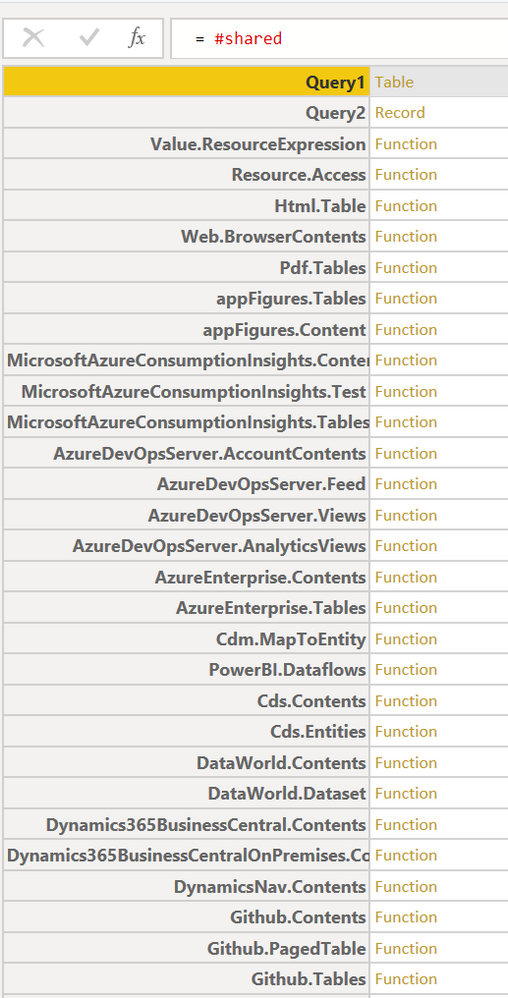
#shared is a record, which contains all tables (queries) and functions. It is a mixture of the PBI core functionality and your custom objects. Check the screenshot below.
Please be carefull with #shared. It isn't supported for refreshes in Power BI Service. It works only in Power BI Desktop. More about the problem: https://community.powerbi.com/t5/Power-Query/Expression-Evaluate-shared-in-PowerBI-Service/td-p/7316...
And to an untold question, which would come as next for sure: Unfortunately, there isn't another way how to get all columns of all tables.
- Mark as New
- Bookmark
- Subscribe
- Mute
- Subscribe to RSS Feed
- Permalink
- Report Inappropriate Content
I'm using the #shared object to get a list of tables and columns in my model. I wanted a dynamic list of columns and tables for a governance workflow. But I've found that it only instatiates these values within the query editor. When the query is applied and the table viewed in the report editor the values of any tables in the query editor are not populated.
Sure I can copy and paste the values..... but this is not the dynamic approach I require.
I'm wondering if anyone has any ideas how to persist the values in a way that survives the query being applied to the model ?
For example using the code below
let
Source = #shared,
#"Converted to Table" = Record.ToTable(Source),
#"Added Custom" = Table.AddColumn(#"Converted to Table", "Column", each try Table.ColumnNames([Value]) otherwise null),
#"Expanded Column" = Table.ExpandListColumn(#"Added Custom", "Column"),
#"Filtered Rows" = Table.SelectRows(#"Expanded Column", each ([Column] <> null)),
#"Removed Duplicates" = Table.Distinct(#"Filtered Rows", {"Name"}),
#"Removed Columns" = Table.RemoveColumns(#"Removed Duplicates",{"Value", "Column"})
in
#"Removed Columns"
I've been trying to persist the values instantiated in query editor to another table in some way. e.g. custom column, convert to list, merge with another table..... but so far all these refresh to null values 😞
Hoping someone has a clever way.
- Mark as New
- Bookmark
- Subscribe
- Mute
- Subscribe to RSS Feed
- Permalink
- Report Inappropriate Content
Try this one:
let
Source = #shared,
#"Converted to Table" = Record.ToTable(Source),
#"Added Custom" = Table.AddColumn(#"Converted to Table", "Column", each try Table.ColumnNames([Value]) otherwise null),
#"Expanded Column" = Table.ExpandListColumn(#"Added Custom", "Column"),
#"Filtered Rows" = Table.SelectRows(#"Expanded Column", each ([Column] <> null)),
#"Removed Columns" = Table.RemoveColumns(#"Filtered Rows",{"Value"})
in
#"Removed Columns"


- Mark as New
- Bookmark
- Subscribe
- Mute
- Subscribe to RSS Feed
- Permalink
- Report Inappropriate Content
Where do I put this code? I'd like to create a new table showing all the tables and columns associated with this .pbix file. Any leads?
Thank you.
- Mark as New
- Bookmark
- Subscribe
- Mute
- Subscribe to RSS Feed
- Permalink
- Report Inappropriate Content
I was able to figure it out:
- Click "Add data" to create a new table
- Enter "test" into one column
- Click "Transform data"
- Paste the code from @Anonymous into the "Advanced Editor"
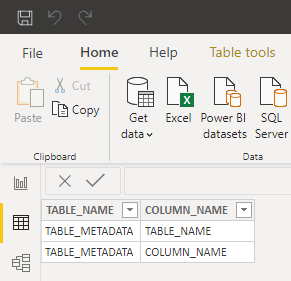
How do we get the view to persist?
In the query editor for the new table, all TableNames and ColumnNames are shown...
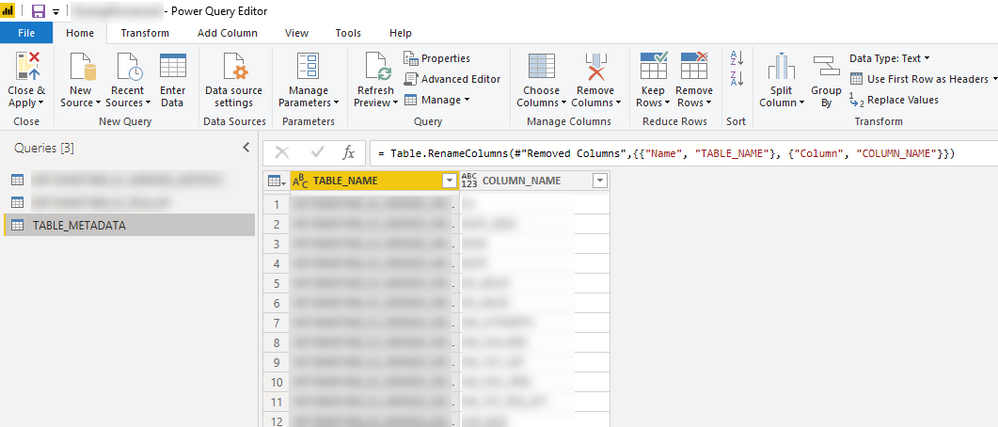
But as soon as I `Close and Apply`, none of the values are visible...?
- Mark as New
- Bookmark
- Subscribe
- Mute
- Subscribe to RSS Feed
- Permalink
- Report Inappropriate Content
I also have a similar requirement, any got how to make these values persistent?

- Mark as New
- Bookmark
- Subscribe
- Mute
- Subscribe to RSS Feed
- Permalink
- Report Inappropriate Content
Did you figure this out? Getting same thing
- Mark as New
- Bookmark
- Subscribe
- Mute
- Subscribe to RSS Feed
- Permalink
- Report Inappropriate Content
Hello friend! Didi you solved this problem? Chears
- Mark as New
- Bookmark
- Subscribe
- Mute
- Subscribe to RSS Feed
- Permalink
- Report Inappropriate Content

Helpful resources

Power BI Dataviz World Championships
The Power BI Data Visualization World Championships is back! Get ahead of the game and start preparing now!

Power BI Monthly Update - November 2025
Check out the November 2025 Power BI update to learn about new features.

FabCon Atlanta 2026
Join us at FabCon Atlanta, March 16-20, for the ultimate Fabric, Power BI, AI and SQL community-led event. Save $200 with code FABCOMM.

| User | Count |
|---|---|
| 10 | |
| 6 | |
| 5 | |
| 4 | |
| 2 |


