Join us at FabCon Atlanta from March 16 - 20, 2026, for the ultimate Fabric, Power BI, AI and SQL community-led event. Save $200 with code FABCOMM.
Register now!Vote for your favorite vizzies from the Power BI Dataviz World Championship submissions. Vote now!
Hi guys, I have a question.
I'm using the monday API to retrieve the platform data. Recovering the initial data was a piece of cake, but now I face a bit annoying problem. When trying to retrieve the sub-items (child activities) of a project, power bi fails, as it displays the query complexity message and gives a timeout.
Have you ever had this kind of problem?
Is there any way to paginate the queries in power BI and somehow give each query a 5 second pause so as not to time out the monday API's 1 minute timeout?
I'll put here the print of the error and also of my query
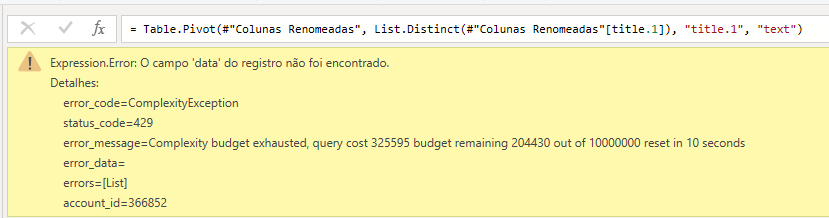
Error returned by BI
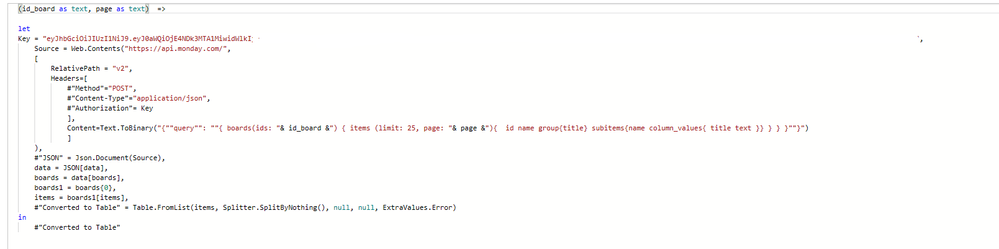
Query I'm using (I hid my token for security measures)
Solved! Go to Solution.
I'm late to this, but it will hopefully help others.
As a software developer, sometimes, doing it ourselves, isn't the best use of our time; just like we use plugins when coding - including paid ones, we can use third parties when the development time is greater than the costs of the App.
Where am I going with this? Well, I have been using Tugger (https://tuggerapp.com/) for a while now. I joined 'em before they even had a Monday connector; what they do is pull (or Tug as they call it) you data into their data warehouse. (It's also nice to see that they are now ISO 27001 certified.)
Once your data is in Tugger's warehouse, they provide secure OData credentials to import into the reporting option of your choice, such as: Power BI, Excel and Tableau.
Trying em out is a no-brainer, IMO, as they offer a free trial.
Hi Ibendlin,
I tried to use this function, but unfortunately it didn't work. Do you have any examples of how it works?
I have a similar issue, We have a Power BI dashboard set up to connect Monday.com with using the API key. We’re receiving a time-out error when trying to refresh the data, but the error is only coming across for only one of the boards, we have connected three boards in total and only one of the board is giving us the time out error.
I did go through the below link https://blog.crossjoin.co.uk/2021/12/17/simulating-slow-data-sources-in-power-bi/
Could you please help where it has to be applied to the current M-Query we have been using.

let
Source = Web.Contents("https://api.monday.com/" & "v2",
[
Headers=[
#"Method"="POST",
#"Content-Type"="application/json",
#"Authorization"="Bearer <APIKey>"
],
Content=Text.ToBinary("{""query"": ""{ boards (ids: <BoardID>) { items { id name column_values { title text } } } }""}")
]
),
#"JSON" = Json.Document(Source,65001),
data = JSON[data],
boards = data[boards],
boards1 = boards{0},
items = boards1[items],
#"Converted to Table" = Table.FromList(items, Splitter.SplitByNothing(), null, null, ExtraValues.Error),
#"Expanded Column1" = Table.ExpandRecordColumn(#"Converted to Table", "Column1", {"name", "column_values"}, {"Column1.name", "Column1.column_values"}),
#"Expanded Column1.column_values" = Table.ExpandListColumn(#"Expanded Column1", "Column1.column_values"),
#"Expanded Column1.column_values1" = Table.ExpandRecordColumn(#"Expanded Column1.column_values", "Column1.column_values", {"title", "text"}, {"Column1.column_values.title", "Column1.column_values.text"}),
#"Changed Type" = Table.TransformColumnTypes(#"Expanded Column1.column_values1",{{"Column1.column_values.title", type text}}),
#"Pivoted Column" = Table.Pivot(#"Changed Type", List.Distinct(#"Changed Type"[Column1.column_values.title]), "Column1.column_values.title", "Column1.column_values.text"),
#"Renamed Columns" = Table.RenameColumns(#"Pivoted Column",{{"Column1.name", "Name"}})
in
#"Renamed Columns"
Wow, I'm so grateful. It worked perfectly, thank you!
Read about Function.InvokeAfter()
Vote for your favorite vizzies from the Power BI World Championship submissions!
If you love stickers, then you will definitely want to check out our Community Sticker Challenge!
Check out the January 2026 Power BI update to learn about new features.
| User | Count |
|---|---|
| 16 | |
| 12 | |
| 9 | |
| 7 | |
| 6 |