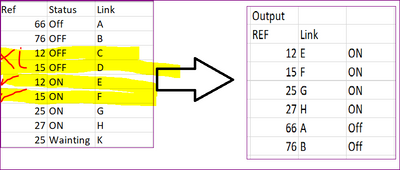
Hi @toum ,
Try this:
let
    Source = Table.FromRows(Json.Document(Binary.Decompress(Binary.FromText("i45WMjNT0lHyd3MDko5KsTrRSuYIASewgKERXMAZImAKF3BBUuEHJFyRFID4bmC+EZzvDuGbw/geCPlwR88QTz93IMtbKTYWAA==", BinaryEncoding.Base64), Compression.Deflate)), let _t = ((type nullable text) meta [Serialized.Text = true]) in type table [Ref = _t, Status = _t, Link = _t]),
    groupRef = Table.Group(Source, {"Ref"}, {{"Count", each Table.RowCount(_), Int64.Type}, {"data", each _, type table [Ref=nullable text, Status=nullable text, Link=nullable text]}}),
    expandData = Table.ExpandTableColumn(groupRef, "data", {"Status", "Link"}, {"Status", "Link"}),
    filterCriteria = Table.SelectRows(expandData, each ([Status] = "OFF" and [Count] = 1) or ([Status] = "ON"))
in
    filterCriteria
Summary:
1) groupRef = group on the [Ref] column and create one Count aggregate and one All Rows aggregate column.
2) expandData = expand the nested [data] column back out to reinstate original columns.
3) filterCriteria = filter table using [Count] column as part of the criteria.
Example output:
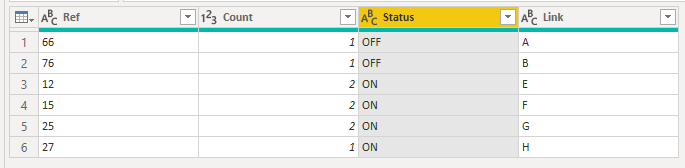
Pete
Now accepting Kudos! If my post helped you, why not give it a thumbs-up? Proud to be a Datanaut!