Get Fabric or SQL Certified for Free.
Get certified for free when you join Fabric Data Days 2026 and dive into Fabric, Power BI, SQL, AI, and other essential data skills.
Join now- Power BI forums
- Get Help with Power BI
- Desktop
- Service
- Report Server
- Power Query
- Mobile Apps
- Developer
- DAX Commands and Tips
- Custom Visuals Development Discussion
- Health and Life Sciences
- Power BI Spanish forums
- Translated Spanish Desktop
- Training and Consulting
- Instructor Led Training
- Dashboard in a Day for Women, by Women
- Galleries
- Data Stories Gallery
- Themes Gallery
- Contests Gallery
- QuickViz Gallery
- Quick Measures Gallery
- Visual Calculations Gallery
- Notebook Gallery
- Translytical Task Flow Gallery
- TMDL Gallery
- R Script Showcase
- Webinars and Video Gallery
- Ideas
- Custom Visuals Ideas (read-only)
- Issues
- Issues
- Events
- Upcoming Events
July 7 - July 17 | Round 2 of the Power BI Dataviz World Championships. Don't miss your chance! Learn more
- Power BI forums
- Forums
- Get Help with Power BI
- Power Query
- Get Previous Value in Column
- Subscribe to RSS Feed
- Mark Topic as New
- Mark Topic as Read
- Float this Topic for Current User
- Bookmark
- Subscribe
- Printer Friendly Page


- Mark as New
- Bookmark
- Subscribe
- Mute
- Subscribe to RSS Feed
- Permalink
- Report Inappropriate Content
Get Previous Value in Column
Hello, I have a Date column with the following values:
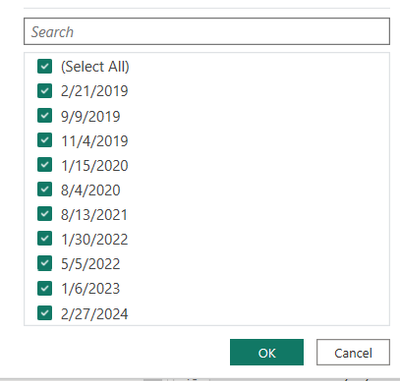
I want to create a new column named "Start Date" that would return the following. The 12/1/2010 value would be a Min Date from another table.
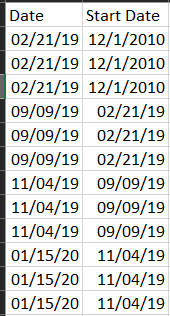
My current attempt is the M code below, but it does it on a row-by-row basis. I'm guessing I need to group by the Date field?
#"SortedRows" = Table.Sort(#"Changed Type1",{{"Date", Order.Ascending}}),
#"ShiftedDates" = {null} & List.RemoveLastN( Table.Column( SortedRows, "Date" ), 1 ),
#"ListOfLists" = Table.ToColumns( SortedRows ) & { ShiftedDates },
#"LastStep"= Table.FromColumns(
ListOfLists,
Table.ColumnNames( SortedRows ) & { "Previous Date" }
)
in
LastStep
Solved! Go to Solution.


- Mark as New
- Bookmark
- Subscribe
- Mute
- Subscribe to RSS Feed
- Permalink
- Report Inappropriate Content
I'm not sure if you want this and what is your source, but if you only want to shift 3 rows, you can do that this way.
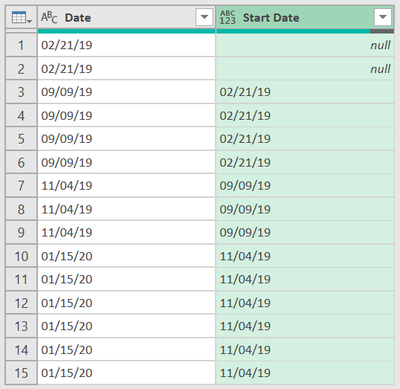
let
    fnShift = (tbl as table, col as text, shift as nullable number, optional newColName as text, optional _type as type) as table =>
        //v 3. parametri zadaj zaporne cislo ak chces posunut riadky hore, kladne ak dole, 4. je nepovinny (novy nazov stlpca), 5. je nepovinny typ
        let
            a = Table.Column(tbl, col),
            b = if shift = 0 or shift = null then a else if shift > 0
                then List.Repeat({null}, shift) & List.RemoveLastN(a, shift)
                else List.RemoveFirstN(a, shift * -1) & List.Repeat({null}, shift * -1),
            c = Table.FromColumns(Table.ToColumns(tbl) & {b}, Table.ColumnNames(tbl) &
                ( if newColName <> null then {newColName} else
                    if shift = 0 then {col & "_Duplicate"} else
                    if shift > 0 then {col & "_PrevValue"}
                    else              {col & "_NextValue"} )),
            d = Table.TransformColumnTypes(c, {List.Last(Table.ColumnNames(c)), if _type <> null then _type else type any})
        in
            d,

    Source = Table.FromRows(Json.Document(Binary.Decompress(Binary.FromText("i45WMjDSNzLUN7RUitVB51jqAxFpHENDfQMTwhwDoCWm+kYGVODEAgA=", BinaryEncoding.Base64), Compression.Deflate)), let _t = ((type nullable text) meta [Serialized.Text = true]) in type table [Date = _t]),
    GroupedRows = Table.Group(Source, {"Date"}, {{"All", each _, type table}}),
    Ad_DatePrevValue = fnShift(GroupedRows, "Date", 1),
    Ad_Data = Table.AddColumn(Ad_DatePrevValue, "Data", each Table.AddColumn([All], "Start Date", (x)=> [Date_PrevValue]), type table),
    Data = Table.Combine(Ad_Data[Data])
in
    Data
- Mark as New
- Bookmark
- Subscribe
- Mute
- Subscribe to RSS Feed
- Permalink
- Report Inappropriate Content
Hi @bernate, I'm not sure why are you trying to shift rows when you need min date from another table. You can add this code as custom column:
List.Min(Another_Table[ColumnName_WithDateYouWant])- Mark as New
- Bookmark
- Subscribe
- Mute
- Subscribe to RSS Feed
- Permalink
- Report Inappropriate Content
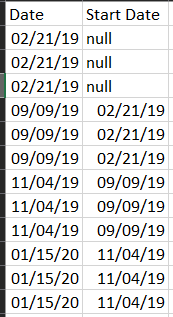
I will need the min date eventually but for now it can be left as null.
- Mark as New
- Bookmark
- Subscribe
- Mute
- Subscribe to RSS Feed
- Permalink
- Report Inappropriate Content
I'm not sure if you want this and what is your source, but if you only want to shift 3 rows, you can do that this way.
let
    fnShift = (tbl as table, col as text, shift as nullable number, optional newColName as text, optional _type as type) as table =>
        //v 3. parametri zadaj zaporne cislo ak chces posunut riadky hore, kladne ak dole, 4. je nepovinny (novy nazov stlpca), 5. je nepovinny typ
        let
            a = Table.Column(tbl, col),
            b = if shift = 0 or shift = null then a else if shift > 0
                then List.Repeat({null}, shift) & List.RemoveLastN(a, shift)
                else List.RemoveFirstN(a, shift * -1) & List.Repeat({null}, shift * -1),
            c = Table.FromColumns(Table.ToColumns(tbl) & {b}, Table.ColumnNames(tbl) &
                ( if newColName <> null then {newColName} else
                    if shift = 0 then {col & "_Duplicate"} else
                    if shift > 0 then {col & "_PrevValue"}
                    else              {col & "_NextValue"} )),
            d = Table.TransformColumnTypes(c, {List.Last(Table.ColumnNames(c)), if _type <> null then _type else type any})
        in
            d,

    Source = Table.FromRows(Json.Document(Binary.Decompress(Binary.FromText("i45WMjDSNzLUN7RUitVB51jqAxFpHENDfQMTwhwDoCWm+kYGVODEAgA=", BinaryEncoding.Base64), Compression.Deflate)), let _t = ((type nullable text) meta [Serialized.Text = true]) in type table [Date = _t]),
    GroupedRows = Table.Group(Source, {"Date"}, {{"All", each _, type table}}),
    Ad_DatePrevValue = fnShift(GroupedRows, "Date", 1),
    Ad_Data = Table.AddColumn(Ad_DatePrevValue, "Data", each Table.AddColumn([All], "Start Date", (x)=> [Date_PrevValue]), type table),
    Data = Table.Combine(Ad_Data[Data])
in
    Data
- Mark as New
- Bookmark
- Subscribe
- Mute
- Subscribe to RSS Feed
- Permalink
- Report Inappropriate Content
Sorry I should have been more clear, the 3 rows was for example purposes. 02/21/19 has 48 rows, 09/09/19 has 51, etc. The number of rows varies by the date value, which is why I thought doing something to group by Date would let me reference the previous Date value and add it to the new column.
- Mark as New
- Bookmark
- Subscribe
- Mute
- Subscribe to RSS Feed
- Permalink
- Report Inappropriate Content
- Mark as New
- Bookmark
- Subscribe
- Mute
- Subscribe to RSS Feed
- Permalink
- Report Inappropriate Content
Thank you for your help!
- Mark as New
- Bookmark
- Subscribe
- Mute
- Subscribe to RSS Feed
- Permalink
- Report Inappropriate Content

Helpful resources

FabCon & SQLCon – Barcelona 2026
Join us in Barcelona for FabCon and SQLCon, the Fabric, Power BI, SQL, and AI community event. Save €200 with code FABCMTY200.

Data Days 2026
Join Fabric Data Days 2026: 60 days of free live/on-demand sessions, challenges, study groups, and certification opportunities.

Power BI DataViz World Championships - June 2026
A new Power BI DataViz World Championship is coming this June! Don't miss out on submitting your entry.


| User | Count |
|---|---|
| 8 | |
| 5 | |
| 5 | |
| 4 | |
| 4 |


