cancel
Showing results for 
Search instead for 
Did you mean: 

The Power BI Data Visualization World Championships is back! It's time to submit your entry. Live now!

Reply
aquaponicsguy
Regular Visitor

Gateway Data Source Error from Excel (PLX-DAQ)

Hello. I am attempting to log my greenhouse values to Power BI to better keep track of the values and to use the data-driven alerts for Power BI on Microsoft Flow. I am doing this by uploading my Arduino sensor values to the PLX-DAQ extension of Excel 2016. My issue is with using this spreadsheet as a gateway data source. My gateway is set up fine but the data source is coming up with an error screen that I will post here. Any help would be appreciated because I presume I cannot set up automatic refreshes without setting this dataset to the gateway. Thanks for everything!

Capture.PNG

 
Also, PLX-DAQ-v2.11.xlsm IS where the savefile is not just the program.

4 REPLIES 4
Anonymous
Not applicable

@aquaponicsguy,

Could you please click "show details" in the above screenshot to expand the error messages?

In your scenario, please check your user account in the Settings of your computer,  ensure that you enter correct user account(domain\user in my scenario) as username when adding Excel data data source. There is a similar thread for your reference.

https://community.powerbi.com/t5/Integrations-with-Files-and/Scheduled-refresh-for-excel-file-with-o...

Regards,
Lydia

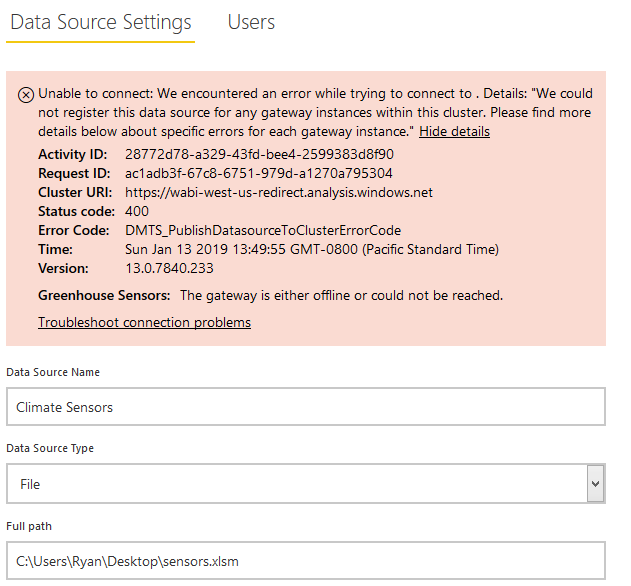
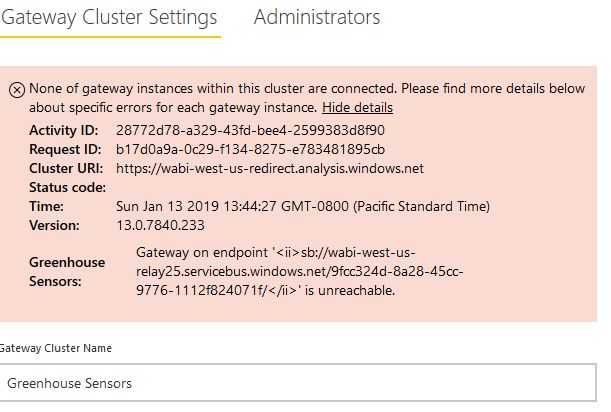
Hi there back from vacation and super excited to get this working. Here are my error messages and thank you all again for helping out. I honestly hope this helps people in the future with this issue too who are trying to get IoT systems going 🙂

data sourcedata source


gateway clustergateway cluster


blopez11
Super User
Super User

To have my reports access excel files, I put them in one drive, essentially in a sharepoint documents folder, and followed the procedures documented below:

https://docs.microsoft.com/en-us/power-bi/desktop-use-onedrive-business-links 


Good luck

Hi there thanks for the quick response. The issue I have with onedrive is that my excel file has new data logging and needs constant updating. I can't seem to automatically update onedrive via sync from excel without manually saving excel (autosave doesn't seem to work) and manually refreshing onedrive. I know that power BI has streaming data reports and can log incoming data but the error above persists. Have you ever used onedrive with excel in a way that you can use automatically inflowing data? I of course am open to any option to get my information onto power bi if I cannot sort out this data source issue.

Helpful resources

Announcements
Power BI DataViz World Championships

Power BI Dataviz World Championships

The Power BI Data Visualization World Championships is back! It's time to submit your entry.

January Power BI Update Carousel

Power BI Monthly Update - January 2026

Check out the January 2026 Power BI update to learn about new features.

FabCon Atlanta 2026 carousel

FabCon Atlanta 2026

Join us at FabCon Atlanta, March 16-20, for the ultimate Fabric, Power BI, AI and SQL community-led event. Save $200 with code FABCOMM.