Hi @sks2701 ,
You can create measures like this:
1 year conversion =
VAR a =
    CALCULATE (
        COUNT ( 'Table'[Company] ),
        FILTER (
            'Table',
            'Table'[Sales] > 0
                && 'Table'[Have launched] = "Yes"
                && 'Table'[Year] = YEAR ( TODAY () )
        )
    )
VAR b =
    CALCULATE (
        COUNT ( 'Table'[Company] ),
        FILTER (
            'Table',
            'Table'[Sales] < 0
                && 'Table'[Have launched] = "No"
                && 'Table'[Year] = YEAR ( TODAY () )
        )
    )
RETURN
    a / b
2 year conversion =
VAR a =
    CALCULATE (
        DISTINCTCOUNT ( 'Table'[Company] ),
        FILTER (
            'Table',
            'Table'[Sales] > 0
                && 'Table'[Have launched] = "Yes"
                && 'Table'[Year] <= YEAR ( TODAY () )
                && 'Table'[Year]
                    >= YEAR ( TODAY () ) - 1
        )
    )
VAR b =
    CALCULATE (
        DISTINCTCOUNT ( 'Table'[Company] ),
        FILTER (
            'Table',
            'Table'[Sales] < 0
                && 'Table'[Have launched] = "No"
                && 'Table'[Year] = YEAR ( TODAY () )
        )
    )
RETURN
    a / b
3 year conversion =
VAR a =
    CALCULATE (
        DISTINCTCOUNT ( 'Table'[Company] ),
        FILTER (
            'Table',
            'Table'[Sales] > 0
                && 'Table'[Have launched] = "Yes"
                && 'Table'[Year] <= YEAR ( TODAY () )
                && 'Table'[Year]
                    >= YEAR ( TODAY () ) - 2
        )
    )
VAR b =
    CALCULATE (
        DISTINCTCOUNT ( 'Table'[Company] ),
        FILTER (
            'Table',
            'Table'[Sales] < 0
                && 'Table'[Have launched] = "No"
                && 'Table'[Year] = YEAR ( TODAY () )
        )
    )
RETURN
    a / b
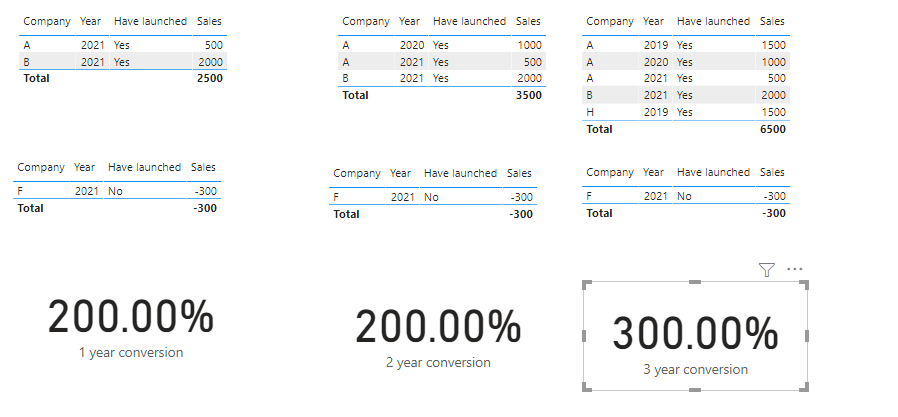
Best Regards,
Community Support Team _ Yingjie Li
If this post helps, then please consider Accept it as the solution to help the other members find it more quickly.


