Get Fabric or SQL Certified for Free.
Get certified for free when you join Fabric Data Days 2026 and dive into Fabric, Power BI, SQL, AI, and other essential data skills.
Join now- Power BI forums
- Get Help with Power BI
- Desktop
- Service
- Report Server
- Power Query
- Mobile Apps
- Developer
- DAX Commands and Tips
- Custom Visuals Development Discussion
- Health and Life Sciences
- Power BI Spanish forums
- Translated Spanish Desktop
- Training and Consulting
- Instructor Led Training
- Dashboard in a Day for Women, by Women
- Galleries
- Data Stories Gallery
- Themes Gallery
- Contests Gallery
- QuickViz Gallery
- Quick Measures Gallery
- Visual Calculations Gallery
- Notebook Gallery
- Translytical Task Flow Gallery
- TMDL Gallery
- R Script Showcase
- Webinars and Video Gallery
- Ideas
- Custom Visuals Ideas (read-only)
- Issues
- Issues
- Events
- Upcoming Events
July 7 - July 17 | Round 2 of the Power BI Dataviz World Championships. Don't miss your chance! Learn more
- Power BI forums
- Forums
- Get Help with Power BI
- Power Query
- Re: Flagging DateTime records in Power Query with ...
- Subscribe to RSS Feed
- Mark Topic as New
- Mark Topic as Read
- Float this Topic for Current User
- Bookmark
- Subscribe
- Printer Friendly Page


- Mark as New
- Bookmark
- Subscribe
- Mute
- Subscribe to RSS Feed
- Permalink
- Report Inappropriate Content
Flagging DateTime records in Power Query with multiple conditions
Hi Guys,
I need to Flag some records with multiple conditions in Power Query. I am not finding the efficient way of doing it with minimal custom columns. Rules are:
- Flag "0" a record when Start DateTime and End DateTime, time value is within groups of 5 min interval. (Example: Ind ID= 11,13,15,18,19,20). Groups of 5min are standard values like: 8:00:00 --> 8:05:00 --> 8:10:00 ..... -->8:55:00-->9:00:00
- Flag "1" if records have start time and end time same and on the standard values like (Ind ID= 12)
- Flag "1" if records have start time and end time across standard values like (Ind ID= 14,16,17)
Sample Data: (Flag column needs to be inserted in Power Query)
| Ind ID | Status From Time | Status To Time | Flag |
| 11 | 10/10/2019 8:02:00AM | 10/10/2019 8:02:00AM | 0 |
| 12 | 10/10/2019 8:05:00AM | 10/10/2019 8:05:00AM | 1 |
| 13 | 10/10/2019 8:02:00AM | 10/10/2019 8:04:00AM | 0 |
| 14 | 10/10/2019 8:02:00AM | 10/10/2019 8:05:00AM | 1 |
| 15 | 10/10/2019 8:05:02AM | 10/10/2019 8:05:02AM | 0 |
| 16 | 10/10/2019 8:04:58AM | 10/10/2019 8:05:02AM | 1 |
| 17 | 10/10/2019 8:05:00AM | 10/10/2019 8:05:02AM | 1 |
| 18 | 10/10/2019 8:22:00AM | 10/10/2019 8:22:00AM | 0 |
| 19 | 10/10/2019 8:32:00AM | 10/10/2019 8:34:00AM | 0 |
| 20 | 10/10/2019 8:05:02AM | 10/10/2019 8:08:12AM | 0 |
Thanks
Solved! Go to Solution.


- Mark as New
- Bookmark
- Subscribe
- Mute
- Subscribe to RSS Feed
- Permalink
- Report Inappropriate Content
Hi @Mann ,
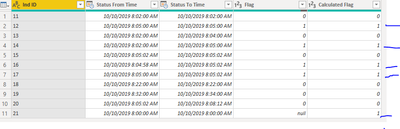
Try this, 14 now receives a 1, as do 12, 16, and 17 (I added a test for 21 which works as well)
Let me know if you have any questions.
If this solves your issues, please mark it as the solution, so that others can find it easily. Kudos are nice too.
Nathaniel
if DateTime.From(Number.RoundUp(Number.From([Status From Time])*288,0)/288) <> DateTime.From(Number.RoundUp(Number.From([Status To Time])*288,0)/288) then "1"

else if Number.Mod(Time.Minute([Status From Time]),5)
 = 0 and Time.Second([Status From Time])= 0 and [Status From Time]= [Status To Time] then "1"

else if Number.Mod(Time.Minute([Status From Time]),5)
 = 0 and Time.Second([Status From Time])= 0 or  Number.Mod(Time.Minute([Status To Time]),5)
 = 0 and Time.Second([Status To Time])= 0 then 1

else if Duration.Minutes([Status To Time]-[Status From Time])<=5 then 0
else "-"
Did I answer your question? Mark my post as a solution!
Proud to be a Super User!

- Mark as New
- Bookmark
- Subscribe
- Mute
- Subscribe to RSS Feed
- Permalink
- Report Inappropriate Content
Interesting puzzle. I am going to look at this this weekend, so someone may answer first, but I do have a question. Your criteria has conflicts. Row 11 satisfies both #1 and #2 criteria.
Did I answer your question? Mark my post as a solution!
Did my answers help arrive at a solution? Give it a kudos by clicking the Thumbs Up!
DAX is for Analysis. Power Query is for Data Modeling
Proud to be a Super User!
MCSA: BI Reporting- Mark as New
- Bookmark
- Subscribe
- Mute
- Subscribe to RSS Feed
- Permalink
- Report Inappropriate Content
Row 11 doesnt satisfy Criteria #2 as it is not a standard value. By standard value I mean values like multiple of 5min e.g. 8:00, 8:05, 8:10.. etc.
It only satisfy Criteria #1 that is when start value and end value (whether it is same or not) is within standard values, in this case Row 11 is between 8:00 and 8:05.
I hope it clarifies.
Mann
- Mark as New
- Bookmark
- Subscribe
- Mute
- Subscribe to RSS Feed
- Permalink
- Report Inappropriate Content
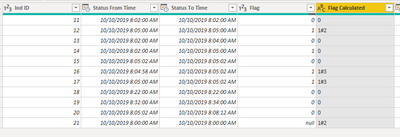
Hi @Mann ,
if DateTime.From(Number.RoundUp(Number.From([Status From Time])*288,0)/288) <> DateTime.From(Number.RoundUp(Number.From([Status To Time])*288,0)/288) then "1#3" else if Number.Mod(Time.Minute([Status From Time]),5)
 = 0 and Time.Second([Status From Time])= 0 and [Status From Time]= [Status To Time] then "1#2" else if Duration.Minutes([Status To Time]-[Status From Time])<=5 then 0 else "-"
I marked the ones as to the condition from your specs. Therefore 1#2 is 1 due to your number 2 requirement. As I said in my message to you I don't think 14,16,and 17 can be the same, as 8:05:00 has to be the beginning or the end of a segment. My logic says that it is at the beginning. end.
If beginning time minutes divided by 5 equals zero, and seconds are zero and if the two times match we solve #2 req.
If we roundup to the next five minutes, both times, and they are not the same, then we have crossed a boundary and #3 is solved.
Everything else is zero unless the time duration > 5, then you get a "-" .
I added a row that starts at 8:00:00 for testing.
This may work for you.
Let me know if you have any questions.
If this solves your issues, please mark it as the solution, so that others can find it easily. Kudos are nice too.
Nathaniel
Did I answer your question? Mark my post as a solution!
Proud to be a Super User!
- Mark as New
- Bookmark
- Subscribe
- Mute
- Subscribe to RSS Feed
- Permalink
- Report Inappropriate Content
Hi @Nathaniel_C
Thanks for the reply on this.
Flag of 14,16 and 17 has to be "1" only as per this rule:
"Flag "1" if records have start time and end time across standard values like (Ind ID= 14,16,17)"
Let me elaborate:
We need to show some chart at every 5 min interval (standard values like 8:00:00, 8:05:00, 8:10:00...) so when for any individual he is detected on these standard values he should be picked for calculation.
Therefore,
14 - when his end time detected on standard value
16- when he is detected at standard value between start time and end time
17- when his start time detected on standard value.
I hope this clarifies.
I checked your code, it worked fine can we include record 14 also there?
Mann
- Mark as New
- Bookmark
- Subscribe
- Mute
- Subscribe to RSS Feed
- Permalink
- Report Inappropriate Content
Hi @Mann ,
Try this, 14 now receives a 1, as do 12, 16, and 17 (I added a test for 21 which works as well)
Let me know if you have any questions.
If this solves your issues, please mark it as the solution, so that others can find it easily. Kudos are nice too.
Nathaniel
if DateTime.From(Number.RoundUp(Number.From([Status From Time])*288,0)/288) <> DateTime.From(Number.RoundUp(Number.From([Status To Time])*288,0)/288) then "1"

else if Number.Mod(Time.Minute([Status From Time]),5)
 = 0 and Time.Second([Status From Time])= 0 and [Status From Time]= [Status To Time] then "1"

else if Number.Mod(Time.Minute([Status From Time]),5)
 = 0 and Time.Second([Status From Time])= 0 or  Number.Mod(Time.Minute([Status To Time]),5)
 = 0 and Time.Second([Status To Time])= 0 then 1

else if Duration.Minutes([Status To Time]-[Status From Time])<=5 then 0
else "-"
Did I answer your question? Mark my post as a solution!
Proud to be a Super User!
- Mark as New
- Bookmark
- Subscribe
- Mute
- Subscribe to RSS Feed
- Permalink
- Report Inappropriate Content
- Mark as New
- Bookmark
- Subscribe
- Mute
- Subscribe to RSS Feed
- Permalink
- Report Inappropriate Content
Hi @Mann ,
You are welcome!
Nathaniel
Did I answer your question? Mark my post as a solution!
Proud to be a Super User!

Helpful resources

FabCon & SQLCon – Barcelona 2026
Join us in Barcelona for FabCon and SQLCon, the Fabric, Power BI, SQL, and AI community event. Save €200 with code FABCMTY200.

Data Days 2026
Join Fabric Data Days 2026: 60 days of free live/on-demand sessions, challenges, study groups, and certification opportunities.

Power BI DataViz World Championships - June 2026
A new Power BI DataViz World Championship is coming this June! Don't miss out on submitting your entry.


