cancel
Showing results for 
Search instead for 
Did you mean: 

July 7 - July 17 | Round 2 of the Power BI Dataviz World Championships. Don't miss your chance! Learn more

Reply
keboon
Microsoft Employee
Microsoft Employee

Finding Mixed Keywords in a Search Query List

Hi All:

I am trying to figure out a formula for the Results column that when I look for keywords in the Search Query List based on the Keyword List I will find the keywords either Direct (Nintendo Switch) or Indirect / Mixed (Switch Games).  If anybody can help, I appreciate it.


Thank You!


Screenshot 2022-06-15 155652.png

2 ACCEPTED SOLUTIONS
edhans
Community Champion
Community Champion

Hi @keboon 
See if this works:

let
    Source = Table.FromRows(Json.Document(Binary.Decompress(Binary.FromText("lYy7CsIwFEB/5XLnDJJPsFCdOli3kCGkV3uxJiUP+vs2RAdbF7fD4XCUwo5dIjd46BdOdkSBzUhmho2Hk3lSRC0UfgmBHS2V4ebD51K6C1lyCTb528qDlPv13tb/77o1MUFjwhoV/O8A/UyWzVRPHAiuIdvHmp99jlS+cMw8DezuqPUL", BinaryEncoding.Base64), Compression.Deflate)), let _t = ((type nullable text) meta [Serialized.Text = true]) in type table [#"Search Query" = _t, Keyword = _t]),
    #"Added All Words" = 
        Table.AddColumn(
            Source, 
            "All Words", 
            each if List.ContainsAll(Text.Split([Keyword], " "),Text.Split([Search Query], " ")) then "Keyword Found" else "Not Found",
            type text
        ),
    #"Added Words in Order" = 
        Table.AddColumn(
            #"Added All Words", 
            "Words in Order", 
            each 
                let
                    varQueryList = Text.Split([Search Query], " "),
                    varKeywordList = Text.Split([Keyword], " "),
                    varFirstWord = varQueryList{0},
                    varWordCount = List.Count(varQueryList),
                    varFirstWordPosition = List.PositionOf(varKeywordList, varFirstWord),
                    varKeywordRange = List.Range(varKeywordList, varFirstWordPosition, varWordCount),
                    varIsMatch = if List.Count(List.Difference(varQueryList, varKeywordRange)) = 0 then "Direct Keyword" else "Mixed"
                in
                if [All Words] = "Keyword Found" then varIsMatch else "No Match",
            type text
        )
in
    #"Added Words in Order"


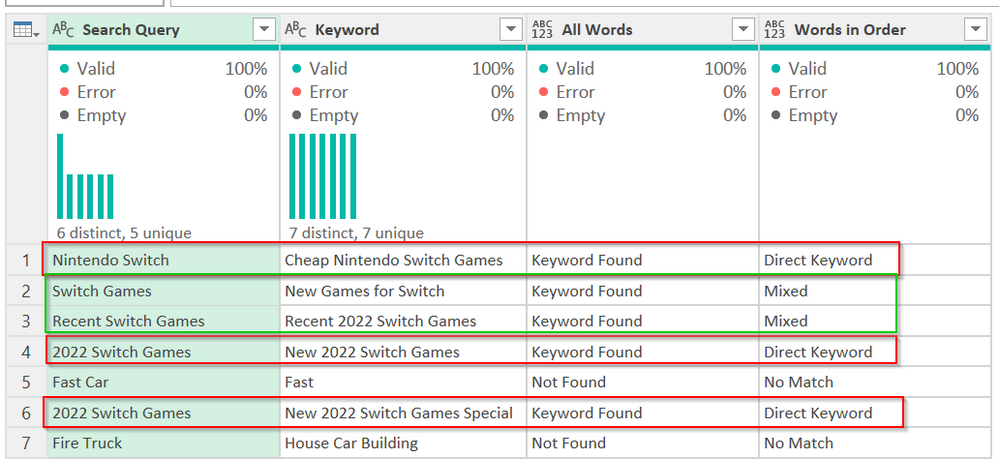
It returns this. The red boxes are a direct match. The green are a mixed match - the words all exist but not in a specific order. The No match means none or not all words were there. The screenshot doesn't show it but the code above will properly type the new columns as text.
edhans_0-1655332016920.png


How to use M code provided in a blank query:
1) In Power Query, select New Source, then Blank Query
2) On the Home ribbon, select "Advanced Editor" button
3) Remove everything you see, then paste the M code I've given you in that box.
4) Press Done
5) See this article if you need help using this M code in your model.


Did I answer your question? Mark my post as a solution!
Did my answers help arrive at a solution? Give it a kudos by clicking the Thumbs Up!

DAX is for Analysis. Power Query is for Data Modeling


Proud to be a Super User!

MCSA: BI Reporting

View solution in original post

edhans
Community Champion
Community Champion

Hi @keboon 
was the above helpful?


Did I answer your question? Mark my post as a solution!
Did my answers help arrive at a solution? Give it a kudos by clicking the Thumbs Up!

DAX is for Analysis. Power Query is for Data Modeling


Proud to be a Super User!

MCSA: BI Reporting

View solution in original post

2 REPLIES 2
edhans
Community Champion
Community Champion

Hi @keboon 
was the above helpful?


Did I answer your question? Mark my post as a solution!
Did my answers help arrive at a solution? Give it a kudos by clicking the Thumbs Up!

DAX is for Analysis. Power Query is for Data Modeling


Proud to be a Super User!

MCSA: BI Reporting

edhans
Community Champion
Community Champion

Hi @keboon 
See if this works:

let
    Source = Table.FromRows(Json.Document(Binary.Decompress(Binary.FromText("lYy7CsIwFEB/5XLnDJJPsFCdOli3kCGkV3uxJiUP+vs2RAdbF7fD4XCUwo5dIjd46BdOdkSBzUhmho2Hk3lSRC0UfgmBHS2V4ebD51K6C1lyCTb528qDlPv13tb/77o1MUFjwhoV/O8A/UyWzVRPHAiuIdvHmp99jlS+cMw8DezuqPUL", BinaryEncoding.Base64), Compression.Deflate)), let _t = ((type nullable text) meta [Serialized.Text = true]) in type table [#"Search Query" = _t, Keyword = _t]),
    #"Added All Words" = 
        Table.AddColumn(
            Source, 
            "All Words", 
            each if List.ContainsAll(Text.Split([Keyword], " "),Text.Split([Search Query], " ")) then "Keyword Found" else "Not Found",
            type text
        ),
    #"Added Words in Order" = 
        Table.AddColumn(
            #"Added All Words", 
            "Words in Order", 
            each 
                let
                    varQueryList = Text.Split([Search Query], " "),
                    varKeywordList = Text.Split([Keyword], " "),
                    varFirstWord = varQueryList{0},
                    varWordCount = List.Count(varQueryList),
                    varFirstWordPosition = List.PositionOf(varKeywordList, varFirstWord),
                    varKeywordRange = List.Range(varKeywordList, varFirstWordPosition, varWordCount),
                    varIsMatch = if List.Count(List.Difference(varQueryList, varKeywordRange)) = 0 then "Direct Keyword" else "Mixed"
                in
                if [All Words] = "Keyword Found" then varIsMatch else "No Match",
            type text
        )
in
    #"Added Words in Order"


It returns this. The red boxes are a direct match. The green are a mixed match - the words all exist but not in a specific order. The No match means none or not all words were there. The screenshot doesn't show it but the code above will properly type the new columns as text.

edhans_0-1655332016920.png


How to use M code provided in a blank query:
1) In Power Query, select New Source, then Blank Query
2) On the Home ribbon, select "Advanced Editor" button
3) Remove everything you see, then paste the M code I've given you in that box.
4) Press Done
5) See this article if you need help using this M code in your model.


Did I answer your question? Mark my post as a solution!
Did my answers help arrive at a solution? Give it a kudos by clicking the Thumbs Up!

DAX is for Analysis. Power Query is for Data Modeling


Proud to be a Super User!

MCSA: BI Reporting

Helpful resources

Announcements
FabCon and SQLCon Barcelona 2026

FabCon & SQLCon – Barcelona 2026

Join us in Barcelona for FabCon and SQLCon, the Fabric, Power BI, SQL, and AI community event. Save €200 with code FABCMTY200.

60 days of Data Days Carousel

Data Days 2026

Join Fabric Data Days 2026: 60 days of free live/on-demand sessions, challenges, study groups, and certification opportunities.

Power BI DataViz World Championships carousel

Power BI DataViz World Championships - June 2026

A new Power BI DataViz World Championship is coming this June! Don't miss out on submitting your entry.