Get certified for free when you join Fabric Data Days 2026 and dive into Fabric, Power BI, SQL, AI, and other essential data skills.
Join nowTry your skills in the Power BI Dataviz World Championship! Round one ends June 26. Join now
I have two tables for which I need to find a date. In other words, I am trying to solve two problems which I feel are closely related.
Table 1: Has today's date in a column. From this date I need to populate another column with the date of the next Friday. In other words, if today is 10/6/19, I want the new column to populate with 10/11/19.
Table 2: Has the day number of "1" in a column. From this number, I need to populate another column with next month's date using that day number. In other words, if today is 10/6/19, I want the new column to populate with 11/1/19.
Any help would be much appreciated. I know how to do this in Excel, but after reviewing a bunch of posts and a list of M date functions, I'm at a loss.
Thanks!
Solved! Go to Solution.
Hi battery514,
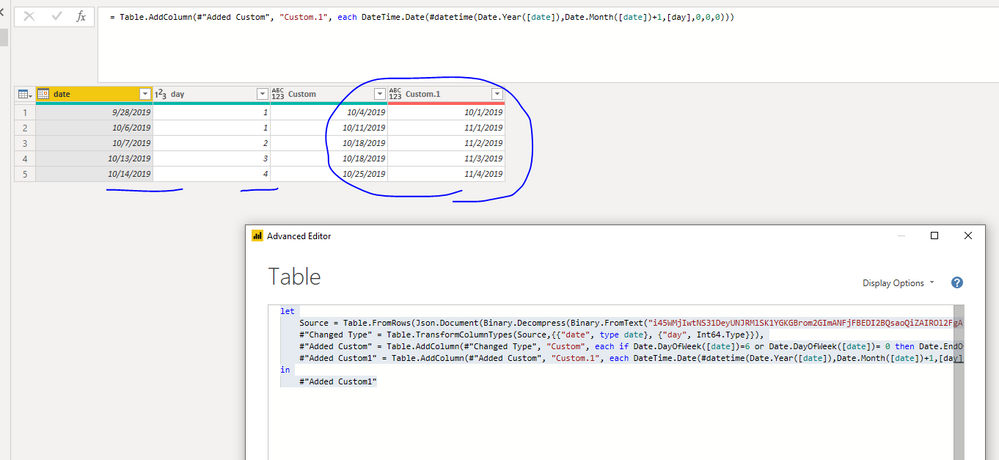
If the date is 2019/10/7, did you want to get another column as 2019/10/18? And did you want to use day number "1" as next month 's day? If so, you could try to use below M code to see whether it work or not.
let
Source = Table.FromRows(Json.Document(Binary.Decompress(Binary.FromText("i45WMjIwtNS31DeyUNJRMlSK1YGKGBrom2GImANFjFBEDI2BQsaoQiZAIROl2FgA", BinaryEncoding.Base64), Compression.Deflate)), let _t = ((type text) meta [Serialized.Text = true]) in type table [date = _t, day = _t]),
#"Changed Type" = Table.TransformColumnTypes(Source,{{"date", type date}, {"day", Int64.Type}}),
#"Added Custom" = Table.AddColumn(#"Changed Type", "Custom", each if Date.DayOfWeek([date])=6 or Date.DayOfWeek([date])= 0 then Date.EndOfWeek([date],Day.Saturday) else Date.AddDays(Date.EndOfWeek([date],Day.Saturday),7)),
#"Added Custom1" = Table.AddColumn(#"Added Custom", "Custom.1", each DateTime.Date(#datetime(Date.Year([date]),Date.Month([date])+1,[day],0,0,0)))
in
#"Added Custom1"
Best Regards,
Zoe Zhi
If this post helps, then please consider Accept it as the solution to help the other members find it more quickly.
Hello @Anonymous
Table 1: Has today's date in a column. From this date I need to populate another column with the date of the next Friday. In other words, if today is 10/6/19, I want the new column to populate with 10/11/19.
Solution- try this
Hi battery514,
If the date is 2019/10/7, did you want to get another column as 2019/10/18? And did you want to use day number "1" as next month 's day? If so, you could try to use below M code to see whether it work or not.
let
Source = Table.FromRows(Json.Document(Binary.Decompress(Binary.FromText("i45WMjIwtNS31DeyUNJRMlSK1YGKGBrom2GImANFjFBEDI2BQsaoQiZAIROl2FgA", BinaryEncoding.Base64), Compression.Deflate)), let _t = ((type text) meta [Serialized.Text = true]) in type table [date = _t, day = _t]),
#"Changed Type" = Table.TransformColumnTypes(Source,{{"date", type date}, {"day", Int64.Type}}),
#"Added Custom" = Table.AddColumn(#"Changed Type", "Custom", each if Date.DayOfWeek([date])=6 or Date.DayOfWeek([date])= 0 then Date.EndOfWeek([date],Day.Saturday) else Date.AddDays(Date.EndOfWeek([date],Day.Saturday),7)),
#"Added Custom1" = Table.AddColumn(#"Added Custom", "Custom.1", each DateTime.Date(#datetime(Date.Year([date]),Date.Month([date])+1,[day],0,0,0)))
in
#"Added Custom1"
Best Regards,
Zoe Zhi
If this post helps, then please consider Accept it as the solution to help the other members find it more quickly.
@Anonymous
Try this custom column\
=Date.AddDays( Date.EndOfWeek([ColumnName]),-1)
Don't miss out on Data Days, June 15 through August 7. Learn Fabric, Power BI, SQL, AI and more.
Check out the May 2026 Power BI update to learn about new features.
| User | Count |
|---|---|
| 3 | |
| 3 | |
| 3 | |
| 2 | |
| 2 |
| User | Count |
|---|---|
| 11 | |
| 9 | |
| 5 | |
| 5 | |
| 4 |