cancel
Showing results for 
Search instead for 
Did you mean: 

We've captured the moments from FabCon & SQLCon that everyone is talking about, and we are bringing them to the community, live and on-demand. Starts on April 14th. Register now

Reply
AnushaAv
New Member

Filters not working in Power Query

Hello All,


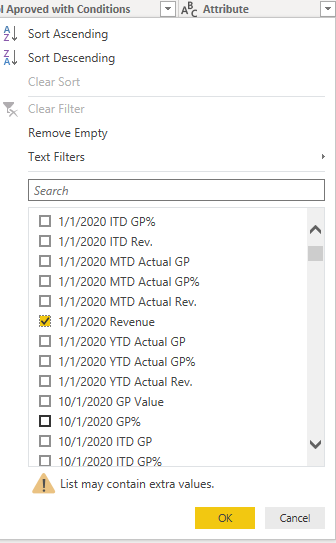
I have a strange issue here. I have imported an Excel sheet and performed "Unpivot Select Columns" on few columns. Once unpivoted, I tried to filter the rows on the "Attribute" column (which will have the list of column headers before unpivot) by some value. The drop-down of that filter is showing the value( shown in pic 1), but when I apply filter based on that value, no rows are being returned(shown in pic 2). It's showing "This table is Empty" message. Can someone please help here? 


Filter.png


Rows.png

3 REPLIES 3
v-juanli-msft
Community Support
Community Support

Hi @AnushaAv 

Is this problem sloved? 
If it is sloved, could you kindly accept it as a solution to close this case?
If not, please let me know.
 
Best Regards
Maggie
v-juanli-msft
Community Support
Community Support

Hi @AnushaAv 

As tested on my side with last version,

It works to filter the column after unpivot selected columns.


Please check the version and update to the lastest one,

share some example data or code in Advanced editor so i can make a test.


Best Regards
Maggie
Community Support Team _ Maggie Li
If this post helps, then please consider Accept it as the solution to help the other members find it more quickly.

Greg_Deckler
Community Champion
Community Champion

Is that the only filter you have applied and is what you show the last step in your query?


Follow on LinkedIn
@ me in replies or I'll lose your thread!!!
Instead of a Kudo, please vote for this idea
Become an expert!: Enterprise DNA
External Tools: MSHGQM
YouTube Channel!: Microsoft Hates Greg
Latest book!:
DAX For Humans

DAX is easy, CALCULATE makes DAX hard...

Helpful resources

Announcements
New to Fabric survey Carousel

New to Fabric Survey

If you have recently started exploring Fabric, we'd love to hear how it's going. Your feedback can help with product improvements.

Power BI DataViz World Championships carousel

Power BI DataViz World Championships - June 2026

A new Power BI DataViz World Championship is coming this June! Don't miss out on submitting your entry.

Join our Fabric User Panel

Join our Fabric User Panel

Share feedback directly with Fabric product managers, participate in targeted research studies and influence the Fabric roadmap.

March Power BI Update Carousel

Power BI Community Update - March 2026

Check out the March 2026 Power BI update to learn about new features.