cancel
Showing results for 
Search instead for 
Did you mean: 

The Power BI Data Visualization World Championships is back! Get ahead of the game and start preparing now! Learn more

Reply
ddurosier
Frequent Visitor

Filtering with Date Diff

Hi all,


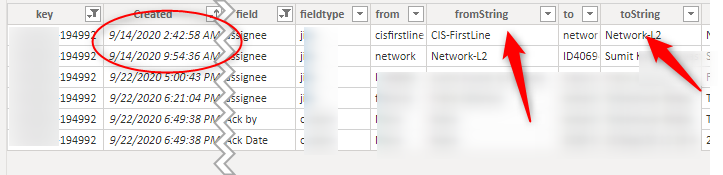
I'm hoping some can help me with this since i've been having a hard time figuring it out. Basically I have a table that contains a few columns and i'm looking to get some sort of date difference by filtering it base on specific value of two columns.


Example: 


if the tostring column value is "network-l2" and the fromstring value is also "network-l2" then calculate the Created date difference. so the ouput should be the time time difference of "9/14 - 2:42am" - "9/14 9:54am" = 9hours + difference.  Hope that make sense. I would like this to be a new column if possible. powerbit.png

Key Columnfromstring to tostring vlaues

1 ACCEPTED SOLUTION
AlB
Community Champion
Community Champion

@ddurosier 

Place this emasure in a card visual. IT will give you the difference in hours. You can then convert it to minutes, etc.

Measure =
VAR val2_ =
    CALCULATE ( DISTINCT ( Table1[Created] ), Table1[fromString] = "Network-l2" )
VAR val1_ =
    CALCULATE ( DISTINCT ( Table1[Created] ), Table1[toString] = "Network-l2" )
RETURN
     ( val2_ - val1_ ) * 24

Please mark the question solved when done and consider giving kudos if posts are helpful.


Contact me privately for support with any larger-scale BI needs, tutoring, etc.


Cheers 


SU18_powerbi_badge

View solution in original post

5 REPLIES 5
AlB
Community Champion
Community Champion

Hi @ddurosier 

What do you need exactly? A measure for only "network-l2" or will you need it for more to-FromString pairs?

Please mark the question solved when done and consider giving kudos if posts are helpful.


Contact me privately for support with any larger-scale BI needs, tutoring, etc.


Cheers 


SU18_powerbi_badge

ddurosier
Frequent Visitor

for now just Network-l2.

AlB
Community Champion
Community Champion

@ddurosier 

Place this emasure in a card visual. IT will give you the difference in hours. You can then convert it to minutes, etc.

Measure =
VAR val2_ =
    CALCULATE ( DISTINCT ( Table1[Created] ), Table1[fromString] = "Network-l2" )
VAR val1_ =
    CALCULATE ( DISTINCT ( Table1[Created] ), Table1[toString] = "Network-l2" )
RETURN
     ( val2_ - val1_ ) * 24

Please mark the question solved when done and consider giving kudos if posts are helpful.


Contact me privately for support with any larger-scale BI needs, tutoring, etc.


Cheers 


SU18_powerbi_badge

ddurosier
Frequent Visitor

After making some minor tweaks I was able to get the data that I need. Thank you.


RETURN
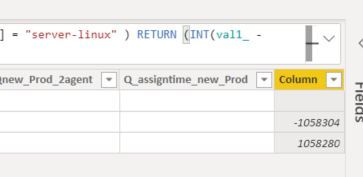
(datediff(val2_,val1_,MINUTE))/60
ddurosier
Frequent Visitor

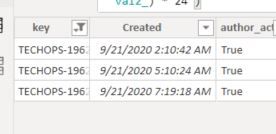
almost there, the output is not correct. The value should be the difference between the two created bottom dates. 5:10am - 7:19 = 2hour etc.


Capture.JPGCapture2.JPG

Helpful resources

Announcements
Power BI DataViz World Championships

Power BI Dataviz World Championships

The Power BI Data Visualization World Championships is back! Get ahead of the game and start preparing now!

December 2025 Power BI Update Carousel

Power BI Monthly Update - December 2025

Check out the December 2025 Power BI Holiday Recap!

FabCon Atlanta 2026 carousel

FabCon Atlanta 2026

Join us at FabCon Atlanta, March 16-20, for the ultimate Fabric, Power BI, AI and SQL community-led event. Save $200 with code FABCOMM.

Top Solution Authors