cancel
Showing results for 
Search instead for 
Did you mean: 

The Power BI Data Visualization World Championships is back! Get ahead of the game and start preparing now! Learn more

Reply
PBI-BOLA
Frequent Visitor

Filtering table before expanding column

Hi,


I'm trying to filter a table in a column before expanding it as the table is extremely large if I don't. I have found another solution to a similar question but it doesn't appear to work for my situation.


My table looks like this


CompanyPBI_Change_Log_Entries

Company 1

[Table]
Company 2[Table]


There is a column in the "PBI_Change_Log_Entries" table called "Table_Caption", I'd like to fiter this to rows containing "Vendor Bank Account". 


My M query looks like this:


let
  Source = OData.Feed("http://server.domain.com:0000/instance/Odata/"null, [Implementation = "2.0"]),
  Navigation = Source{[Name = "Company", Signature = "table"]}[Data],
  #"Filtered rows" = Table.SelectRows(Navigation, each [Name] = "Company 1" or [Name] = "Company 2" 
  #"Choose columns" = Table.SelectColumns(#"Filtered rows", {"Name""PBI_Change_Log_Entries"}),
  #"Renamed columns" = Table.RenameColumns(#"Choose columns", {{"Name""Company"}}),
 
Presumably new code goes here?
 
  #"Expanded PBI_Change_Log_Entries" = Table.ExpandTableColumn(#"Renamed columns", "PBI_Change_Log_Entries", {"Entry_No""Date_and_Time""User_ID""Table_No""Table_Caption""Primary_Key""Primary_Key_Field_1_No""Primary_Key_Field_1_Caption""Primary_Key_Field_1_Value""Primary_Key_Field_2_No""Primary_Key_Field_2_Caption""Primary_Key_Field_2_Value""Primary_Key_Field_3_No""Primary_Key_Field_3_Caption""Primary_Key_Field_3_Value""Field_No""Field_Caption""Type_of_Change""Old_Value""Old_Value_Local""New_Value""New_Value_Local"}, {"Entry_No""Date_and_Time""User_ID""Table_No""Table_Caption""Primary_Key""Primary_Key_Field_1_No""Primary_Key_Field_1_Caption""Primary_Key_Field_1_Value""Primary_Key_Field_2_No""Primary_Key_Field_2_Caption""Primary_Key_Field_2_Value""Primary_Key_Field_3_No""Primary_Key_Field_3_Caption""Primary_Key_Field_3_Value""Field_No""Field_Caption""Type_of_Change""Old_Value""Old_Value_Local""New_Value""New_Value_Local"})
in
  #"Expanded PBI_Change_Log_Entries"
 
Your help would be appreciated.
 
Thanks
1 ACCEPTED SOLUTION
Anonymous
Not applicable

I would proceed like this:

Table.addcolumn (# "Choose columns", "Company", each Table.SelectRows (_ [PBI_Change_Log_Entries], (r) => r [Table_Caption] = "Vendor Bank Account"))

instead of

# "Renamed columns" = Table.RenameColumns (# "Choose columns", {{"Name", "Company"}}),


then you delete the [name] column and finally expand the [Company] column.


I couldn't test the code, so pay attention to syntax and name matching.

View solution in original post

5 REPLIES 5
Anonymous
Not applicable

I would proceed like this:

Table.addcolumn (# "Choose columns", "Company", each Table.SelectRows (_ [PBI_Change_Log_Entries], (r) => r [Table_Caption] = "Vendor Bank Account"))

instead of

# "Renamed columns" = Table.RenameColumns (# "Choose columns", {{"Name", "Company"}}),


then you delete the [name] column and finally expand the [Company] column.


I couldn't test the code, so pay attention to syntax and name matching.

Thanks again for this. I have an additional question, how would the step change if the column [table_caption] actually contained dates and I wanted to filter by a date range?


So if for example I wanted to select rows where [table_caption] was between 01/01/2020 and 31/12/2021?


I think this will be useful to know in the near future.

Anonymous
Not applicable


you should change this 

Table.addcolumn (# "Choose columns", "Company", each Table.SelectRows (_ [PBI_Change_Log_Entries], (r) => r [Table_Caption] = "Vendor Bank Account"))


to  somethink like this


Table.addcolumn (# "Choose columns", "Company", each Table.SelectRows (_ [PBI_Change_Log_Entries], (r) => r [Table_Caption] > #date(2020,1,1) and  r [Table_Caption] < #date(2020,12,ù31) ))


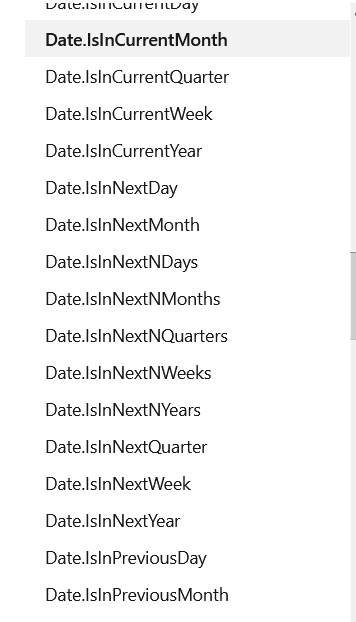
but if your choices fall into one of the many cases provided by MS and that you find here you could simplify the filter using one of these functions


image.png

Thanks

Thanks, exactly what I needed

Helpful resources

Announcements
Power BI DataViz World Championships

Power BI Dataviz World Championships

The Power BI Data Visualization World Championships is back! Get ahead of the game and start preparing now!

December 2025 Power BI Update Carousel

Power BI Monthly Update - December 2025

Check out the December 2025 Power BI Holiday Recap!

FabCon Atlanta 2026 carousel

FabCon Atlanta 2026

Join us at FabCon Atlanta, March 16-20, for the ultimate Fabric, Power BI, AI and SQL community-led event. Save $200 with code FABCOMM.

Top Solution Authors