cancel
Showing results for 
Search instead for 
Did you mean: 

The Power BI Data Visualization World Championships is back! Get ahead of the game and start preparing now! Learn more

Reply
musafasih
Frequent Visitor

Filtering column in one table using values in a column in another table

Hi,


I have got three tbales in my model : the Revenue Accounts, Sales Order List and Sales Order Lines. SO list is connnected to both Rev ACs and SO lines by a one to many relationship. Rev Acs and SO lines have a many to many relaironsip, hence are not connected. I want the values in SO Number column in SO lines to be filterd using values in SO Number in Rev ACs table. I have tried using query parameter but have failed. Please help.

3 REPLIES 3
edhans
Community Champion
Community Champion

You are going to have to provide data and expected result. You can use a TREATAS fuction to filter one column fro another for disconnected tables, but I'm not going to mock something up without understanding more of what you have and what your goal is.


How to get good help fast. Help us help you.

How To Ask A Technical Question If you Really Want An Answer

How to Get Your Question Answered Quickly - Give us a good and concise explanation
How to provide sample data in the Power BI Forum - Provide data in a table format per the link, or share an Excel/CSV file via OneDrive, Dropbox, etc.. Provide expected output using a screenshot of Excel or other image. Do not provide a screenshot of the source data. I cannot paste an image into Power BI tables.


Did I answer your question? Mark my post as a solution!
Did my answers help arrive at a solution? Give it a kudos by clicking the Thumbs Up!

DAX is for Analysis. Power Query is for Data Modeling


Proud to be a Super User!

MCSA: BI Reporting

HI @edhans 


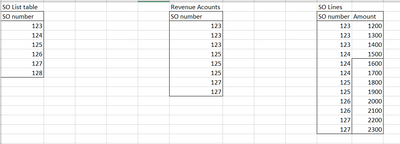
Thanks for reaching out. This is what the tables looks like:


musafasih_1-1622694379070.png


SO list table has a one-to-many relationship with both Rev Accounts table and SO lines table. I want the result such that the SO number in SO lines table is able to filter values by SO number in Revenue Accounts. Notice that there are numbers in SO lines that do not exist in Rev Accounts. 


Hi @musafasih 


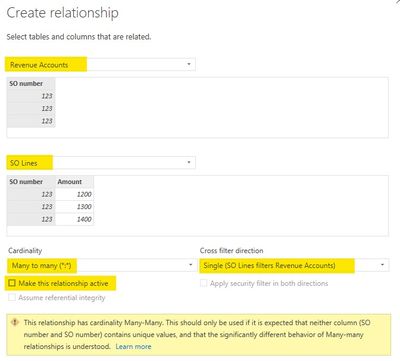
You could add an inactive many-to-many relationship between RA table and SO Lines table on SO number column with a Single (SO Lines filters RA) cross filter direction. Then use USERELATIONSHIP() function in DAX codes to activate this inactive relationship. 

060802.jpg


You can also use TREATAS function to filter a table by a disconnected table in DAX codes.


Additionally, SO List table already has relationships with both RA table and SO Lines table, so actually there is a relationship between RA table and SO Lines table through SO List table. You can modify the cross filter direction of both relationships to Both, then SO Lines table can filter RA table through the relationship.


Regards,
Community Support Team _ Jing
If this post helps, please Accept it as the solution to help other members find it.

Helpful resources

Announcements
Power BI DataViz World Championships

Power BI Dataviz World Championships

The Power BI Data Visualization World Championships is back! Get ahead of the game and start preparing now!

December 2025 Power BI Update Carousel

Power BI Monthly Update - December 2025

Check out the December 2025 Power BI Holiday Recap!

FabCon Atlanta 2026 carousel

FabCon Atlanta 2026

Join us at FabCon Atlanta, March 16-20, for the ultimate Fabric, Power BI, AI and SQL community-led event. Save $200 with code FABCOMM.

Top Solution Authors