Join the FabCon + SQLCon recap series. Up next: Power BI, Real-Time Intelligence, IQ and AI, and Data Factory take center stage. All sessions are available on-demand after the live show. Register now
Hi guys,
So I have this table and i want to create a new column that display "Presented" if "Presented or Not" has both "Presented" and "Not Presented" for the same "ProductName", else just display normal result accordance to "Presented Or Not" column . I am not sure how to do this so please help.
Solved! Go to Solution.
Hi @dduc2310 ,
1. Whole M In Power Query:
let
Source = Table.FromRows(Json.Document(Binary.Decompress(Binary.FromText("i45WclTSUQooSi1OzStJTVGK1YGI+OWXKFAmiirihFUddlFnDN3OxKiLBQA=", BinaryEncoding.Base64), Compression.Deflate)), let _t = ((type nullable text) meta [Serialized.Text = true]) in type table [ProjectName = _t, #"Presented Or Not" = _t]),
#"Changed Type" = Table.TransformColumnTypes(Source,{{"ProjectName", type text}, {"Presented Or Not", type text}}),
#"Grouped Rows" = Table.Group(#"Changed Type", {"ProjectName"}, {{"Count", each _, type table [ProjectName=nullable text, Presented Or Not=nullable text]}}),
#"Added Custom" = Table.AddColumn(#"Grouped Rows", "Custom", each if Table.Contains([Count],[Presented Or Not="Presented"]) then "Presented" else "Not Presented"),
#"Expanded Count" = Table.ExpandTableColumn(#"Added Custom", "Count", {"Presented Or Not"}, {"Presented Or Not"})
in
#"Expanded Count"
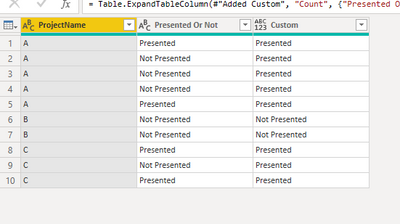
2. try the following DAX formula:
Result =
var _t=DISTINCT( SUMMARIZE('Table','Table'[ProjectName], 'Table'[Presented Or Not]))
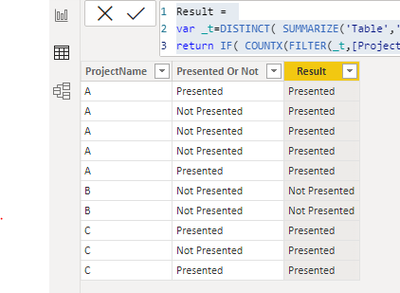
return IF( COUNTX(FILTER(_t,[ProjectName]=EARLIER('Table'[ProjectName])),[Presented Or Not])=2,"Presented",[Presented Or Not])
Below is the final output:
Best Regards,
Eyelyn Qin
If this post helps, then please consider Accept it as the solution to help the other members find it more quickly.
Hi @dduc2310 ,
1. Whole M In Power Query:
let
Source = Table.FromRows(Json.Document(Binary.Decompress(Binary.FromText("i45WclTSUQooSi1OzStJTVGK1YGI+OWXKFAmiirihFUddlFnDN3OxKiLBQA=", BinaryEncoding.Base64), Compression.Deflate)), let _t = ((type nullable text) meta [Serialized.Text = true]) in type table [ProjectName = _t, #"Presented Or Not" = _t]),
#"Changed Type" = Table.TransformColumnTypes(Source,{{"ProjectName", type text}, {"Presented Or Not", type text}}),
#"Grouped Rows" = Table.Group(#"Changed Type", {"ProjectName"}, {{"Count", each _, type table [ProjectName=nullable text, Presented Or Not=nullable text]}}),
#"Added Custom" = Table.AddColumn(#"Grouped Rows", "Custom", each if Table.Contains([Count],[Presented Or Not="Presented"]) then "Presented" else "Not Presented"),
#"Expanded Count" = Table.ExpandTableColumn(#"Added Custom", "Count", {"Presented Or Not"}, {"Presented Or Not"})
in
#"Expanded Count"
2. try the following DAX formula:
Result =
var _t=DISTINCT( SUMMARIZE('Table','Table'[ProjectName], 'Table'[Presented Or Not]))
return IF( COUNTX(FILTER(_t,[ProjectName]=EARLIER('Table'[ProjectName])),[Presented Or Not])=2,"Presented",[Presented Or Not])
Below is the final output:
Best Regards,
Eyelyn Qin
If this post helps, then please consider Accept it as the solution to help the other members find it more quickly.

This is better done in DAX. Use COUNTROWS(VALUES([ProductName])) and test if it is more than 1.
Check out the April 2026 Power BI update to learn about new features.
If you have recently started exploring Fabric, we'd love to hear how it's going. Your feedback can help with product improvements.
A new Power BI DataViz World Championship is coming this June! Don't miss out on submitting your entry.
| User | Count |
|---|---|
| 5 | |
| 4 | |
| 4 | |
| 4 | |
| 4 |