Don't miss your chance to take the Fabric Data Engineer (DP-600) exam for FREE! Find out how by attending the DP-600 session on April 23rd (pacific time), live or on-demand.
Learn moreNext up in the FabCon + SQLCon recap series: The roadmap for Microsoft SQL and Maximizing Developer experiences in Fabric. All sessions are available on-demand after the live show. Register now
Hi,
I have a transactions query with product ID and transaction date.
I want to filter the transaction date, so that it shows the latest transaction date for each product.
For example:
Product 1 1/1/2020
Product 1 1/2/2020
Product 2 1/5/2020
Will be converted to:
Product 1 1/2/2020
Product 2 1/5/2020
Where for each product, it only shows the row that has the max date.
I would like to do this in Power Query if possible, not DAX. Help will be appriciated.
Solved! Go to Solution.
Hello @numersoz
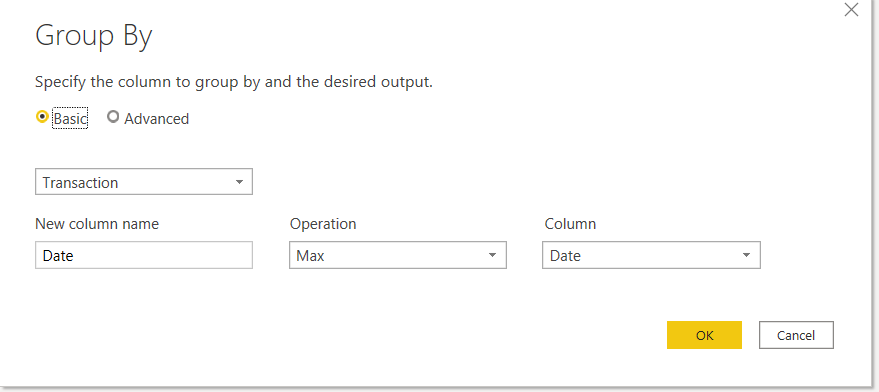
select your transaction column, and launch the group function. Select there your new name of the date, function max and your date column
Here is the code
let
Source = Table.FromRows(Json.Document(Binary.Decompress(Binary.FromText("i45WCijKTylNLlEwVNJRMjDUAyIjA6VYHUwJI3QJI4QOQ6wSxnpGRkqxsQA=", BinaryEncoding.Base64), Compression.Deflate)), let _t = ((type nullable text) meta [Serialized.Text = true]) in type table [Transaction = _t, Date = _t]),
#"Changed Type" = Table.TransformColumnTypes(Source,{{"Transaction", type text}, {"Date", type date, "de-DE"}}),
#"Grouped Rows" = Table.Group(#"Changed Type", {"Transaction"}, {{"Date", each List.Max([Date]), type date}})
in
#"Grouped Rows"
Copy paste this code to the advanced editor in a new blank query to see how the solution works.
If this post helps or solves your problem, please mark it as solution (to help other users find useful content and to acknowledge the work of users that helped you)
Kudoes are nice too
Have fun
Jimmy
Hello @numersoz
select your transaction column, and launch the group function. Select there your new name of the date, function max and your date column
Here is the code
let
Source = Table.FromRows(Json.Document(Binary.Decompress(Binary.FromText("i45WCijKTylNLlEwVNJRMjDUAyIjA6VYHUwJI3QJI4QOQ6wSxnpGRkqxsQA=", BinaryEncoding.Base64), Compression.Deflate)), let _t = ((type nullable text) meta [Serialized.Text = true]) in type table [Transaction = _t, Date = _t]),
#"Changed Type" = Table.TransformColumnTypes(Source,{{"Transaction", type text}, {"Date", type date, "de-DE"}}),
#"Grouped Rows" = Table.Group(#"Changed Type", {"Transaction"}, {{"Date", each List.Max([Date]), type date}})
in
#"Grouped Rows"
Copy paste this code to the advanced editor in a new blank query to see how the solution works.
If this post helps or solves your problem, please mark it as solution (to help other users find useful content and to acknowledge the work of users that helped you)
Kudoes are nice too
Have fun
Jimmy
let
Source = Table.FromRows(Json.Document(Binary.Decompress(Binary.FromText("i45WCijKTylNLlEwVNJRMtQ31DcyMDJQitVBlzDClDACS5hCJWIB", BinaryEncoding.Base64), Compression.Deflate)), let _t = ((type nullable text) meta [Serialized.Text = true]) in type table [Product = _t, date = _t]),
#"Changed Type" = Table.TransformColumnTypes(Source,{{"Product", type text}, {"date", type date}}),
#"Grouped Rows" = Table.Group(#"Changed Type", {"Product"}, {{"dates", each List.Max([date]), type nullable date}})
in
#"Grouped Rows"use above query
If you have recently started exploring Fabric, we'd love to hear how it's going. Your feedback can help with product improvements.
A new Power BI DataViz World Championship is coming this June! Don't miss out on submitting your entry.
| User | Count |
|---|---|
| 5 | |
| 3 | |
| 3 | |
| 3 | |
| 2 |
| User | Count |
|---|---|
| 7 | |
| 5 | |
| 5 | |
| 5 | |
| 4 |