Don't miss your chance to take the Fabric Data Engineer (DP-600) exam for FREE! Find out how by attending the DP-600 session on April 23rd (pacific time), live or on-demand.
Learn moreNext up in the FabCon + SQLCon recap series: The roadmap for Microsoft SQL and Maximizing Developer experiences in Fabric. All sessions are available on-demand after the live show. Register now
Hi
could someone help me with custom column ?
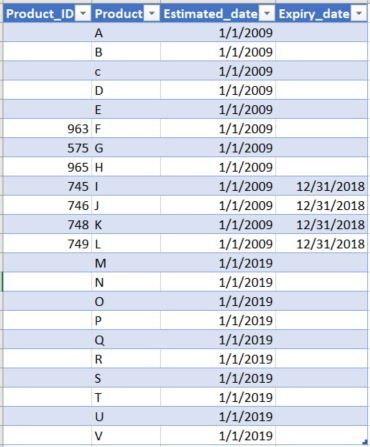
i have a table let say "Product Rules" with ProductID,Productname, effective_date, Expiry_date
something like this:
All i need is ,
little more explaintion if need: since Expiry_date 12/31/2018 have only for 4 ProductID. and theoretically Product from 2009 are effective till 12/31/2018 from 1/1/2019 is in effective or expired. and product from 1/1/2019.......... are all Effective they don't have Expiry_date.
any help will abe much appreciated.
Thanks.
Solved! Go to Solution.
Hi @dax ,
Thanks for the quick response.
i think i was not clear before but i want to display both blanks and expirydate in Expiry_date column, when user select any dates between jan 2009 to dec2018. similarly when user select any date from jan 2019- dec2019 or 2020 going forward it should show only 2019 with blanks in Exipry_date column because products from 2019 are all Effective since no Expirydate in Expiry_date column.
since i don't see option for me to drop my file, i can just post screen shots.
when user select any dates between jan2019 to dec2019 or 2020:
when user select any dates between 2009-2018:
not this: not to show all dates like this below screenshot in estimated dates ignoring the filter condition.
we need to display in single table .
i hope i made it clear.
Thanks.
Hi @harip1 ,
Because when you use blank(), it will automatically be ignored, so you could try to replace it with " ". You could try below measure to see whether it work or not.
Measure = if( MIN('Table'[expiry_date])=BLANK()," ",if( MIN('Table'[expiry_date])>=MAX('calendar'[Date]) , MIN('Table'[expiry_date]),BLANK()))
Best Regards,
Zoe Zhi
If this post helps, then please consider Accept it as the solution to help the other members find it more quickly.
Hi @harip1 ,
You could refer to my sample for details.
Best Regards,
Zoe Zhi
If this post helps, then please consider Accept it as the solution to help the other members find it more quickly.
Hi @dax ,
Thanks for the quick response.
i think i was not clear before but i want to display both blanks and expirydate in Expiry_date column, when user select any dates between jan 2009 to dec2018. similarly when user select any date from jan 2019- dec2019 or 2020 going forward it should show only 2019 with blanks in Exipry_date column because products from 2019 are all Effective since no Expirydate in Expiry_date column.
since i don't see option for me to drop my file, i can just post screen shots.
when user select any dates between jan2019 to dec2019 or 2020:
when user select any dates between 2009-2018:
not this: not to show all dates like this below screenshot in estimated dates ignoring the filter condition.
we need to display in single table .
i hope i made it clear.
Thanks.
Hi @harip1 ,
Because when you use blank(), it will automatically be ignored, so you could try to replace it with " ". You could try below measure to see whether it work or not.
Measure = if( MIN('Table'[expiry_date])=BLANK()," ",if( MIN('Table'[expiry_date])>=MAX('calendar'[Date]) , MIN('Table'[expiry_date]),BLANK()))
Best Regards,
Zoe Zhi
If this post helps, then please consider Accept it as the solution to help the other members find it more quickly.
If you have recently started exploring Fabric, we'd love to hear how it's going. Your feedback can help with product improvements.
A new Power BI DataViz World Championship is coming this June! Don't miss out on submitting your entry.
Share feedback directly with Fabric product managers, participate in targeted research studies and influence the Fabric roadmap.
| User | Count |
|---|---|
| 6 | |
| 3 | |
| 3 | |
| 3 | |
| 2 |