cancel
Showing results for 
Search instead for 
Did you mean: 

The Power BI Data Visualization World Championships is back! Get ahead of the game and start preparing now! Learn more

Reply
harip1
Frequent Visitor

Fill Dates between dates using custom column

Hi 

could someone  help me with custom column ?


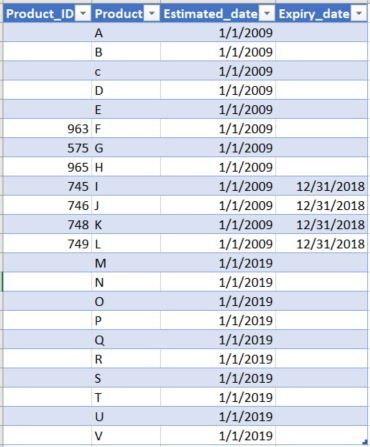
i have a table let say "Product Rules" with ProductID,Productname, effective_date, Expiry_date

something like this:

Updated_table.JPG


All i need is ,

  1. the custom column with the list of all dates from "1/1/2009 - 12/31/2019" as Effective _date and
  2.  when user select date slicer(date dimension table)  and pick randomly 3/21/2009 or any month or any year or any day between 2009 to 2018  Expiry_date column should show as blank Except for productId (745,746,748,749)  should show its Expiry_date as 12/31/2018 but when user select date slicer from 2019 or 2020....... these products are Effective and should also show blanks in Expiry_date column. because it doesn't have any Expiry_date . i hope am clear.


little more explaintion if need: since Expiry_date 12/31/2018  have only for 4 ProductID. and theoretically Product from 2009 are effective till 12/31/2018 from 1/1/2019 is in effective or expired. and product from 1/1/2019.......... are all Effective they don't have Expiry_date.


any help will abe much appreciated.


Thanks.


2 ACCEPTED SOLUTIONS
harip1
Frequent Visitor

Hi @dax ,


Thanks for the quick response.


i think i was not clear before but i want to display both blanks and expirydate in Expiry_date column, when user select any dates between jan 2009 to dec2018. similarly when user select any date from jan 2019- dec2019 or 2020 going forward it should show only 2019 with blanks in Exipry_date column because products from 2019 are all Effective since no Expirydate in Expiry_date column.

since i don't see option for me to drop my file, i can just post screen shots.

when user select any dates between jan2019 to dec2019 or 2020:

Dates between jan2019-dec2019.JPG

when user select any dates between 2009-2018:

Dates between 2009-2018.JPG

not this: not to show all dates like this below screenshot in estimated dates ignoring the filter condition.

Not This.JPG

we need to display in single table .

i hope i made it clear.


Thanks.

View solution in original post

dax
Community Support
Community Support

Hi @harip1 , 

Because when you use blank(), it will automatically be ignored, so you could try to replace it with " ". You could try below measure to see whether it work or not.

Measure = if( MIN('Table'[expiry_date])=BLANK()," ",if( MIN('Table'[expiry_date])>=MAX('calendar'[Date]) , MIN('Table'[expiry_date]),BLANK()))


Best Regards,
Zoe Zhi

If this post helps, then please consider Accept it as the solution to help the other members find it more quickly.

View solution in original post

3 REPLIES 3
dax
Community Support
Community Support

Hi @harip1 , 

You could refer to my sample for details.

Best Regards,
Zoe Zhi

If this post helps, then please consider Accept it as the solution to help the other members find it more quickly.

harip1
Frequent Visitor

Hi @dax ,


Thanks for the quick response.


i think i was not clear before but i want to display both blanks and expirydate in Expiry_date column, when user select any dates between jan 2009 to dec2018. similarly when user select any date from jan 2019- dec2019 or 2020 going forward it should show only 2019 with blanks in Exipry_date column because products from 2019 are all Effective since no Expirydate in Expiry_date column.

since i don't see option for me to drop my file, i can just post screen shots.

when user select any dates between jan2019 to dec2019 or 2020:

Dates between jan2019-dec2019.JPG

when user select any dates between 2009-2018:

Dates between 2009-2018.JPG

not this: not to show all dates like this below screenshot in estimated dates ignoring the filter condition.

Not This.JPG

we need to display in single table .

i hope i made it clear.


Thanks.

dax
Community Support
Community Support

Hi @harip1 , 

Because when you use blank(), it will automatically be ignored, so you could try to replace it with " ". You could try below measure to see whether it work or not.

Measure = if( MIN('Table'[expiry_date])=BLANK()," ",if( MIN('Table'[expiry_date])>=MAX('calendar'[Date]) , MIN('Table'[expiry_date]),BLANK()))


Best Regards,
Zoe Zhi

If this post helps, then please consider Accept it as the solution to help the other members find it more quickly.

Helpful resources

Announcements
Power BI DataViz World Championships

Power BI Dataviz World Championships

The Power BI Data Visualization World Championships is back! Get ahead of the game and start preparing now!

December 2025 Power BI Update Carousel

Power BI Monthly Update - December 2025

Check out the December 2025 Power BI Holiday Recap!

FabCon Atlanta 2026 carousel

FabCon Atlanta 2026

Join us at FabCon Atlanta, March 16-20, for the ultimate Fabric, Power BI, AI and SQL community-led event. Save $200 with code FABCOMM.

Top Solution Authors