



This time we’re going bigger than ever. Fabric, Power BI, SQL, AI and more. We're covering it all. You won't want to miss it.
Learn moreLevel up your Power BI skills this month - build one visual each week and tell better stories with data! Get started
Hello everyone.
In my company, we are using dataverse, and we need to associate a pdf to each row of a table.
For this we have used the option to attatch files in dataverse, in a file column in a table. And we have activated the ability of the table to save files in the table.
What would be the way to view that file in powerBI?
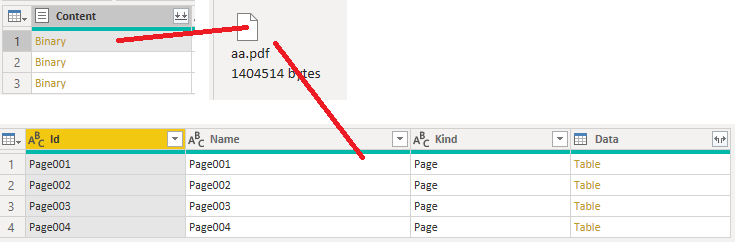
We tried to view the log in powerquery, but it shows a table and you can't see the file anywhere.
Attached screenshot of power query.
Thank you in advance.
I'm facing the same challenge and wonder if you resolved it? Not a lot of answers
BR,
Kerstin
Hi @Anonymous ,
Is there a column with a binary data type after expansion?
If so, see if the PDF file needed in it.
Best Regards,
Gao
Community Support Team
If there is any post helps, then please consider Accept it as the solution to help the other members find it more quickly. If I misunderstand your needs or you still have problems on it, please feel free to let us know. Thanks a lot!
How to get your questions answered quickly -- How to provide sample data
No, it hasn´t Content column.
it only has de followings columns:
Check out the April 2026 Power BI update to learn about new features.
Sign up to receive a private message when registration opens and key events begin.
If you have recently started exploring Fabric, we'd love to hear how it's going. Your feedback can help with product improvements.