



Get certified for free when you join Fabric Data Days 2026 and dive into Fabric, Power BI, SQL, AI, and other essential data skills.
Join nowData Days is here! Join us now for 60+ days of learning, challenges, and connection. Learn more
Hello everyone.
In my company, we are using dataverse, and we need to associate a pdf to each row of a table.
For this we have used the option to attatch files in dataverse, in a file column in a table. And we have activated the ability of the table to save files in the table.
What would be the way to view that file in powerBI?
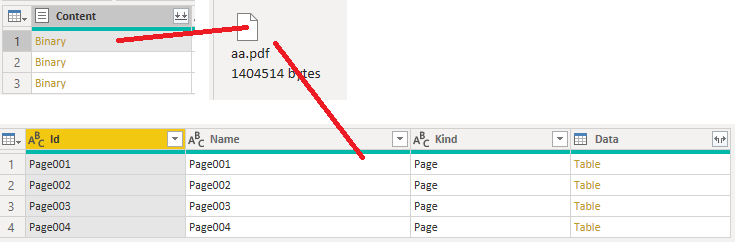
We tried to view the log in powerquery, but it shows a table and you can't see the file anywhere.
Attached screenshot of power query.
Thank you in advance.
I'm facing the same challenge and wonder if you resolved it? Not a lot of answers
BR,
Kerstin
Hi @Anonymous ,
Is there a column with a binary data type after expansion?
If so, see if the PDF file needed in it.
Best Regards,
Gao
Community Support Team
If there is any post helps, then please consider Accept it as the solution to help the other members find it more quickly. If I misunderstand your needs or you still have problems on it, please feel free to let us know. Thanks a lot!
How to get your questions answered quickly -- How to provide sample data
No, it hasn´t Content column.
it only has de followings columns:
Don't miss out on Data Days, June 15 through August 7. Learn Fabric, Power BI, SQL, AI and more.
Check out the May 2026 Power BI update to learn about new features.
| User | Count |
|---|---|
| 4 | |
| 4 | |
| 2 | |
| 2 | |
| 1 |
| User | Count |
|---|---|
| 11 | |
| 11 | |
| 5 | |
| 4 | |
| 4 |