This time we’re going bigger than ever. Fabric, Power BI, SQL, AI and more. We're covering it all. You won't want to miss it.
Learn moreLevel up your Power BI skills this month - build one visual each week and tell better stories with data! Get started
I have a code that looks for a file exists or not before doing further processing. Result of "try Source" evaluation, Test[HasError] in if statement returns "False" always, whether or not there was a file "MyLog.log" in the path "C:\Log-Files\Empty-LogFolder\".
Appreciate if you can shed some light on it. Code below. Thank you.
***********************************
let
File_Path = "C:\Log-Files\Empty-LogFolder\MyLog.log",
Source = Csv.Document(File.Contents(File_Path),[Delimiter=";", Columns=3, Encoding=1252, QuoteStyle=QuoteStyle.None]),
Test = try Source,
Output = if Test[HasError] then "True" else "False"
in
Output
Solved! Go to Solution.
Hi bidev,
Based on test, I can achieve your requirement, perhaps you could refer to below code:
let
Path = "C:\Users\xxxxx\Desktop\audit.csv",
Result = try Binary.ToText(File.Contents(Path)),
Output =if Logical.From(Result[HasError]) then "not exist" else "exist"
in
Output
Screenshots.
Exist:
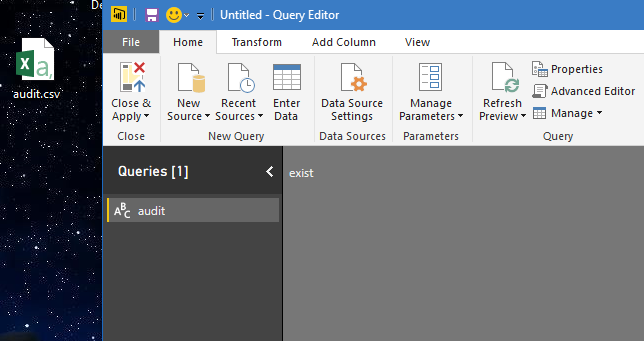
Not exist:
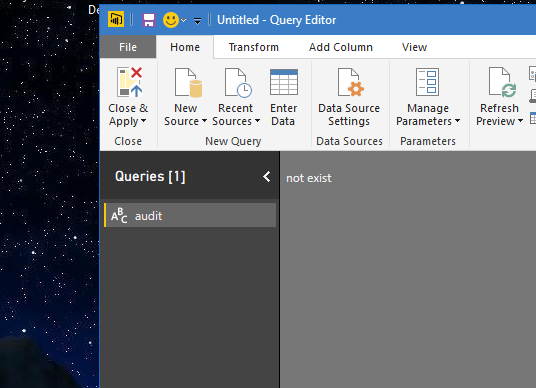
Descript:
Path = "C:\Users\xxxxx\Desktop\audit.csv", // the file path.
File.Contents(Path) // get the file from specify path and convert it to binary.
Binary.ToText(), // convert binary format to text.
Try //catch the error , if the action has error, it means the file doesn’t exist.
Output =if Logical.From(Result[HasError]) then "not exist" else "exist" //use if to format the result to text.
Reference:
Regards,
Xiaoxin Sheng
Hi bidev,
Based on test, I can achieve your requirement, perhaps you could refer to below code:
let
Path = "C:\Users\xxxxx\Desktop\audit.csv",
Result = try Binary.ToText(File.Contents(Path)),
Output =if Logical.From(Result[HasError]) then "not exist" else "exist"
in
Output
Screenshots.
Exist:
Not exist:
Descript:
Path = "C:\Users\xxxxx\Desktop\audit.csv", // the file path.
File.Contents(Path) // get the file from specify path and convert it to binary.
Binary.ToText(), // convert binary format to text.
Try //catch the error , if the action has error, it means the file doesn’t exist.
Output =if Logical.From(Result[HasError]) then "not exist" else "exist" //use if to format the result to text.
Reference:
Regards,
Xiaoxin Sheng
Hello Xiaoxin_Sheng,
Thank you very much. Your solution really worked! Awesome.
Thanks again.
Check out the April 2026 Power BI update to learn about new features.
Sign up to receive a private message when registration opens and key events begin.
If you have recently started exploring Fabric, we'd love to hear how it's going. Your feedback can help with product improvements.