cancel
Showing results for 
Search instead for 
Did you mean: 

The Power BI Data Visualization World Championships is back! Get ahead of the game and start preparing now! Learn more

Reply
Visualization
Regular Visitor

Extracting specific values from a column

Hello, I'm currently trying to extract specific values from a column into a new column in power query. The column consists of differing values (dates, numbers, words) and I would only like the new column to contain the dates from this existing column. I've tried using extract, lookupvalue, and creating a column from example but have been unable to get solely the dates in the new column. Any help is appreciated, thank you

Capture.PNG

1 ACCEPTED SOLUTION

Did you ensure you were replacing the other step, and not creating a new one?


Otherwise, you could try adding a Custom Column  in the add column tab, and use the code:

if 
Text.Contains([Column1] ,"-") or Text.Contains([Column1] ,"/") or Text.Contains([Column1] ,"\")
then
try
Date.FromText([Column1])
otherwise
null
else
null

 Change the red to your column.

It first looks for any of - / \ and if it finds them, tries to transform it to a date


Did I answer your question? Mark my post as a solution! Proud to be a Super User!


Connect with me!
Stay up to date on  
Read my blogs on  


View solution in original post

5 REPLIES 5
SteveCampbell
Memorable Member
Memorable Member

Duplaicate the column by Right click > duplicate column.


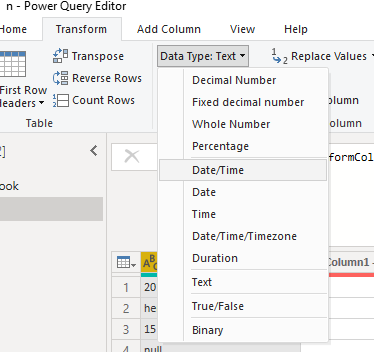
Click on the new column, and change the data type of your new column to Date in Transform > Data Type:

ss.png

Right click on the nbew column and Replace Errors. Type in the word null. 

Now your new column will only contain the dates ! 

T81yPTgno3JQRH71g6qU8f9Ry1Zo76fMxxRrHSKT.gif


Did I answer your question? Mark my post as a solution! Proud to be a Super User!


Connect with me!
Stay up to date on  
Read my blogs on  


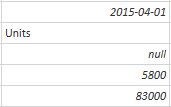
Hello, thank you for the reply! This seems to work for the values that are words (such as "Units" in the screenshot of the column), but for values that are numbers (such as "5800" in the screenshot) they are turned into date values rather than errors. As a result, they do not get changed to null when errors are replaced. Could I be missing something here?

Dates are stored as integers, so that would make sense - Try to change to "Date/Time/Timezone" instead of just date


Did I answer your question? Mark my post as a solution! Proud to be a Super User!


Connect with me!
Stay up to date on  
Read my blogs on  


Unfortunately this resulted in the same output, where the numbers changed to date/time/timezone rather than error.

Did you ensure you were replacing the other step, and not creating a new one?


Otherwise, you could try adding a Custom Column  in the add column tab, and use the code:

if 
Text.Contains([Column1] ,"-") or Text.Contains([Column1] ,"/") or Text.Contains([Column1] ,"\")
then
try
Date.FromText([Column1])
otherwise
null
else
null

 Change the red to your column.

It first looks for any of - / \ and if it finds them, tries to transform it to a date


Did I answer your question? Mark my post as a solution! Proud to be a Super User!


Connect with me!
Stay up to date on  
Read my blogs on  


Helpful resources

Announcements
Power BI DataViz World Championships

Power BI Dataviz World Championships

The Power BI Data Visualization World Championships is back! Get ahead of the game and start preparing now!

December 2025 Power BI Update Carousel

Power BI Monthly Update - December 2025

Check out the December 2025 Power BI Holiday Recap!

FabCon Atlanta 2026 carousel

FabCon Atlanta 2026

Join us at FabCon Atlanta, March 16-20, for the ultimate Fabric, Power BI, AI and SQL community-led event. Save $200 with code FABCOMM.

Top Solution Authors