Join us in Barcelona for FabCon and SQLCon, September 28 - October 1, 2026.
This is best Fabric, Power BI, SQL and AI community event. How do we know? The last event sold out! Save €200 with code FABCMTY200.
Register now- Power BI forums
- Get Help with Power BI
- Desktop
- Service
- Report Server
- Power Query
- Mobile Apps
- Developer
- DAX Commands and Tips
- Custom Visuals Development Discussion
- Health and Life Sciences
- Power BI Spanish forums
- Translated Spanish Desktop
- Training and Consulting
- Instructor Led Training
- Dashboard in a Day for Women, by Women
- Galleries
- Data Stories Gallery
- Themes Gallery
- Contests Gallery
- QuickViz Gallery
- Quick Measures Gallery
- Visual Calculations Gallery
- Fabric Apps Gallery
- Notebook Gallery
- Translytical Task Flow Gallery
- TMDL Gallery
- R Script Showcase
- Webinars and Video Gallery
- Ideas
- Custom Visuals Ideas (read-only)
- Issues
- Issues
- Events
- Upcoming Events
The Fabric community is upgrading! Read all of the details including the timeline and what you can expect. Learn more
- Power BI forums
- Forums
- Get Help with Power BI
- Power Query
- Re: Extract year from date data
- Subscribe to RSS Feed
- Mark Topic as New
- Mark Topic as Read
- Float this Topic for Current User
- Bookmark
- Subscribe
- Printer Friendly Page

- Mark as New
- Bookmark
- Subscribe
- Mute
- Subscribe to RSS Feed
- Permalink
- Report Inappropriate Content
Extract year from date data
I've been trying to use Date.Year to extract yyyy from mm/dd/yyyy, for a few days now. The best thought I have is to convert the date to text and take the last four characters, but I believe there's a better/easier way to solve this.
Thank you.
Solved! Go to Solution.


- Mark as New
- Bookmark
- Subscribe
- Mute
- Subscribe to RSS Feed
- Permalink
- Report Inappropriate Content
the first parameter of this function should be text, not a date value.
if [order date] is date type,try Text.AfterDelimiter(Text.From([ORDER DATE]),"/",{0,1})
- Mark as New
- Bookmark
- Subscribe
- Mute
- Subscribe to RSS Feed
- Permalink
- Report Inappropriate Content
Hi @Anonymous ,
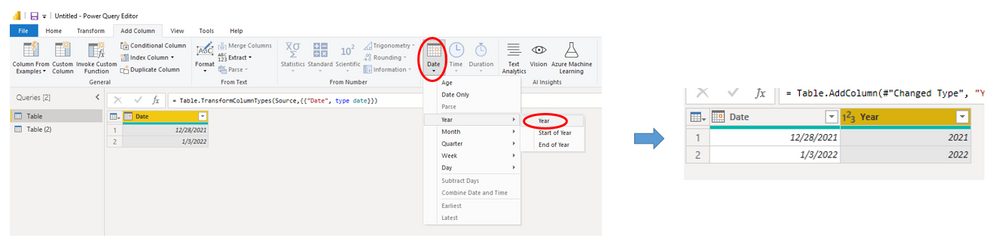
If the column type is Date, please directly go to Add Column tab--> Date-->Year to extract :
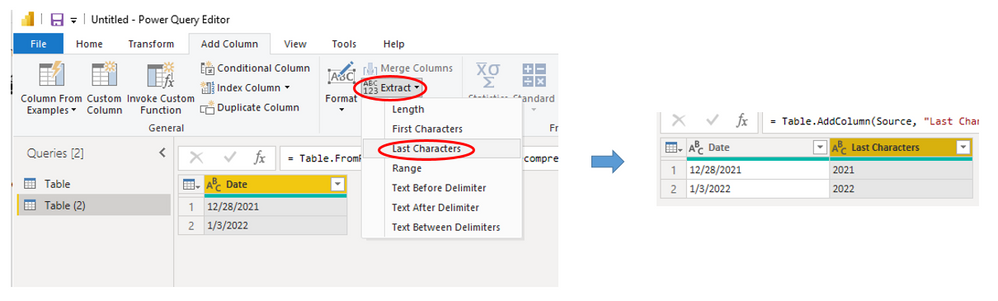
If the column type is Text, then go to Add Column tab--> Extract --> Last characters:
Best Regards,
Eyelyn Qin
If this post helps, then please consider Accept it as the solution to help the other members find it more quickly.
- Mark as New
- Bookmark
- Subscribe
- Mute
- Subscribe to RSS Feed
- Permalink
- Report Inappropriate Content
It knows how to parse dates using the rules of the system's culture.
= Table.TransformColumnTypes(Source,{{"Text", type date}}, "en-US")
// verses
= Table.TransformColumnTypes(Source,{{"Text", type date}}, "en-GB")
// or
= Table.TransformColumnTypes(Source,{{"Text", type date}}, "fr")

// your default is
= Culture.Current
- Mark as New
- Bookmark
- Subscribe
- Mute
- Subscribe to RSS Feed
- Permalink
- Report Inappropriate Content
Thank you, Daniel.
I'm painfully new but begging to catch on.
- Mark as New
- Bookmark
- Subscribe
- Mute
- Subscribe to RSS Feed
- Permalink
- Report Inappropriate Content
Hi @Anonymous ,
Sorry for my miss for your solution posted before.

Please kindly Accept it as the solution. More people will benefit from it.😀
Best Regards,
Eyelyn Qin
- Mark as New
- Bookmark
- Subscribe
- Mute
- Subscribe to RSS Feed
- Permalink
- Report Inappropriate Content
Hi @Anonymous ,
If the column type is Date, please directly go to Add Column tab--> Date-->Year to extract :
If the column type is Text, then go to Add Column tab--> Extract --> Last characters:
Best Regards,
Eyelyn Qin
If this post helps, then please consider Accept it as the solution to help the other members find it more quickly.
- Mark as New
- Bookmark
- Subscribe
- Mute
- Subscribe to RSS Feed
- Permalink
- Report Inappropriate Content
Oh, WOW! I've been making it way too hard all this time.
1) select data column
2) Date icon, select year, select year. DONE!
I see now there are many ways to get the result we're seeking, but thanfully this was a "built-in" option.
Thanks to your both. I love this group and shall return.
- Mark as New
- Bookmark
- Subscribe
- Mute
- Subscribe to RSS Feed
- Permalink
- Report Inappropriate Content
It knows how to parse dates using the rules of the system's culture.
= Table.TransformColumnTypes(Source,{{"Text", type date}}, "en-US")
// verses
= Table.TransformColumnTypes(Source,{{"Text", type date}}, "en-GB")
// or
= Table.TransformColumnTypes(Source,{{"Text", type date}}, "fr")

// your default is
= Culture.Current

- Mark as New
- Bookmark
- Subscribe
- Mute
- Subscribe to RSS Feed
- Permalink
- Report Inappropriate Content
@Anonymous Split on right most delimiter, which will be the YEAR
========================
Did I answer your question? Mark my post as a solution!
Proud to be a Super User
My Custom Visualization Projects
• Plotting Live Sound: Live Sound
• Beautiful News: Women in Parliament, Energy Mix, Shrinking Armies
• Visual Capitalist: Working Hrs
• Others: Easing Graph, Animated Calendar
MayViz Submissions
• Week 1: View
• Week 2: View
• Week 3: View
• Week 4: View
========================
- Mark as New
- Bookmark
- Subscribe
- Mute
- Subscribe to RSS Feed
- Permalink
- Report Inappropriate Content
That sounds logical; however, I am pretty new and don't know how to split or determine the rightmost delimiter. Of I go to search, the game is afoot.
- Mark as New
- Bookmark
- Subscribe
- Mute
- Subscribe to RSS Feed
- Permalink
- Report Inappropriate Content
Text.AfterDelimiter(text,"/",{0,1})
- Mark as New
- Bookmark
- Subscribe
- Mute
- Subscribe to RSS Feed
- Permalink
- Report Inappropriate Content
Daniel,
I just tried =Text.AfterDelimiter([ORDER DATE],"/",{0,1}), it failed.
- Mark as New
- Bookmark
- Subscribe
- Mute
- Subscribe to RSS Feed
- Permalink
- Report Inappropriate Content
the first parameter of this function should be text, not a date value.
if [order date] is date type,try Text.AfterDelimiter(Text.From([ORDER DATE]),"/",{0,1})
Helpful resources

FabCon & SQLCon – Barcelona 2026
Join us in Barcelona for FabCon and SQLCon, the Fabric, Power BI, SQL, and AI community event. Save €200 with code FABCMTY200.

Power BI DataViz World Championships - June 2026
A new Power BI DataViz World Championship is coming this June! Don't miss out on submitting your entry.


