Hi @Anonymous
There isn't one function to do this in a quick step. This below will walk you through the logic of it. Put this M code in a blank query:
1) In Power Query, select New Source, then Blank Query
2) On the Home ribbon, select "Advanced Editor" button
3) Remove everything you see, then paste the M code I've given you in that box.
4) Press Done
let
    Source = Table.FromRows(Json.Document(Binary.Decompress(Binary.FromText("i45WclTSUUosTklTitWJVnJC5jgjc0DKKioq4KpgbGcYOxYA", BinaryEncoding.Base64), Compression.Deflate)), let _t = ((type text) meta [Serialized.Text = true]) in type table [Data = _t, Test = _t]),
    #"Changed Type" = Table.TransformColumnTypes(Source,{{"Data", type text}, {"Test", type text}}),
    #"Grouped Rows" = Table.Group(#"Changed Type", {"Data"}, {{"All Rows", each _, type table [Data=text, Test=text]}}),
    #"Added Just the Test Column as Table" = Table.AddColumn(#"Grouped Rows", "Test Column", each Table.SelectColumns([All Rows], "Test")),
    #"Added Transposed Table" = Table.AddColumn(#"Added Just the Test Column as Table", "Transposed Table", each Table.Transpose([Test Column])),
    #"Added Table as a List" = Table.AddColumn(#"Added Transposed Table", "Table as a List", each Table.ColumnNames([Transposed Table])),
    #"Added Concatenated Fields" = Table.AddColumn(#"Added Table as a List", "Concatenated Fields", each Table.CombineColumns([Transposed Table],[Table as a List], Combiner.CombineTextByDelimiter(","), "Test")),
    #"Expanded Custom.2" = Table.ExpandTableColumn(#"Added Concatenated Fields", "Concatenated Fields", {"Test"}, {"Test"})
in
    #"Expanded Custom.2"
Kind of the long way, but this is easier to read:

Start with step 1. The first few steps were just me slapping in some data to get a nested table with a single column really quickly.
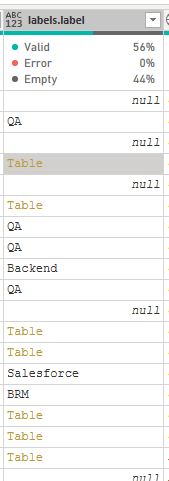
- This is the single column like yours.
- Transposed this table
- Converted the table to a list
- Expanded the list and concantenated the fields together as I did
- Expanded the final column giving you the asdf,xxx field.
This should work with multiple rows, not just two.
If you need further help, please post back with sample data.
Did I answer your question? Mark my post as a solution!Did my answers help arrive at a solution? Give it a kudos by clicking the Thumbs Up!DAX is for Analysis. Power Query is for Data Modeling
Proud to be a Super User!
MCSA: BI Reporting