Get certified for free when you join Fabric Data Days 2026 and dive into Fabric, Power BI, SQL, AI, and other essential data skills.
Join nowData Days is here! Join us now for 60+ days of learning, challenges, and connection. Learn more
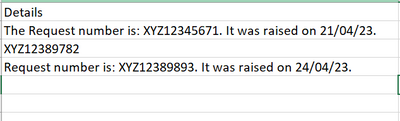
I have a excel column from which I need to extract XYZ12345671, XYZ12389782 and XYZ12389893 which can occur anywhere in the column like below:
How can I accomplish this using Power Query. I want to extract it to a new column. The pattern is XYZ followed by 8 numbers
Solved! Go to Solution.
= Table.AddColumn(PriorStepOrTableName, "ID", each Text.Range([Details], Text.PositionOf([Details], "XYZ"), 11))
--Nate
= Table.AddColumn(PriorStepOrTableName, "ID", each Text.Range([Details], Text.PositionOf([Details], "XYZ"), 11))
--Nate
Don't miss out on Data Days, June 15 through August 7. Learn Fabric, Power BI, SQL, AI and more.
Check out the May 2026 Power BI update to learn about new features.
| User | Count |
|---|---|
| 4 | |
| 4 | |
| 3 | |
| 2 | |
| 1 |
| User | Count |
|---|---|
| 11 | |
| 11 | |
| 5 | |
| 4 | |
| 4 |