Get certified for free when you join Fabric Data Days 2026 and dive into Fabric, Power BI, SQL, AI, and other essential data skills.
Join nowData Days is here! Join us now for 60+ days of learning, challenges, and connection. Learn more
Hi All,
Need to extract number values from text, the number should be 3 digits long.
every extraction should be on new column.
| Text | kolom1 | kolom2 | kolom3 |
| 111 A 222 ab 333 text | 111 | 222 | 333 |
| 11 A 444 some text | 444 | ||
| text 111 c 22 ab 333 | 111 | 333 | |
| sometext11122 A 333 | 333 | ||
| 44 A 222 d 3333 | 222 | ||
| text12 A 22223 | |||
| 222 ab 333 | 222 | 333 |
help is greatly appreciated.
Solved! Go to Solution.
See the working here - Open a blank query - Home - Advanced Editor - Remove everything from there and paste the below code to test (later on when you use the query on your dataset, you will have to change the source appropriately. If you have columns other than these, then delete Changed type step and do a Changed type for complete table from UI again)
let
Source = Table.FromRows(Json.Document(Binary.Decompress(Binary.FromText("i45WMjQ0VHBUMDIyUkhMUjA2NlYoSa0oMTO3UIrVAUkC5UxMTBSK83NTwTJgYRBDAaQxWQGuDywBUgaSBMoBJRzh4kATIHakgISM4YYYGkHEjSBCRkimxQIA", BinaryEncoding.Base64), Compression.Deflate)), let _t = ((type nullable text) meta [Serialized.Text = true]) in type table [Text = _t]),
#"Added Custom" = Table.AddColumn(Source, "Custom", each Text.Trim(Text.Select([Text],{"0".."9"," "}))),
#"Split Column by Delimiter" = Table.ExpandListColumn(Table.TransformColumns(#"Added Custom", {{"Custom", Splitter.SplitTextByDelimiter(" ", QuoteStyle.Csv), let itemType = (type nullable text) meta [Serialized.Text = true] in type {itemType}}}), "Custom"),
#"Filtered Rows" = Table.SelectRows(#"Split Column by Delimiter", each (Text.Length([Custom]) = 3)),
#"Grouped Rows" = Table.Group(#"Filtered Rows", {"Text"}, {{"kolom", each Text.Combine([Custom],","), type nullable text}}),
Custom1 = Table.SplitColumn(#"Grouped Rows", "kolom", Splitter.SplitTextByDelimiter(",", QuoteStyle.Csv), List.Transform({1..List.Max(Table.AddColumn(#"Grouped Rows", "Temp", each List.Count(Text.Split([kolom],",")))[Temp])},each "kolom." & Number.ToText(_)))
in
Custom1
See the working here - Open a blank query - Home - Advanced Editor - Remove everything from there and paste the below code to test (later on when you use the query on your dataset, you will have to change the source appropriately. If you have columns other than these, then delete Changed type step and do a Changed type for complete table from UI again)
let
Source = Table.FromRows(Json.Document(Binary.Decompress(Binary.FromText("i45WMjQ0VHBUMDIyUkhMUjA2NlYoSa0oMTO3UIrVAUkC5UxMTBSK83NTwTJgYRBDAaQxWQGuDywBUgaSBMoBJRzh4kATIHakgISM4YYYGkHEjSBCRkimxQIA", BinaryEncoding.Base64), Compression.Deflate)), let _t = ((type nullable text) meta [Serialized.Text = true]) in type table [Text = _t]),
#"Added Custom" = Table.AddColumn(Source, "Custom", each Text.Trim(Text.Select([Text],{"0".."9"," "}))),
#"Split Column by Delimiter" = Table.ExpandListColumn(Table.TransformColumns(#"Added Custom", {{"Custom", Splitter.SplitTextByDelimiter(" ", QuoteStyle.Csv), let itemType = (type nullable text) meta [Serialized.Text = true] in type {itemType}}}), "Custom"),
#"Filtered Rows" = Table.SelectRows(#"Split Column by Delimiter", each (Text.Length([Custom]) = 3)),
#"Grouped Rows" = Table.Group(#"Filtered Rows", {"Text"}, {{"kolom", each Text.Combine([Custom],","), type nullable text}}),
Custom1 = Table.SplitColumn(#"Grouped Rows", "kolom", Splitter.SplitTextByDelimiter(",", QuoteStyle.Csv), List.Transform({1..List.Max(Table.AddColumn(#"Grouped Rows", "Temp", each List.Count(Text.Split([kolom],",")))[Temp])},each "kolom." & Number.ToText(_)))
in
Custom1
@Vijay_A_Verma Great this is what i needed.
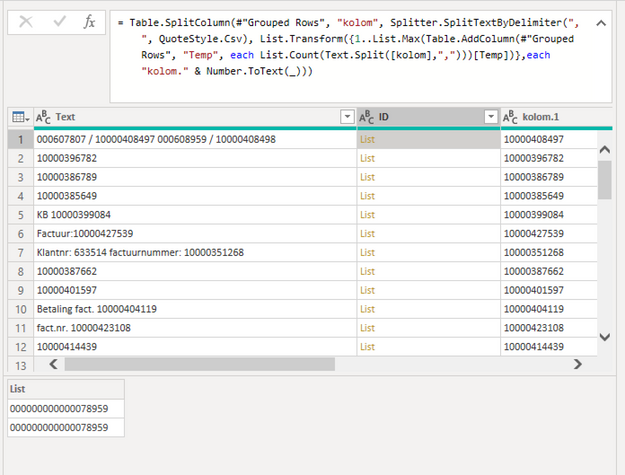
Now trying to implement in my existing query, when i try to keep a extra column(Row id) when grouping the result is new column with list values.
Is there a better way to do this?
Also it would be nice to keep the orginal column with the summarized values, maybe even new kolom with the account.
Anyhow accepted it as a solution since my orginal question has been solved.
Thanks Again
Use this
let
Source = Table.FromRows(Json.Document(Binary.Decompress(Binary.FromText("Tc07EoAgDATQq2RS2yQg2HIOhsIPpWMhhcc3CQ5jyb7NkjMSESRgZlg3cM5Bq08LccEJCcukBXHvPdzXWU2F2EgfoAM7jHtBZ6h1LYgLps+8maz1Pw+NNZ/HIHE31jhYzP/1iKW8", BinaryEncoding.Base64), Compression.Deflate)), let _t = ((type nullable text) meta [Serialized.Text = true]) in type table [Text = _t, #"Row ID" = _t]),
#"Added Custom" = Table.AddColumn(Source, "Custom", each Text.Trim(Text.Select([Text],{"0".."9"," "}))),
#"Split Column by Delimiter" = Table.ExpandListColumn(Table.TransformColumns(#"Added Custom", {{"Custom", Splitter.SplitTextByDelimiter(" ", QuoteStyle.Csv), let itemType = (type nullable text) meta [Serialized.Text = true] in type {itemType}}}), "Custom"),
#"Filtered Rows" = Table.SelectRows(#"Split Column by Delimiter", each (Text.Length([Custom]) = 3)),
#"Grouped Rows" = Table.Group(#"Filtered Rows", {"Text", "Row ID"}, {{"kolom", each Text.Combine([Custom],","), type nullable text}})
in
#"Grouped Rows"
Don't miss out on Data Days, June 15 through August 7. Learn Fabric, Power BI, SQL, AI and more.
Check out the May 2026 Power BI update to learn about new features.
| User | Count |
|---|---|
| 4 | |
| 4 | |
| 3 | |
| 2 | |
| 1 |
| User | Count |
|---|---|
| 11 | |
| 11 | |
| 4 | |
| 4 | |
| 4 |