cancel
Showing results for 
Search instead for 
Did you mean: 

The Power BI Data Visualization World Championships is back! Get ahead of the game and start preparing now! Learn more

Reply
ugoriuko
Frequent Visitor

Extract decimal number from string/array in a column

 Hello Everyone,


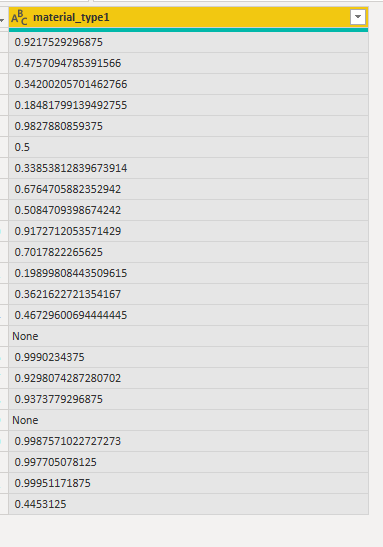
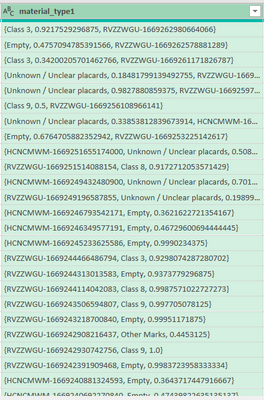
I need help extracting the decimal value(probability) in the colmn below to a new column

Where column is "None", just return "None"

I appreciate your usual assistance.


Thank you
ugoriuko_0-1669267355617.png


Sample Column Data

material_type1
{Class 3, 0.9217529296875, RVZZWGU-1669262980664066}
{Empty, 0.4757094785391566, RVZZWGU-1669262578881289}
{Class 3, 0.34200205701462766, RVZZWGU-1669261171826787}
{Unknown / Unclear placards, 0.18481799139492755, RVZZWGU-1669260433017770}
{Unknown / Unclear placards, 0.9827880859375, RVZZWGU-1669259748272718}
{Class 9, 0.5, RVZZWGU-1669256108966141}
{Unknown / Unclear placards, 0.33853812839673914, HCNCMWM-1669255650236044}
{Empty, 0.6764705882352942, RVZZWGU-1669253225142617}
{HCNCMWM-1669251655174000, Unknown / Unclear placards, 0.5084709398674242}
{RVZZWGU-1669251514088154, Class 8, 0.9172712053571429}
{HCNCMWM-1669249432480900, Unknown / Unclear placards, 0.7017822265625}
{RVZZWGU-1669249196587855, Unknown / Unclear placards, 0.19899808443509615}
{HCNCMWM-1669246793542171, Empty, 0.3621622721354167}
{HCNCMWM-1669246349577191, Empty, 0.46729600694444445}

None
{HCNCMWM-1669245233625586, Empty, 0.9990234375}
{RVZZWGU-1669244466486794, Class 3, 0.9298074287280702}
{RVZZWGU-1669244313013583, Empty, 0.9373779296875}

None
{RVZZWGU-1669244114042083, Class 8, 0.9987571022727273}
{RVZZWGU-1669243506594807, Class 9, 0.997705078125}
{RVZZWGU-1669243218700840, Empty, 0.99951171875}
{RVZZWGU-1669242908216437, Other Marks, 0.4453125}

1 ACCEPTED SOLUTION
Anonymous
Not applicable

Hi @ugoriuko

vcgaomsft_1-1669364213212.png

let
    Source = Table.FromRows(Json.Document(Binary.Decompress(Binary.FromText("jVRbSxthFPwrHz5v23O/PIdiX2KhkAqKD0EDBWOURCil9L/3bLJKLttqQshDMmfmzMzZ6+uz35PlfLNp3DX4mISulJQWrl379v3q6vJ89gHNkowywEzq8+fspivg54en5189TFwdUjyUE9XsBKkeEUiRA3KPkoUACGoAipGfghEdg8zDB/Bsdb96/Llqn9psdbtczNftaTm/na/vNv08DAn0TOSUJNeTNUCYAd0d3jUvg0o8hCafWKLpUj9TCTxYLHvgyZ8NIdIMBd9FzFx29qZxmpev0rUvk4vJ9HI6zFNTIK595DgPcxMHjSCuNIWOlTCRopS1L5YeDkZTRRcA6Nr/NSpEESVnmAsJDeMO2bC4oOLX2mDnT2yNxd64Sp7VS0yOSZEUJgnIt6VUfzyIyLTqNqZDEtM0qqT61izMyCp7iLBCGuqoNvNklboY7Nqr9WyERtUJrN/QRg0WY0l1x9xH1ry6OwBL2b4G0ovH1WJshhIXl2rY3ozMrEpINXXUAZG634oqX5MYrr6WrfzCqb5hNMWyAutsWIP3+djZfXheHOs9wmO1oG69x++3IAvpCL1l9eZR7krBNKsH/oLNHbaOWMHrSMb3ZcJwqBzh0CPdPlP+YRIlRGVYJnbt6/OPxbpN5+v7bS8qFN5x3fwF", BinaryEncoding.Base64), Compression.Deflate)), let _t = ((type nullable text) meta [Serialized.Text = true]) in type table [material_type1 = _t]),
    #"Changed Type" = Table.TransformColumnTypes(Source,{{"material_type1", type text}}),
    #"Split Column by Delimiter" = Table.ExpandListColumn(Table.TransformColumns(#"Changed Type", {{"material_type1", Splitter.SplitTextByDelimiter(",", QuoteStyle.Csv), let itemType = (type nullable text) meta [Serialized.Text = true] in type {itemType}}}), "material_type1"),
    #"Filtered Rows" = Table.SelectRows(#"Split Column by Delimiter", each Text.Contains([material_type1], ".") or [material_type1] = "None"),
    #"Replaced Value" = Table.ReplaceValue(#"Filtered Rows","}","",Replacer.ReplaceText,{"material_type1"})
in
    #"Replaced Value"

Best Regards,
Gao

Community Support Team


If there is any post helps, then please consider Accept it as the solution  to help the other members find it more quickly. If I misunderstand your needs or you still have problems on it, please feel free to let us know. Thanks a lot!

How to get your questions answered quickly -- How to provide sample data

View solution in original post

4 REPLIES 4
Anonymous
Not applicable

Hi @ugoriuko

vcgaomsft_1-1669364213212.png

let
    Source = Table.FromRows(Json.Document(Binary.Decompress(Binary.FromText("jVRbSxthFPwrHz5v23O/PIdiX2KhkAqKD0EDBWOURCil9L/3bLJKLttqQshDMmfmzMzZ6+uz35PlfLNp3DX4mISulJQWrl379v3q6vJ89gHNkowywEzq8+fspivg54en5189TFwdUjyUE9XsBKkeEUiRA3KPkoUACGoAipGfghEdg8zDB/Bsdb96/Llqn9psdbtczNftaTm/na/vNv08DAn0TOSUJNeTNUCYAd0d3jUvg0o8hCafWKLpUj9TCTxYLHvgyZ8NIdIMBd9FzFx29qZxmpev0rUvk4vJ9HI6zFNTIK595DgPcxMHjSCuNIWOlTCRopS1L5YeDkZTRRcA6Nr/NSpEESVnmAsJDeMO2bC4oOLX2mDnT2yNxd64Sp7VS0yOSZEUJgnIt6VUfzyIyLTqNqZDEtM0qqT61izMyCp7iLBCGuqoNvNklboY7Nqr9WyERtUJrN/QRg0WY0l1x9xH1ry6OwBL2b4G0ovH1WJshhIXl2rY3ozMrEpINXXUAZG634oqX5MYrr6WrfzCqb5hNMWyAutsWIP3+djZfXheHOs9wmO1oG69x++3IAvpCL1l9eZR7krBNKsH/oLNHbaOWMHrSMb3ZcJwqBzh0CPdPlP+YRIlRGVYJnbt6/OPxbpN5+v7bS8qFN5x3fwF", BinaryEncoding.Base64), Compression.Deflate)), let _t = ((type nullable text) meta [Serialized.Text = true]) in type table [material_type1 = _t]),
    #"Changed Type" = Table.TransformColumnTypes(Source,{{"material_type1", type text}}),
    #"Split Column by Delimiter" = Table.ExpandListColumn(Table.TransformColumns(#"Changed Type", {{"material_type1", Splitter.SplitTextByDelimiter(",", QuoteStyle.Csv), let itemType = (type nullable text) meta [Serialized.Text = true] in type {itemType}}}), "material_type1"),
    #"Filtered Rows" = Table.SelectRows(#"Split Column by Delimiter", each Text.Contains([material_type1], ".") or [material_type1] = "None"),
    #"Replaced Value" = Table.ReplaceValue(#"Filtered Rows","}","",Replacer.ReplaceText,{"material_type1"})
in
    #"Replaced Value"

Best Regards,
Gao

Community Support Team


If there is any post helps, then please consider Accept it as the solution  to help the other members find it more quickly. If I misunderstand your needs or you still have problems on it, please feel free to let us know. Thanks a lot!

How to get your questions answered quickly -- How to provide sample data

wdx223_Daniel
Super User
Super User

=Table.AddColumn(PreviousStepName,"Decimal Number",each Number.From(List.Select(Text.Split([material_type1],","),each Text.Remove(_,{".","0".."9"})=""){0}?))

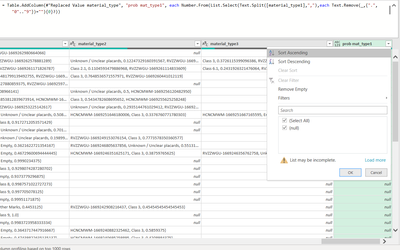
Thanks for your swift assistance @wdx223_Daniel but it returns all nulls

I just need the decimal number (probability) extracted regardless of the what format it returns it in


I appreciate the effort.

ugoriuko_0-1669304933840.png


=Table.AddColumn(PreviousStepName,"Decimal Number",each Number.From(List.Select(Text.SplitAny([material_type1],",}"),each Text.Remove(_,{".","0".."9"})=""){0}?))

Helpful resources

Announcements
Power BI DataViz World Championships

Power BI Dataviz World Championships

The Power BI Data Visualization World Championships is back! Get ahead of the game and start preparing now!

December 2025 Power BI Update Carousel

Power BI Monthly Update - December 2025

Check out the December 2025 Power BI Holiday Recap!

FabCon Atlanta 2026 carousel

FabCon Atlanta 2026

Join us at FabCon Atlanta, March 16-20, for the ultimate Fabric, Power BI, AI and SQL community-led event. Save $200 with code FABCOMM.