cancel
Showing results for 
Search instead for 
Did you mean: 

Join the FabCon + SQLCon recap series. Up next: Power BI, Real-Time Intelligence, IQ and AI, and Data Factory take center stage. All sessions are available on-demand after the live show. Register now

Reply
JanD
Frequent Visitor

Extract data from a chart on website

Hello everyone, 


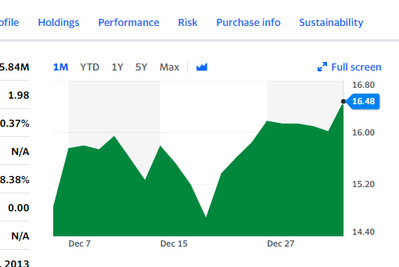
I woudl like to ask for an advise how to extract data from a specific object (Chart) on a website. 

My intension is to get daily values of mutual funds into Power BI, howover so far I couldn't find any way how to do it. 

Is it even possible?


https://finance.yahoo.com/quote/WPLCX?p=WPLCX

JanD_0-1641269614653.png


Thanks a lot!

Jan


5 REPLIES 5
jan_tothemoon
New Member

Hi @JanD 

Did you figured how to solve this? I'm trying to build somoething similar as well i can´t find a solution

Anonymous
Not applicable

Hi @JanD ,


Agree with @AlexisOlson .such a difficult requirement could not be realized currently.


If you also want this in power bi, let the power bi community to know this things and give your votes at power bi site's feedback - Ideas


Best Regards,
Eyelyn Qin

JanD
Frequent Visitor

Thank you @AlexisOlson

But this is just example. I have many different websites, which I need to extract data from. 

Usually there is only chart without any download option or historical data table..

That's why I am looking for an option how to extract data from the chart.


Here is another case

Conseq - UNIQA CEE Akciový fond (CZK)

That one has a link to historical prices too (scroll down to documents). 😉


I don't think I can provide a general solution since different charts are generated differently.


AlexisOlson
Super User
Super User

The Historical Data tab should be friendlier to work with:

AlexisOlson_0-1641308271716.png


It has a download option that exports CSV but you could also connect to the web page via Power Query with a query like this:

let
    Source = Web.BrowserContents("https://finance.yahoo.com/quote/WPLCX/history?p=WPLCX"),
    #"Extracted Table From Html" = Html.Table(Source, {{"Column1", ".Pend\(10px\)"}, {"Column2", ".Pend\(10px\) + *"}, {"Column3", ".Pstart\(10px\):nth-child(3)"}, {"Column4", ".Pstart\(10px\):nth-child(4)"}, {"Column5", ".Pstart\(10px\):nth-child(5)"}, {"Column6", ".Pstart\(10px\):nth-child(6)"}}, [RowSelector=".Pend\(10px\)"]),
    #"Changed Type" = Table.TransformColumnTypes(#"Extracted Table From Html",{{"Column1", type date}, {"Column2", type text}, {"Column3", type text}, {"Column4", type text}, {"Column5", type text}, {"Column6", type text}}),
    #"Renamed Columns" = Table.RenameColumns(#"Changed Type",{{"Column1", "Date"}, {"Column2", "Open"}, {"Column3", "High"}, {"Column4", "Low"}, {"Column5", "Close"}, {"Column6", "Adj Close"}})
in
    #"Renamed Columns"

Helpful resources

Announcements
April Power BI Update Carousel

Power BI Monthly Update - April 2026

Check out the April 2026 Power BI update to learn about new features.

New to Fabric survey Carousel

New to Fabric Survey

If you have recently started exploring Fabric, we'd love to hear how it's going. Your feedback can help with product improvements.

Power BI DataViz World Championships carousel

Power BI DataViz World Championships - June 2026

A new Power BI DataViz World Championship is coming this June! Don't miss out on submitting your entry.

FabCon and SQLCon Highlights Carousel

FabCon & SQLCon Highlights

Experience the highlights from FabCon & SQLCon, available live and on-demand starting April 14th.