I'm trying to extract the records out of a list. I've read this but I'm still stuck... https://community.powerbi.com/t5/Power-Query/Extract-Values-From-a-List-of-Records/td-p/2061234
I am trying to download NDC numbers from the FDA using the JSON code provided here... https://open.fda.gov/data/downloads/

So I added a column to rename "results.drug.drugsfda.partitions" to "NDC_List" because the "." causes a problem in the code.

= Table.AddColumn(#"Expanded results.drug.drugsfda", "NDC_List", each [results.drug.ndc.partitions])
Then, I tried to get the list items out with...
=Table.AddColumn(#"Added Custom", "NDC Out", each let typeList = [NDC_List], typeCount = List.Count([NDC_List]) in Text.Combine(List.Transform(List.Numbers(0, typeCount, 1), each Record.Field(typeList{_},"/drug/ndc data")), ", "))
So the error says "Expression.Error: The field '/drug/ndc data' of the record wasn't found.
Details:
display_name=/drug/ndc data
file=https://download.open.fda.gov/drug/ndc/drug-ndc-0001-of-0001.json.zip
size_mb=26.48
records=133919"
The record in "NDC_List" looks like this
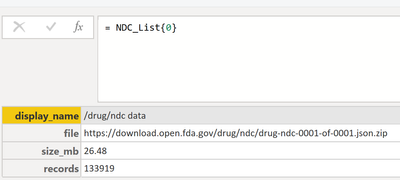
How do I access that data?
Thanks in advance!


