A new Data Days event is coming soon!
This time we’re going bigger than ever. Fabric, Power BI, SQL, AI and more. We're covering it all. You won't want to miss it.
Learn more- Power BI forums
- Get Help with Power BI
- Desktop
- Service
- Report Server
- Power Query
- Mobile Apps
- Developer
- DAX Commands and Tips
- Custom Visuals Development Discussion
- Health and Life Sciences
- Power BI Spanish forums
- Translated Spanish Desktop
- Training and Consulting
- Instructor Led Training
- Dashboard in a Day for Women, by Women
- Galleries
- Data Stories Gallery
- Themes Gallery
- Contests Gallery
- QuickViz Gallery
- Quick Measures Gallery
- Visual Calculations Gallery
- Notebook Gallery
- Translytical Task Flow Gallery
- TMDL Gallery
- R Script Showcase
- Webinars and Video Gallery
- Ideas
- Custom Visuals Ideas (read-only)
- Issues
- Issues
- Events
- Upcoming Events
Level up your Power BI skills this month - build one visual each week and tell better stories with data! Get started
- Power BI forums
- Forums
- Get Help with Power BI
- Power Query
- Extract Using Any Non-Number As Delimiter
- Subscribe to RSS Feed
- Mark Topic as New
- Mark Topic as Read
- Float this Topic for Current User
- Bookmark
- Subscribe
- Printer Friendly Page

- Mark as New
- Bookmark
- Subscribe
- Mute
- Subscribe to RSS Feed
- Permalink
- Report Inappropriate Content
Extract Using Any Non-Number As Delimiter
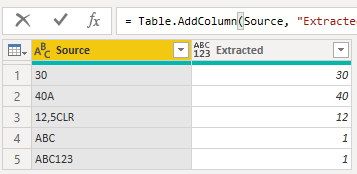
Hi. I am trying to extract numbers that only exist before any characters occur in the string. Once ANY characters start, that will be the end of the number. The trick here is that somtimes there are also numbers after the characters I want to use as a delimiter and should be ignored, so I simply can't use the function to extract all numbers. If there are no numbers before characters start, it would default to 1. Below are some examples:
| Source | Extracted |
| 30 | 30 |
| 40A | 40 |
| 12,5CLR | 12 |
| ABC | 1 |
| ABC123 | 1 |
I have attempted to use the Add Column --> Column From Examples function but it seems to revert to a simple "IF this value, THEN that value". Thanks!
Solved! Go to Solution.
- Mark as New
- Bookmark
- Subscribe
- Mute
- Subscribe to RSS Feed
- Permalink
- Report Inappropriate Content
= Table.AddColumn(#"Modificato tipo", "Personalizzato", each try Number.From(Splitter.SplitTextByCharacterTransition({"0".."9"}, (c) => c <"0" or c>"9")([Source]){0}) otherwise 1)

- Mark as New
- Bookmark
- Subscribe
- Mute
- Subscribe to RSS Feed
- Permalink
- Report Inappropriate Content
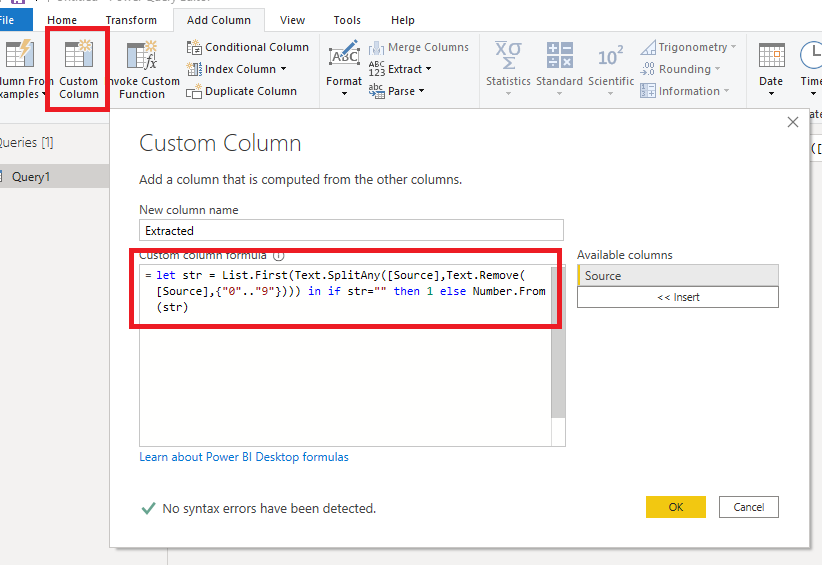
@Anonymous , you need to add a new column this way in your senario,
| Thanks to the great efforts by MS engineers to simplify syntax of DAX! Most beginners are SUCCESSFULLY MISLED to think that they could easily master DAX; but it turns out that the intricacy of the most frequently used RANKX() is still way beyond their comprehension! |
DAX is simple, but NOT EASY! |
- Mark as New
- Bookmark
- Subscribe
- Mute
- Subscribe to RSS Feed
- Permalink
- Report Inappropriate Content
Hi, @Anonymous , you might want try a simple solution
let
    Source = Table.FromRows(Json.Document(Binary.Decompress(Binary.FromText("i45WMjZQitWJVjIxcATThkY6ps4+QWC2o5MzjDY0MlaKjQUA", BinaryEncoding.Base64), Compression.Deflate)), let _t = ((type nullable text) meta [Serialized.Text = true]) in type table [Source = _t]),

    #"Added Custom" = Table.AddColumn(Source, "Extracted", each let str = List.First(Text.SplitAny([Source],Text.Remove([Source],{"0".."9"}))) in if str="" then 1 else Number.From(str))
in
    #"Added Custom"
| Thanks to the great efforts by MS engineers to simplify syntax of DAX! Most beginners are SUCCESSFULLY MISLED to think that they could easily master DAX; but it turns out that the intricacy of the most frequently used RANKX() is still way beyond their comprehension! |
DAX is simple, but NOT EASY! |
- Mark as New
- Bookmark
- Subscribe
- Mute
- Subscribe to RSS Feed
- Permalink
- Report Inappropriate Content
Hi @CNENFRNL . Thanks for replying. When I create a new column with this code, it looks like my table turns into the exact image you provided. I do not need those exact values as they are examples to show the different scenarios of values I would need to convernt.
- Mark as New
- Bookmark
- Subscribe
- Mute
- Subscribe to RSS Feed
- Permalink
- Report Inappropriate Content
@Anonymous , you need to add a new column this way in your senario,
| Thanks to the great efforts by MS engineers to simplify syntax of DAX! Most beginners are SUCCESSFULLY MISLED to think that they could easily master DAX; but it turns out that the intricacy of the most frequently used RANKX() is still way beyond their comprehension! |
DAX is simple, but NOT EASY! |

- Mark as New
- Bookmark
- Subscribe
- Mute
- Subscribe to RSS Feed
- Permalink
- Report Inappropriate Content
Hello @Anonymous
you can use this formula in a new column
let GetNumber= List.FirstN(Text.ToList(_[Source]), (itemlist)=> Value.Is(try Number.From(itemlist) otherwise "text",type number) ) in if List.IsEmpty(GetNumber) then 1 else Number.From(Text.Combine(GetNumber))
here a complete example
let
    Source = Table.FromRows(Json.Document(Binary.Decompress(Binary.FromText("i45WMjZQitWJVjIxcATThkY6ps4+QWC2o5MzjDY0MlaKjQUA", BinaryEncoding.Base64), Compression.Deflate)), let _t = ((type nullable text) meta [Serialized.Text = true]) in type table [Source = _t]),
    AddColumn = Table.AddColumn
    (
        Source,
        "Extract",
        each let GetNumber=  List.FirstN(Text.ToList(_[Source]), (itemlist)=> Value.Is(try Number.From(itemlist) otherwise "text",type number) ) in if List.IsEmpty(GetNumber) then 1 else Number.From(Text.Combine(GetNumber))
    )
in
    AddColumn
Copy paste this code to the advanced editor in a new blank query to see how the solution works.
If this post helps or solves your problem, please mark it as solution (to help other users find useful content and to acknowledge the work of users that helped you)
Kudoes are nice too
Have fun
Jimmy
- Mark as New
- Bookmark
- Subscribe
- Mute
- Subscribe to RSS Feed
- Permalink
- Report Inappropriate Content
= Table.AddColumn(#"previou step", "extract", each try Number.From(Splitter.SplitTextByCharacterTransition({"0".."9"}, (c) => not List.Contains({"0".."9"}, c))([Source]){0}) otherwise 1)
- Mark as New
- Bookmark
- Subscribe
- Mute
- Subscribe to RSS Feed
- Permalink
- Report Inappropriate Content
= Table.AddColumn(#"Modificato tipo", "Personalizzato", each try Number.From(Splitter.SplitTextByCharacterTransition({"0".."9"}, (c) => c <"0" or c>"9")([Source]){0}) otherwise 1)- Mark as New
- Bookmark
- Subscribe
- Mute
- Subscribe to RSS Feed
- Permalink
- Report Inappropriate Content
Hi @Anonymous. All values in this column are showing up as 1 with this paritcular code.
- Mark as New
- Bookmark
- Subscribe
- Mute
- Subscribe to RSS Feed
- Permalink
- Report Inappropriate Content
mmhh ... I don't believe it. 🤔
Can you show the code you used and also the results obtained?
Helpful resources

Power BI Monthly Update - April 2026
Check out the April 2026 Power BI update to learn about new features.

Data Days 2026 coming soon!
Sign up to receive a private message when registration opens and key events begin.

New to Fabric Survey
If you have recently started exploring Fabric, we'd love to hear how it's going. Your feedback can help with product improvements.

Power BI DataViz World Championships - June 2026
A new Power BI DataViz World Championship is coming this June! Don't miss out on submitting your entry.

| User | Count |
|---|---|
| 3 | |
| 2 | |
| 2 | |
| 2 | |
| 2 |


