
cancel
Showing results for 
Search instead for 
Did you mean: 

The Power BI Data Visualization World Championships is back! Get ahead of the game and start preparing now! Learn more

Reply
2019
Helper II
Helper II

Extract Recent Date With It's Corresponded Row

I have tried to search in google and in this community to find a solution for this, unfortunately no luck.

I have two tables as per the attachements in links below:


Data Source Excelsheet File 

Power Bi File 


I would like to show only the latest date with its corresponded row for each well number.

1 ACCEPTED SOLUTION

@2019 


After Grouping as you showed, expand the "Rest of Column".


add a custom column where you type 

[Rig Spud] = [Max Date]

now filter only True from this column then delete unnecessary columns 


Did I answer your question? Mark my post as a solution! and hit thumbs up


Subscribe and learn Power BI from these videos

Website LinkedIn PBI User Group

View solution in original post

6 REPLIES 6
Fowmy
Super User
Super User

@2019 

Can you explain more on the expected results?


Did I answer your question? Mark my post as a solution! and hit thumbs up


Subscribe and learn Power BI from these videos

Website LinkedIn PBI User Group

@Fowmy 

Yes of course,


The desired result would be a table with the latest dates of Rig spud for each well number.


Let’s take Ru-160 well number as example, in SPUD table/query as you can see there are 4 rows for this well, the desired result would be one row which contain the latest Rig spud date, in this example it’s the 3rd row which have the date 10/27/2020 as shown in below image, and so on for the rest of the well numbers in tables.

Latest Date.PNG


I was trying to use the group by with Max () function operation but it did not fully work, it was pulling the latest date but the wrong Rig number, that is why I was hoping to find a way where well number get checked row by row and find the latest Rig spud date, then power bi pull that particular row alongside with  corresponded rows (Rig number and station)

Latest Date 2.PNG

@2019 


After Grouping as you showed, expand the "Rest of Column".


add a custom column where you type 

[Rig Spud] = [Max Date]

now filter only True from this column then delete unnecessary columns 


Did I answer your question? Mark my post as a solution! and hit thumbs up


Subscribe and learn Power BI from these videos

Website LinkedIn PBI User Group

2019
Helper II
Helper II

@Fowmy 

@Jakinta 

Thank you for the answers, unfortunately it does not work with my situation, i have edited the post and added the data source file alongside with the power bi native file for more details.

Fowmy
Super User
Super User

@2019 

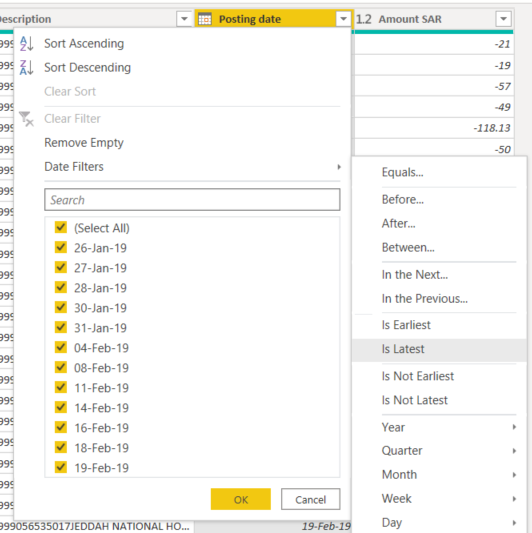
Click on the filter of the "Rig Spud" column and choose "Is Latest" under the date filter as shown in the example below.

Fowmy_0-1622989910607.png


Did I answer your question? Mark my post as a solution! and hit thumbs up


Subscribe and learn Power BI from these videos

Website LinkedIn PBI User Group

Jakinta
Solution Sage
Solution Sage

You can Sort Descending [Rig Spud], then Keep Top Rows, only first.

Helpful resources

Announcements
Power BI DataViz World Championships

Power BI Dataviz World Championships

The Power BI Data Visualization World Championships is back! Get ahead of the game and start preparing now!

December 2025 Power BI Update Carousel

Power BI Monthly Update - December 2025

Check out the December 2025 Power BI Holiday Recap!

FabCon Atlanta 2026 carousel

FabCon Atlanta 2026

Join us at FabCon Atlanta, March 16-20, for the ultimate Fabric, Power BI, AI and SQL community-led event. Save $200 with code FABCOMM.

Top Solution Authors