Get certified for free when you join Fabric Data Days 2026 and dive into Fabric, Power BI, SQL, AI, and other essential data skills.
Join nowTry your skills in the Power BI Dataviz World Championship! Round one ends June 26. Join now
Hello.
I'm hoping to find some help for an issue I've been dealing with.
I receive data weekly in a PowerPoint and I then have to parse, manipulate, and transfer that data to another PowerPoint. The data comes in tables and visuals. Is there any way for me to pull that information into an Excel from the initial PowerPoint file?
The dataset is growing exponentially each week and will soon be out of the scope for a human to be able to do timeously. Any help is greatly appreciated!
Solved! Go to Solution.
Hi @Syndicate_Admin ,
Here is a blog talking about How to Convert PowerPoint to Excel
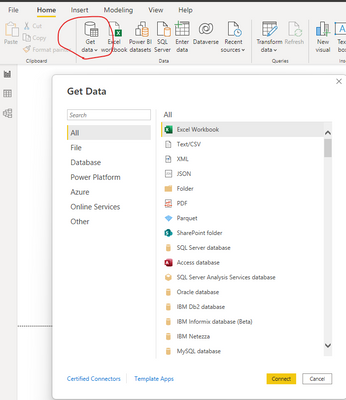
Or if Power BI provides the direct connector to your weekly data ,you could click "Get Data" to import the datasets:
And then try Incremental refresh which extends scheduled refresh operations by providing automated partition creation and management for dataset tables that frequently load new and updated data.
Best Regards,
Eyelyn Qin
If this post helps, then please consider Accept it as the solution to help the other members find it more quickly.
Hi @Syndicate_Admin ,
Here is a blog talking about How to Convert PowerPoint to Excel
Or if Power BI provides the direct connector to your weekly data ,you could click "Get Data" to import the datasets:
And then try Incremental refresh which extends scheduled refresh operations by providing automated partition creation and management for dataset tables that frequently load new and updated data.
Best Regards,
Eyelyn Qin
If this post helps, then please consider Accept it as the solution to help the other members find it more quickly.
| User | Count |
|---|---|
| 3 | |
| 3 | |
| 2 | |
| 2 | |
| 1 |