Get certified for free when you join Fabric Data Days 2026 and dive into Fabric, Power BI, SQL, AI, and other essential data skills.
Join nowData Days is here! Join us now for 60+ days of learning, challenges, and connection. Learn more
Hello All,
Hope Everyone is doing good.
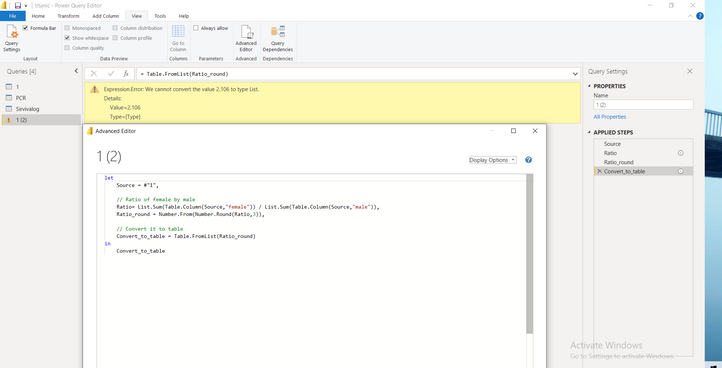
I am new to power query and I am having this error.
I cannot convert list back to a table.
Can someone please find whats wrong here.
Solved! Go to Solution.
Your last step is expecting a list as input, but you've got a scalar value already, not a list. Instead of Table.FromList(Ratio_Round),
use:
Table.FromValue(Ratio_Round)
-Nate
I suspect that you intended to post this question in one of the Power BI forums rather than the Power Automate forum.
You almost had it. In your last step, add the each keyword before Difference_round, so instead of:
"Difference", Difference_round)
it should be:
"Difference", each Difference_round)
The parameter requires a function; the each keyword makes it so!
--Nate
Your last step is expecting a list as input, but you've got a scalar value already, not a list. Instead of Table.FromList(Ratio_Round),
use:
Table.FromValue(Ratio_Round)
-Nate
Thank you @Anonymous ,
I have one more problem. I want to find difference b/w female and male and want to add the difference to the table.
Don't miss out on Data Days, June 15 through August 7. Learn Fabric, Power BI, SQL, AI and more.
Check out the May 2026 Power BI update to learn about new features.
| User | Count |
|---|---|
| 4 | |
| 4 | |
| 3 | |
| 2 | |
| 1 |
| User | Count |
|---|---|
| 11 | |
| 11 | |
| 5 | |
| 4 | |
| 3 |