Join us at FabCon Atlanta from March 16 - 20, 2026, for the ultimate Fabric, Power BI, AI and SQL community-led event. Save $200 with code FABCOMM.
Register now!Learn from the best! Meet the four finalists headed to the FINALS of the Power BI Dataviz World Championships! Register now
Hello All,
Hope Everyone is doing good.
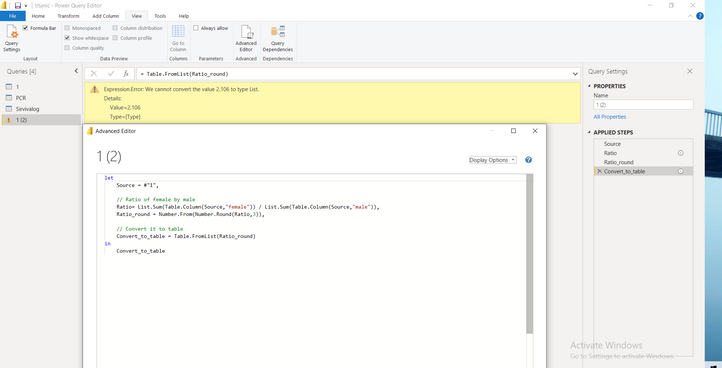
I am new to power query and I am having this error.
I cannot convert list back to a table.
Can someone please find whats wrong here.
Solved! Go to Solution.
Your last step is expecting a list as input, but you've got a scalar value already, not a list. Instead of Table.FromList(Ratio_Round),
use:
Table.FromValue(Ratio_Round)
-Nate
I suspect that you intended to post this question in one of the Power BI forums rather than the Power Automate forum.
You almost had it. In your last step, add the each keyword before Difference_round, so instead of:
"Difference", Difference_round)
it should be:
"Difference", each Difference_round)
The parameter requires a function; the each keyword makes it so!
--Nate
Your last step is expecting a list as input, but you've got a scalar value already, not a list. Instead of Table.FromList(Ratio_Round),
use:
Table.FromValue(Ratio_Round)
-Nate
Thank you @Anonymous ,
I have one more problem. I want to find difference b/w female and male and want to add the difference to the table.
Share feedback directly with Fabric product managers, participate in targeted research studies and influence the Fabric roadmap.
Check out the February 2026 Power BI update to learn about new features.
| User | Count |
|---|---|
| 14 | |
| 12 | |
| 10 | |
| 7 | |
| 6 |