Join us at FabCon Atlanta from March 16 - 20, 2026, for the ultimate Fabric, Power BI, AI and SQL community-led event. Save $200 with code FABCOMM.
Register now!The Power BI Data Visualization World Championships is back! Get ahead of the game and start preparing now! Learn more
Hi Everyone,
I have merged two source tables and made one result table. then i removed unnecessary columns from source tables for optimize the performance
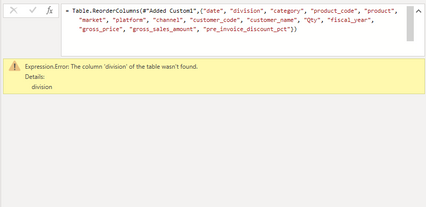
But ended up with "Expression.Error: The column 'division' of the table wasn't found.
Details:
division"
Can someone help me solve this ?
Thanks in Advance,
Mohideen
Solved! Go to Solution.
Hi @Anonymous ,
Either delete the reference to [division] in the M code here:
OR...
Go back through your query steps and adjust them to ensure that the [division] column exists in the table at the step before your reorder columns step.
Pete
Proud to be a Datanaut!
Hi @Anonymous ,
Either delete the reference to [division] in the M code here:
OR...
Go back through your query steps and adjust them to ensure that the [division] column exists in the table at the step before your reorder columns step.
Pete
Proud to be a Datanaut!
The Power BI Data Visualization World Championships is back! Get ahead of the game and start preparing now!
Check out the November 2025 Power BI update to learn about new features.