cancel
Showing results for 
Search instead for 
Did you mean: 

July 7 - July 17 | Round 2 of the Power BI Dataviz World Championships. Don't miss your chance! Learn more

Reply
rmahmood
New Member

Expanding list within column

Hello,

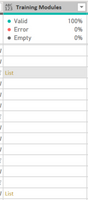
I am having trouble trying to get a numerical list to expand or display from within a column in Power Query. 

I would appreciate any help!  List in Column.png


Please see attached picture.  Thank you!

1 ACCEPTED SOLUTION
edhans
Community Champion
Community Champion

Try this @rmahmood 
It uses Value.Is to determine if it is a list or not, then extracts the numbers. From there you can split columns, or whatever.


let
    Source = #table(
                {"ID", "Name", "City", "Other"},
                    {
                        {123, "Alice", "Wonderand", ""},
                        {456, "Bob", "Wonderland", {1..10}}
                    }
            ),
    #"Added Custom" = 
        Table.AddColumn(
            Source, 
            "Custom", 
            each 
                if Value.Is([Other], type list) 
                then Text.Combine(List.Transform([Other], Text.From), ",")
                else [Other]
        )
in
    #"Added Custom"
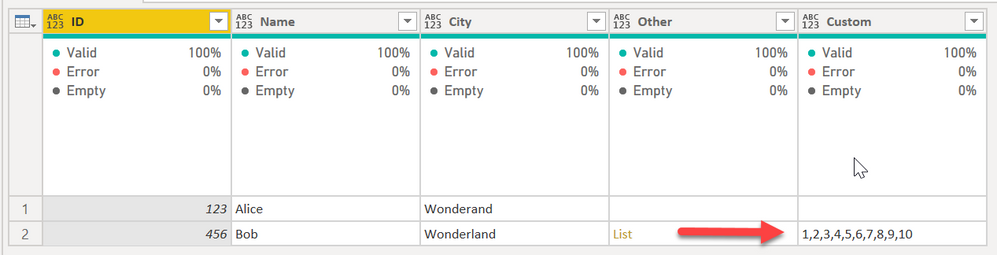
 

edhans_0-1627661353382.png


How to use M code provided in a blank query:
1) In Power Query, select New Source, then Blank Query
2) On the Home ribbon, select "Advanced Editor" button
3) Remove everything you see, then paste the M code I've given you in that box.
4) Press Done
5) See this article if you need help using this M code in your model.


Did I answer your question? Mark my post as a solution!
Did my answers help arrive at a solution? Give it a kudos by clicking the Thumbs Up!

DAX is for Analysis. Power Query is for Data Modeling


Proud to be a Super User!

MCSA: BI Reporting

View solution in original post

5 REPLIES 5
wdx223_Daniel
Community Champion
Community Champion

Table.SplitColumn(PreviousStepName,"Training Modules",each if _ is list then _ else {_},List.Max(List.Transform(PreviousStepName[Training Modules],each if _ is list then List.Count(_) else 1)))

mussaenda
Community Champion
Community Champion

Hi @rmahmood, Is this a custom column or coming from the source? 

Hi,


This is actually coming from the source.

edhans
Community Champion
Community Champion

Try this @rmahmood 
It uses Value.Is to determine if it is a list or not, then extracts the numbers. From there you can split columns, or whatever.


let
    Source = #table(
                {"ID", "Name", "City", "Other"},
                    {
                        {123, "Alice", "Wonderand", ""},
                        {456, "Bob", "Wonderland", {1..10}}
                    }
            ),
    #"Added Custom" = 
        Table.AddColumn(
            Source, 
            "Custom", 
            each 
                if Value.Is([Other], type list) 
                then Text.Combine(List.Transform([Other], Text.From), ",")
                else [Other]
        )
in
    #"Added Custom"


edhans_0-1627661353382.png


How to use M code provided in a blank query:
1) In Power Query, select New Source, then Blank Query
2) On the Home ribbon, select "Advanced Editor" button
3) Remove everything you see, then paste the M code I've given you in that box.
4) Press Done
5) See this article if you need help using this M code in your model.


Did I answer your question? Mark my post as a solution!
Did my answers help arrive at a solution? Give it a kudos by clicking the Thumbs Up!

DAX is for Analysis. Power Query is for Data Modeling


Proud to be a Super User!

MCSA: BI Reporting
Greg_Deckler
Community Champion
Community Champion

@rmahmood Seems like you are going to need an if statement to check if null, then return null or otherwise, extract values from the list like:

#"Extracted Values" = Table.TransformColumns(#"Added Custom", {"Custom", each Text.Combine(List.Transform(_, Text.From)), type text})


Will be different if you are trying to expand to rows, would be:

#"Expanded Custom" = Table.ExpandListColumn(#"Added Custom", "Custom")


@ImkeF and @edhans might have other thoughts.


Follow on LinkedIn
@ me in replies or I'll lose your thread!!!
Instead of a Kudo, please vote for this idea
Become an expert!: Enterprise DNA
External Tools: MSHGQM
YouTube Channel!: Microsoft Hates Greg
Latest book!:
DAX For Humans

DAX is easy, CALCULATE makes DAX hard...

Helpful resources

Announcements
FabCon and SQLCon Barcelona 2026

FabCon & SQLCon – Barcelona 2026

Join us in Barcelona for FabCon and SQLCon, the Fabric, Power BI, SQL, and AI community event. Save €200 with code FABCMTY200.

60 days of Data Days Carousel

Data Days 2026

Join Data Days 2026: 60 days of free live/on-demand sessions, challenges, study groups, and certification opportunities.

Power BI DataViz World Championships carousel

Power BI DataViz World Championships - June 2026

A new Power BI DataViz World Championship is coming this June! Don't miss out on submitting your entry.

Top Solution Authors