cancel
Showing results for 
Search instead for 
Did you mean: 

The Power BI Data Visualization World Championships is back! Get ahead of the game and start preparing now! Learn more

Reply
Findex-Jimmy
Regular Visitor

Expanding JSON Record as Row

I'm having an issue where I'd like to expand the records as rows more efficiently?

Currently my method is to get a dynamic list of all values and expand the column based on that, then unpivoting that column to make it into rows. Was wondering is there another method that is perhaps more elegant than unpivoting 50+ columns?


Expand as Rows.PNG

1 ACCEPTED SOLUTION
mahoneypat
Microsoft Employee
Microsoft Employee

You can add a custom column when your query looks like this

mahoneypat_0-1629339317224.png


 = Record.ToTable([#"Year-Month"])


and then expand from there to get your result.


Here is the full example query.  To see how it works, just create a blank query, open the Advanced Editor and replace the text there with the M code below.

let
    Source = Table.FromRows(Json.Document(Binary.Decompress(Binary.FromText("rZM9C8IwEIb/SrnZQhJr/VidC4Iu0utQbLBCm0hNB5H+d1Oi1IhDkMuWPHcP7zskz+GBKrIHYX+qZdU3EmETvR4d6HSvqos6j4DNPslRll2caWVqhMjbclwwwWO2/DJOvGyt2owYIUkFgj80zH4LV0FCFqpbk+o4I67LOW0+QagTMQtLF1rXConzzWl1CXXdBW2+9E/ddB28L55JU+vKbe10Z8oGwRs43K/S4W1/M7p9m61xgKJ4Ag==", BinaryEncoding.Base64), Compression.Deflate)), let _t = ((type nullable text) meta [Serialized.Text = true]) in type table [Schedule = _t]),
    #"Added Custom" = Table.AddColumn(Source, "Custom", each Json.Document([Schedule])),
    #"Expanded Custom" = Table.ExpandRecordColumn(#"Added Custom", "Custom", {"Schedule"}, {"Schedule.1"}),
    #"Expanded Schedule.1" = Table.ExpandRecordColumn(#"Expanded Custom", "Schedule.1", {"rounding", "Year-Month", "Method", "Type"}, {"rounding", "Year-Month", "Method", "Type"}),
    #"Added Custom1" = Table.AddColumn(#"Expanded Schedule.1", "Custom", each Record.ToTable([#"Year-Month"])),
    #"Expanded Custom1" = Table.ExpandTableColumn(#"Added Custom1", "Custom", {"Name", "Value"}, {"Name", "Value"}),
    #"Expanded Value" = Table.ExpandRecordColumn(#"Expanded Custom1", "Value", {"amount"}, {"amount"})
in
    #"Expanded Value"
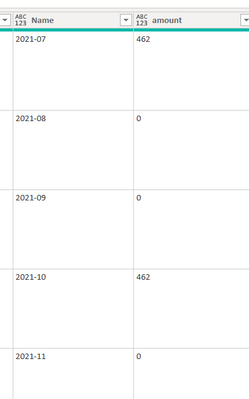
 

mahoneypat_1-1629339388208.png


Pat


Did I answer your question? Mark my post as a solution! Kudos are also appreciated!

To learn more about Power BI, follow me on Twitter or subscribe on YouTube.


@mahoneypa HoosierBI on YouTube


View solution in original post

3 REPLIES 3
mahoneypat
Microsoft Employee
Microsoft Employee

You can add a custom column when your query looks like this

mahoneypat_0-1629339317224.png


 = Record.ToTable([#"Year-Month"])


and then expand from there to get your result.


Here is the full example query.  To see how it works, just create a blank query, open the Advanced Editor and replace the text there with the M code below.

let
    Source = Table.FromRows(Json.Document(Binary.Decompress(Binary.FromText("rZM9C8IwEIb/SrnZQhJr/VidC4Iu0utQbLBCm0hNB5H+d1Oi1IhDkMuWPHcP7zskz+GBKrIHYX+qZdU3EmETvR4d6HSvqos6j4DNPslRll2caWVqhMjbclwwwWO2/DJOvGyt2owYIUkFgj80zH4LV0FCFqpbk+o4I67LOW0+QagTMQtLF1rXConzzWl1CXXdBW2+9E/ddB28L55JU+vKbe10Z8oGwRs43K/S4W1/M7p9m61xgKJ4Ag==", BinaryEncoding.Base64), Compression.Deflate)), let _t = ((type nullable text) meta [Serialized.Text = true]) in type table [Schedule = _t]),
    #"Added Custom" = Table.AddColumn(Source, "Custom", each Json.Document([Schedule])),
    #"Expanded Custom" = Table.ExpandRecordColumn(#"Added Custom", "Custom", {"Schedule"}, {"Schedule.1"}),
    #"Expanded Schedule.1" = Table.ExpandRecordColumn(#"Expanded Custom", "Schedule.1", {"rounding", "Year-Month", "Method", "Type"}, {"rounding", "Year-Month", "Method", "Type"}),
    #"Added Custom1" = Table.AddColumn(#"Expanded Schedule.1", "Custom", each Record.ToTable([#"Year-Month"])),
    #"Expanded Custom1" = Table.ExpandTableColumn(#"Added Custom1", "Custom", {"Name", "Value"}, {"Name", "Value"}),
    #"Expanded Value" = Table.ExpandRecordColumn(#"Expanded Custom1", "Value", {"amount"}, {"amount"})
in
    #"Expanded Value"


mahoneypat_1-1629339388208.png


Pat


Did I answer your question? Mark my post as a solution! Kudos are also appreciated!

To learn more about Power BI, follow me on Twitter or subscribe on YouTube.


@mahoneypa HoosierBI on YouTube


mahoneypat
Microsoft Employee
Microsoft Employee

Can you share some example JSON and desired output, so a specific solution can be suggested?


Pat


Did I answer your question? Mark my post as a solution! Kudos are also appreciated!

To learn more about Power BI, follow me on Twitter or subscribe on YouTube.


@mahoneypa HoosierBI on YouTube


Thanks for the reply.

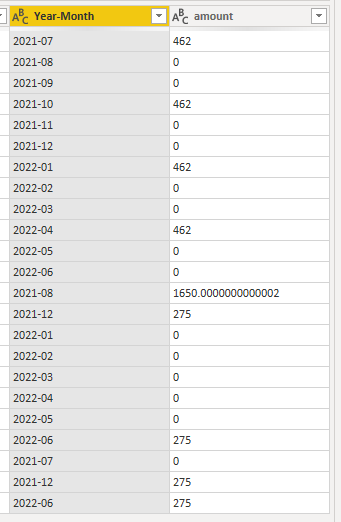
The output I desire would be for each row, expanding the record into multiple year-month rows and the respective data within.

Output.PNG

And an example of the Json is. The Schedule section is a subset of the complete Json (Which has been already expanded in the power query) - Just made the other sections blank.

Example.png

""Schedule"": {""rounding"": 0, ""Year-Month"": {""2021-07"": {""amount"": ""462""}, ""2021-08"": {""amount"": ""0""}, ""2021-09"": {""amount"": ""0""}, ""2021-10"": {""amount"": ""462""}, ""2021-11"": {""amount"": ""0""}, ""2021-12"": {""amount"": ""0""}, ""2022-01"": {""amount"": ""462""}, ""2022-02"": {""amount"": ""0""}, ""2022-03"": {""amount"": ""0""}, ""2022-04"": {""amount"": ""462""}, ""2022-05"": {""amount"": ""0""}, ""2022-06"": {""amount"": ""0""}}, ""Method"": ""Portal"", ""Type"": ""Custom""}


Helpful resources

Announcements
Power BI DataViz World Championships

Power BI Dataviz World Championships

The Power BI Data Visualization World Championships is back! Get ahead of the game and start preparing now!

December 2025 Power BI Update Carousel

Power BI Monthly Update - December 2025

Check out the December 2025 Power BI Holiday Recap!

FabCon Atlanta 2026 carousel

FabCon Atlanta 2026

Join us at FabCon Atlanta, March 16-20, for the ultimate Fabric, Power BI, AI and SQL community-led event. Save $200 with code FABCOMM.