Don't miss your chance to take the Fabric Data Engineer (DP-600) exam for FREE! Find out how by watching the DP-600 session on-demand now through April 28th.
Learn moreJoin the FabCon + SQLCon recap series. Up next: Power BI, Real-Time Intelligence, IQ and AI, and Data Factory take center stage. All sessions are available on-demand after the live show. Register now
I'm having an issue where I'd like to expand the records as rows more efficiently?
Currently my method is to get a dynamic list of all values and expand the column based on that, then unpivoting that column to make it into rows. Was wondering is there another method that is perhaps more elegant than unpivoting 50+ columns?
Solved! Go to Solution.
You can add a custom column when your query looks like this

= Record.ToTable([#"Year-Month"])
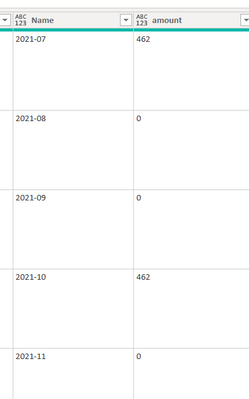
and then expand from there to get your result.
Here is the full example query. To see how it works, just create a blank query, open the Advanced Editor and replace the text there with the M code below.
let
Source = Table.FromRows(Json.Document(Binary.Decompress(Binary.FromText("rZM9C8IwEIb/SrnZQhJr/VidC4Iu0utQbLBCm0hNB5H+d1Oi1IhDkMuWPHcP7zskz+GBKrIHYX+qZdU3EmETvR4d6HSvqos6j4DNPslRll2caWVqhMjbclwwwWO2/DJOvGyt2owYIUkFgj80zH4LV0FCFqpbk+o4I67LOW0+QagTMQtLF1rXConzzWl1CXXdBW2+9E/ddB28L55JU+vKbe10Z8oGwRs43K/S4W1/M7p9m61xgKJ4Ag==", BinaryEncoding.Base64), Compression.Deflate)), let _t = ((type nullable text) meta [Serialized.Text = true]) in type table [Schedule = _t]),
#"Added Custom" = Table.AddColumn(Source, "Custom", each Json.Document([Schedule])),
#"Expanded Custom" = Table.ExpandRecordColumn(#"Added Custom", "Custom", {"Schedule"}, {"Schedule.1"}),
#"Expanded Schedule.1" = Table.ExpandRecordColumn(#"Expanded Custom", "Schedule.1", {"rounding", "Year-Month", "Method", "Type"}, {"rounding", "Year-Month", "Method", "Type"}),
#"Added Custom1" = Table.AddColumn(#"Expanded Schedule.1", "Custom", each Record.ToTable([#"Year-Month"])),
#"Expanded Custom1" = Table.ExpandTableColumn(#"Added Custom1", "Custom", {"Name", "Value"}, {"Name", "Value"}),
#"Expanded Value" = Table.ExpandRecordColumn(#"Expanded Custom1", "Value", {"amount"}, {"amount"})
in
#"Expanded Value"
Pat
To learn more about Power BI, follow me on Twitter or subscribe on YouTube.
You can add a custom column when your query looks like this
= Record.ToTable([#"Year-Month"])
and then expand from there to get your result.
Here is the full example query. To see how it works, just create a blank query, open the Advanced Editor and replace the text there with the M code below.
let
Source = Table.FromRows(Json.Document(Binary.Decompress(Binary.FromText("rZM9C8IwEIb/SrnZQhJr/VidC4Iu0utQbLBCm0hNB5H+d1Oi1IhDkMuWPHcP7zskz+GBKrIHYX+qZdU3EmETvR4d6HSvqos6j4DNPslRll2caWVqhMjbclwwwWO2/DJOvGyt2owYIUkFgj80zH4LV0FCFqpbk+o4I67LOW0+QagTMQtLF1rXConzzWl1CXXdBW2+9E/ddB28L55JU+vKbe10Z8oGwRs43K/S4W1/M7p9m61xgKJ4Ag==", BinaryEncoding.Base64), Compression.Deflate)), let _t = ((type nullable text) meta [Serialized.Text = true]) in type table [Schedule = _t]),
#"Added Custom" = Table.AddColumn(Source, "Custom", each Json.Document([Schedule])),
#"Expanded Custom" = Table.ExpandRecordColumn(#"Added Custom", "Custom", {"Schedule"}, {"Schedule.1"}),
#"Expanded Schedule.1" = Table.ExpandRecordColumn(#"Expanded Custom", "Schedule.1", {"rounding", "Year-Month", "Method", "Type"}, {"rounding", "Year-Month", "Method", "Type"}),
#"Added Custom1" = Table.AddColumn(#"Expanded Schedule.1", "Custom", each Record.ToTable([#"Year-Month"])),
#"Expanded Custom1" = Table.ExpandTableColumn(#"Added Custom1", "Custom", {"Name", "Value"}, {"Name", "Value"}),
#"Expanded Value" = Table.ExpandRecordColumn(#"Expanded Custom1", "Value", {"amount"}, {"amount"})
in
#"Expanded Value"
Pat
To learn more about Power BI, follow me on Twitter or subscribe on YouTube.
Can you share some example JSON and desired output, so a specific solution can be suggested?
Pat
To learn more about Power BI, follow me on Twitter or subscribe on YouTube.
Thanks for the reply.
The output I desire would be for each row, expanding the record into multiple year-month rows and the respective data within.
And an example of the Json is. The Schedule section is a subset of the complete Json (Which has been already expanded in the power query) - Just made the other sections blank.
""Schedule"": {""rounding"": 0, ""Year-Month"": {""2021-07"": {""amount"": ""462""}, ""2021-08"": {""amount"": ""0""}, ""2021-09"": {""amount"": ""0""}, ""2021-10"": {""amount"": ""462""}, ""2021-11"": {""amount"": ""0""}, ""2021-12"": {""amount"": ""0""}, ""2022-01"": {""amount"": ""462""}, ""2022-02"": {""amount"": ""0""}, ""2022-03"": {""amount"": ""0""}, ""2022-04"": {""amount"": ""462""}, ""2022-05"": {""amount"": ""0""}, ""2022-06"": {""amount"": ""0""}}, ""Method"": ""Portal"", ""Type"": ""Custom""}
Check out the April 2026 Power BI update to learn about new features.
If you have recently started exploring Fabric, we'd love to hear how it's going. Your feedback can help with product improvements.
A new Power BI DataViz World Championship is coming this June! Don't miss out on submitting your entry.
| User | Count |
|---|---|
| 3 | |
| 2 | |
| 2 | |
| 2 | |
| 2 |
| User | Count |
|---|---|
| 5 | |
| 4 | |
| 4 | |
| 4 | |
| 4 |