Join us at FabCon Atlanta from March 16 - 20, 2026, for the ultimate Fabric, Power BI, AI and SQL community-led event. Save $200 with code FABCOMM.
Register now!The Power BI Data Visualization World Championships is back! Get ahead of the game and start preparing now! Learn more
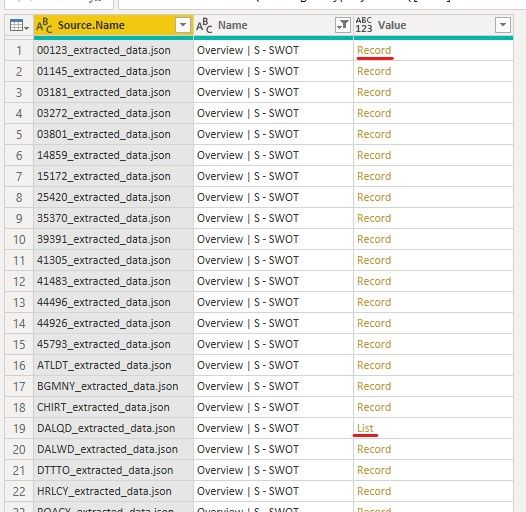
I need to be able to expand the all of the values within the column of the query without making a new table. Right now there is only one list and all others are records (this will change as more data is added). When the "Records" are expanded they are "null". The only way i know to expand the "List" is to select only "List", right-click - Drill Down - To Table - and then expand, which will give me the full text for the List. But, this action removes the connection to the original table.
How do I expand all values: "Records" and "Lists" so that they remain in their original table column titled: "Value"?
You have to transform the record and lists into a common format (or if you're really sure that records can be ignored, turn them into lists).
This blogpost describes the general technique: https://www.thebiccountant.com/2017/07/25/how-to-expand-a-column-that-cannot-be-expanded-in-power-bi...
But in general I'm a bit suspicious when I see such a scenario. Often it means that these are very different data that should be channeld into 2 different tables. So again, if the records are all null and should be ignored, you can just add a condition that returns an empty list instead.
Imke Feldmann (The BIccountant)
If you liked my solution, please give it a thumbs up. And if I did answer your question, please mark this post as a solution. Thanks!
How to integrate M-code into your solution -- How to get your questions answered quickly -- How to provide sample data -- Check out more PBI- learning resources here -- Performance Tipps for M-queries
The Power BI Data Visualization World Championships is back! Get ahead of the game and start preparing now!
| User | Count |
|---|---|
| 19 | |
| 10 | |
| 9 | |
| 8 | |
| 7 |