We've captured the moments from FabCon & SQLCon that everyone is talking about, and we are bringing them to the community, live and on-demand. Starts on April 14th. Register now
Hello,
Is it not possible to EXEC SQL Server (SQL 2014) stored procs from PowerBI? I've been reading various posts on different forums and people are saying that I need to use OPENQUERY for this, is this this correct? I basically have 7 stored procs that all return tables that I want to display independanly on a a single dashboard. I want the stored procs to be called every time the dashboard refreshes so direct query seems to make sense, rather than import.
What I mean by "independanly" is that they should not have dependancies on each other, so slight follow up question, how do I stop dependancies, would it just be some form on panel?
Thanks
Solved! Go to Solution.
@thedavegray,
I am not quite clear about your requirement that call stored procedure when the dashboard refreshes. Could you please elaborate your expected result?
In Power BI Desktop, you can call stored procedure by passing different parameter values as described by Eric in this similar thread. Or you can import data from Stored procedure using OPENQUERY as follows.
Regards,
Lydia
@thedavegray,
I am not quite clear about your requirement that call stored procedure when the dashboard refreshes. Could you please elaborate your expected result?
In Power BI Desktop, you can call stored procedure by passing different parameter values as described by Eric in this similar thread. Or you can import data from Stored procedure using OPENQUERY as follows.
Regards,
Lydia
Ok so this does not appear to work. I have enabled "exec sp_server_option 'server', 'data access', 'true'
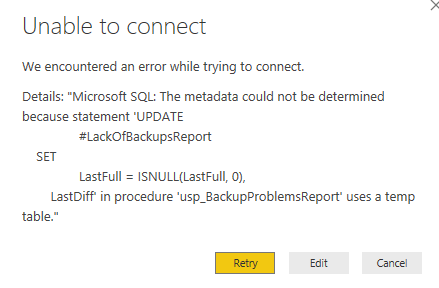
The stored procedure I want to connect to has multiple parameters where only the first is mandatory. The error I'm getting relates to the stored procedure using #temp tables. Is this really true, you cannot call stored procedures that make use of temp tables?
"Or you can import data from Stored procedure using OPENQUERY as follows."
Does that mean that it's a one-time import? I want the data loaded on schedule.
Thanks
Hello,
Sorry I don't seem to be getting notification so only just realised that you had posted. Thanks, you example will
work for my requirments.
Regards
If you have recently started exploring Fabric, we'd love to hear how it's going. Your feedback can help with product improvements.
A new Power BI DataViz World Championship is coming this June! Don't miss out on submitting your entry.
Share feedback directly with Fabric product managers, participate in targeted research studies and influence the Fabric roadmap.
| User | Count |
|---|---|
| 5 | |
| 3 | |
| 3 | |
| 2 | |
| 2 |
| User | Count |
|---|---|
| 11 | |
| 10 | |
| 7 | |
| 7 | |
| 6 |