cancel
Showing results for 
Search instead for 
Did you mean: 

The Power BI Data Visualization World Championships is back! Get ahead of the game and start preparing now! Learn more

Reply
Anonymous
Not applicable

Exctracting Cell value from a tables before expanding them

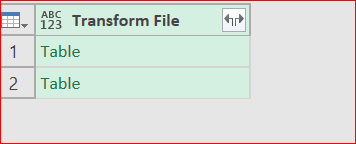
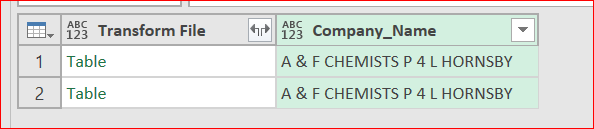
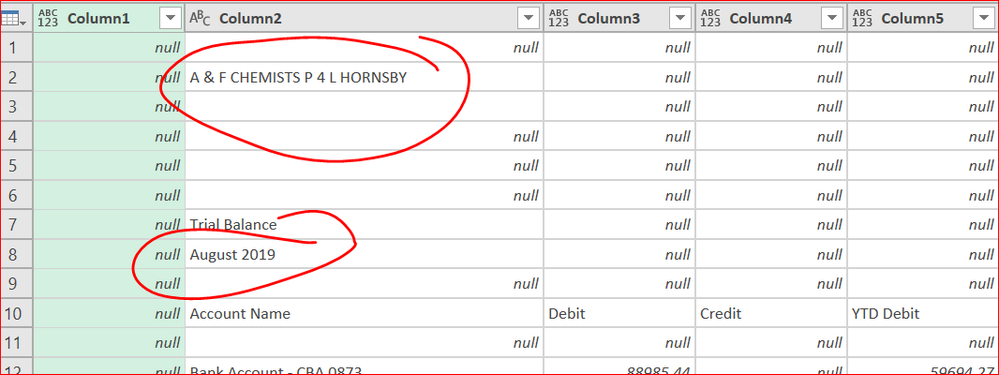
this is the list of table where in need to add one more column contains cell value for each table to indicate the name of the company one more for the date of the reportthis is the list of table where in need to add one more column contains cell value for each table to indicate the name of the company one more for the date of the reportsecond column to contain the name , of course different name based on the value of the cells in the headerssecond column to contain the name , of course different name based on the value of the cells in the headersthese are the value from each table which i need to bring to new column into the first table.these are the value from each table which i need to bring to new column into the first table.
 

Hellow guys ,

this is my first question in the form and i wish i could find an ansuwer to it. 

I have to note that iam begginer with M language .

My question is :

I am loading data from a folder which should contain more than 40 identical structured table, now these table arent in a good data set shapte. there is header in contacins comopany name and underneath it with few rows date of the report. the object is to retrive these tow field in put it in new columns right before i expand the tables so these record are attached to each row in each table when become in the same table.

Please refer to above picures for more details. and thanks alot in advance

1 ACCEPTED SOLUTION
ImkeF
Community Champion
Community Champion

Hi @Anonymous 

you can add a column with the following code:


[TransformFile][Column2]{1} to retrieve the Company name and 

[TransformFile][Column2]{7} for the date.


See here for more information: http://excel-inside.pro/blog/2015/11/05/absolute-and-relative-references-in-power-query/

Imke Feldmann (The BIccountant)

If you liked my solution, please give it a thumbs up. And if I did answer your question, please mark this post as a solution. Thanks!

How to integrate M-code into your solution -- How to get your questions answered quickly -- How to provide sample data -- Check out more PBI- learning resources here -- Performance Tipps for M-queries

View solution in original post

2 REPLIES 2
ImkeF
Community Champion
Community Champion

Hi @Anonymous 

you can add a column with the following code:


[TransformFile][Column2]{1} to retrieve the Company name and 

[TransformFile][Column2]{7} for the date.


See here for more information: http://excel-inside.pro/blog/2015/11/05/absolute-and-relative-references-in-power-query/

Imke Feldmann (The BIccountant)

If you liked my solution, please give it a thumbs up. And if I did answer your question, please mark this post as a solution. Thanks!

How to integrate M-code into your solution -- How to get your questions answered quickly -- How to provide sample data -- Check out more PBI- learning resources here -- Performance Tipps for M-queries

Anonymous
Not applicable

thanks alot ,,its perfect

Helpful resources

Announcements
Power BI DataViz World Championships

Power BI Dataviz World Championships

The Power BI Data Visualization World Championships is back! Get ahead of the game and start preparing now!

December 2025 Power BI Update Carousel

Power BI Monthly Update - December 2025

Check out the December 2025 Power BI Holiday Recap!

FabCon Atlanta 2026 carousel

FabCon Atlanta 2026

Join us at FabCon Atlanta, March 16-20, for the ultimate Fabric, Power BI, AI and SQL community-led event. Save $200 with code FABCOMM.