Join us at FabCon Atlanta from March 16 - 20, 2026, for the ultimate Fabric, Power BI, AI and SQL community-led event. Save $200 with code FABCOMM.
Register now!The Power BI Data Visualization World Championships is back! Get ahead of the game and start preparing now! Learn more
Hi Experts,
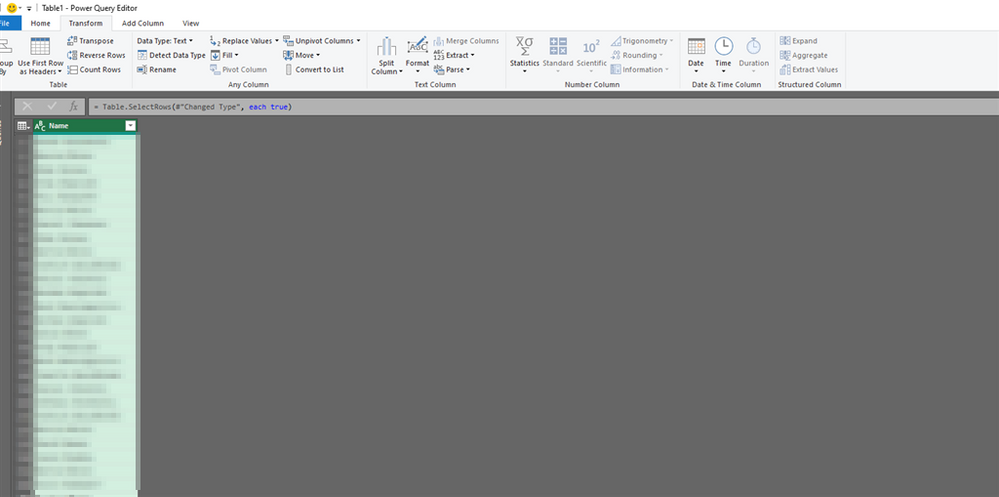
Please can you help me, my excel (office 365), I am not able to see the following "Add Data Type" is missing as "Structured Data Column" in the Transform is greyed out. I have tried by selecting the coloumn and multiple columns
The other things of Interest.
1. I also notice that when power query as Com ADD-INs is missing but I am able to get power query transform by selecting the add source. Please can you help me
Thanks
Solved! Go to Solution.
@acerNZ
Power Query data types are available only for Office 365 subscriber, if you have O365 subscription please get the latest updates to use this feature.
Paul Zheng _ Community Support Team
If this post helps, please Accept it as the solution to help the other members find it more quickly.
@acerNZ
Power Query data types are available only for Office 365 subscriber, if you have O365 subscription please get the latest updates to use this feature.
Paul Zheng _ Community Support Team
If this post helps, please Accept it as the solution to help the other members find it more quickly.
@Anonymous
Thanks Paul, Yes I am on Office 365 but updates are controlled by organization, I have no control. So I cannot do much.
The Power BI Data Visualization World Championships is back! Get ahead of the game and start preparing now!