Don't miss your chance to take the Fabric Data Engineer (DP-600) exam for FREE! Find out how by attending the DP-600 session on April 23rd (pacific time), live or on-demand.
Learn moreNext up in the FabCon + SQLCon recap series: The roadmap for Microsoft SQL and Maximizing Developer experiences in Fabric. All sessions are available on-demand after the live show. Register now
Is there any way to figure out a formula on the below :
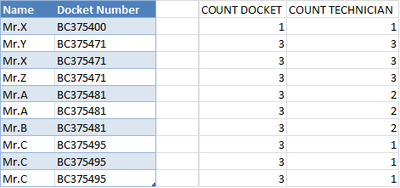
I need the last column with a formula that could count as per the docket number how many people has worked on that docket. The last column will count and return a value accordingly.
If there are three dockets open with same number, and one person has worked on it - it will return value 1. The below is an example
I have attached both picture and a table below to understand it clearly.
| Name | Docket Open | Number of Times Docket Appears | No. of Person on Same Docket |
| Example | |||
| Need a formula to count this column | |||
| Name | Docket Number | COUNT DOCKET | COUNT TECHNICIAN |
| Mr.X | BC375400 | 1 | 1 |
| Mr.Y | BC375471 | 3 | 3 |
| Mr.X | BC375471 | 3 | 3 |
| Mr.Z | BC375471 | 3 | 3 |
| Mr.A | BC375481 | 3 | 2 |
| Mr.A | BC375481 | 3 | 2 |
| Mr.B | BC375481 | 3 | 2 |
| Mr.C | BC375495 | 3 | 1 |
| Mr.C | BC375495 | 3 | 1 |
| Mr.C | BC375495 | 3 | 1 |
Solved! Go to Solution.
Hi,
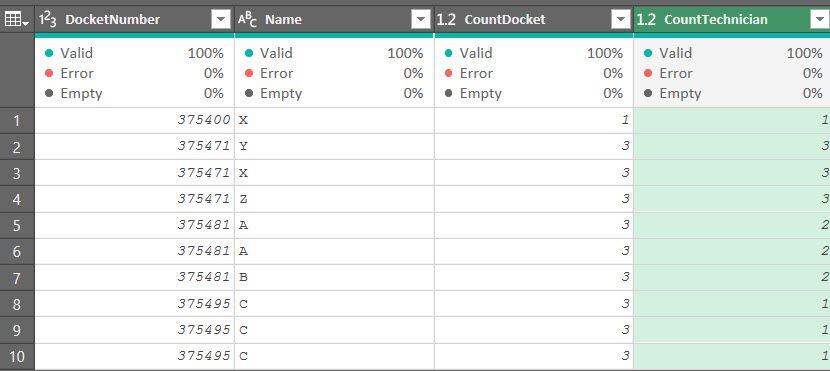
1. group by on docket number - use the advanced grouping.
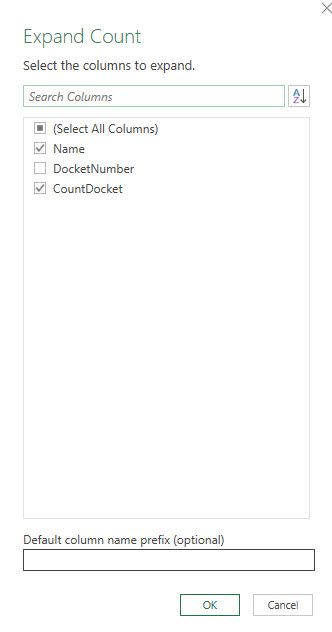
2. distinct count on rows and then expand:
// if this is an answer please mark as such, kudos always appreciated.
Hi @Anonymous ,
Have you resolved it? If yes, please accept the helpful answers as solutions. Others will benefit from this thread. Thanks!! If you still need help, please feel free to ask us.
Aha, formula, my good old ones ...😉
Hi, @Anonymous , since PQ and DAX solutions are already provided, pls refer to formula solution as follows,
COUNT DOCKET =COUNTIF(DS[Docket Number],DS[@[Docket Number]])
//Array formula, Ctrl+Shift+Enter to enter
COUNT TECHNICIAN {=COUNT(0/FREQUENCY(IFERROR(MATCH(IF(DS[Docket Number]=DS[@[Docket Number]],DS[Name]),DS[Name],),""),ROW(DS[Name])-ROW(DS[[#Headers],[Name]])))}
first things first, convert the dataset range into a table (hotkey: Ctr+T) named "DS".
| Thanks to the great efforts by MS engineers to simplify syntax of DAX! Most beginners are SUCCESSFULLY MISLED to think that they could easily master DAX; but it turns out that the intricacy of the most frequently used RANKX() is still way beyond their comprehension! |
DAX is simple, but NOT EASY! |
Hi,
1. group by on docket number - use the advanced grouping.
2. distinct count on rows and then expand:
// if this is an answer please mark as such, kudos always appreciated.
@Anonymous - Maybe:
Count Technician (Column) =
VAR __Table = FILTER('Table',[Docket Number]=EARLIER([Docket Number]))
RETURN
COUNTROWS(DISTINCT(SELECTCOLUMNS(__Table,"Name",[Name])))
If you have recently started exploring Fabric, we'd love to hear how it's going. Your feedback can help with product improvements.
A new Power BI DataViz World Championship is coming this June! Don't miss out on submitting your entry.
Share feedback directly with Fabric product managers, participate in targeted research studies and influence the Fabric roadmap.
| User | Count |
|---|---|
| 5 | |
| 3 | |
| 3 | |
| 3 | |
| 2 |