Get certified for free when you join Fabric Data Days 2026 and dive into Fabric, Power BI, SQL, AI, and other essential data skills.
Join nowJuly 7 - July 17 | Round 2 of the Power BI Dataviz World Championships. Don't miss your chance! Learn more
Hi everyone!
I´m having problems with the configuration of a SQL server Data source.
I have the on premise Gateway ready on the server, everything looks OK.
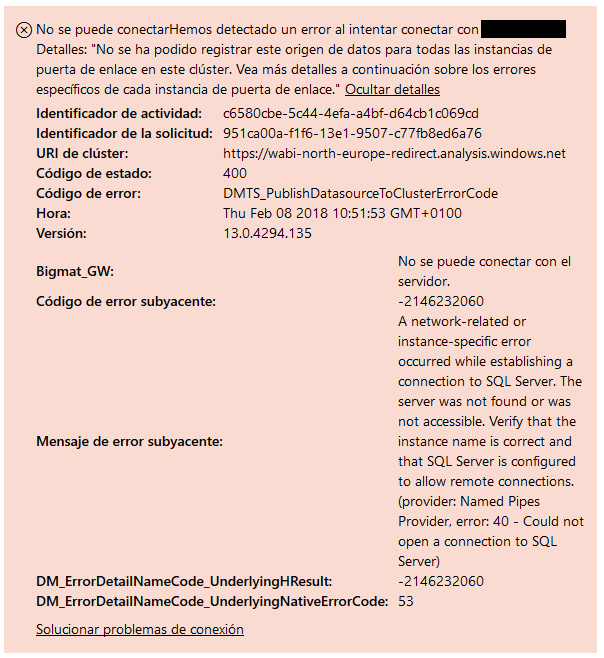
But when I try to configure the data source on the online service, shows me this:
Any idea?
Solved! Go to Solution.
@Anonymous,
Are you able to access SQL Server from the machine that installing gateway? You can install SQL Server Management Studio on the machine to test the connection.
In addition, please configure remote setting for your SQL Server following the guide in this blog, also add your SQL TCP port and UDP port into inbound rule of your firewall, for more details, please review this blog.
Regards,
Lydia
@Anonymous,
Are you able to access SQL Server from the machine that installing gateway? You can install SQL Server Management Studio on the machine to test the connection.
In addition, please configure remote setting for your SQL Server following the guide in this blog, also add your SQL TCP port and UDP port into inbound rule of your firewall, for more details, please review this blog.
Regards,
Lydia
Thanks @Anonymous!
Finally we have solved the problem with a rule in the firewall.
Join us in Barcelona for FabCon and SQLCon, the Fabric, Power BI, SQL, and AI community event. Save €200 with code FABCMTY200.
Join Data Days 2026: 60 days of free live/on-demand sessions, challenges, study groups, and certification opportunities.