Join us at FabCon Atlanta from March 16 - 20, 2026, for the ultimate Fabric, Power BI, AI and SQL community-led event. Save $200 with code FABCOMM.
Register now!Vote for your favorite vizzies from the Power BI Dataviz World Championship submissions. Vote now!
Hi,
I am trying to call a table function in our SQL database and it is expecting smalldatetime but Power Query Editor always return this error:
DataSource.Error: Microsoft SQL: The conversion of a datetime2 data type to a smalldatetime data type resulted in an out-of-range value.
Details:
DataSourceKind=SQL
DataSourcePath=******
Message=The conversion of a datetime2 data type to a smalldatetime data type resulted in an out-of-range value.
ErrorCode=-2146232060
Number=242
Class=16
Below is my attempt (sensitive data is masked with XXXX):
let
Source = Sql.Database(XXXX, XXXXXX),
dbo_Report = Source{[Schema="dbo",Item="Report"]}[Data],
#"Invoked Function" = dbo_Report(XXXXX, #datetime(2000,1,1,0,0,0) , #datetime(2080,1,1,0,0,0))
in
#"Invoked Function"
Solved! Go to Solution.
Hi @hale
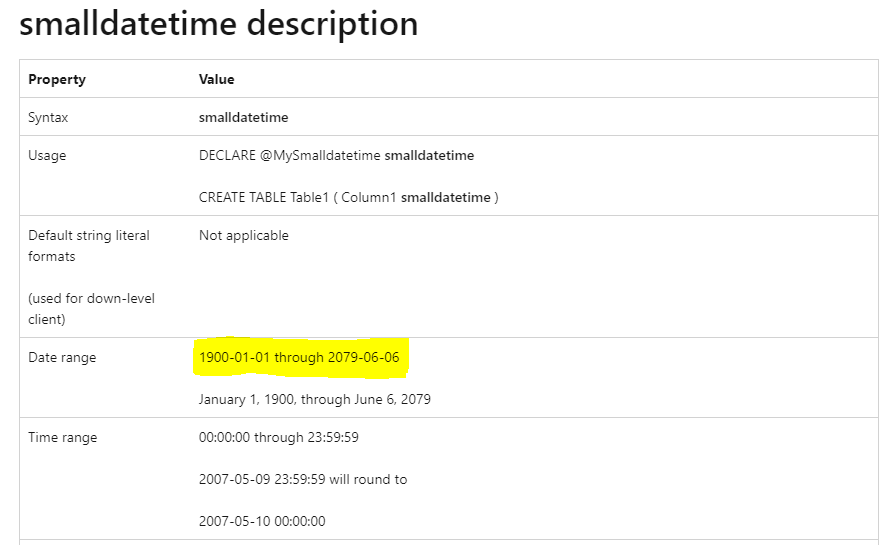
It is because the value #datetime(2080,1,1,0,0,0) you passed in the function is out of the range of smalldatetime type. I guess the column in your SQL Server table is set to smalldatetime type, so it cannot accept this value, which leading to this error.
Please refer to this official doc:smalldatetime (Transact-SQL) - SQL Server
Date & time data type value range
| Data type | Date & Time Range |
| datetime | 1753-01-01 00:00:00 ~ 9999-12-31 23:59:59.997 |
| datetime2 | 0001-01-01 00:00:00 ~ 9999-12-31 23:59:59.9999999 |
| date | 0001-01-01 ~ 9999-12-31 |
| smalldatetime | 1900-01-01 00:00:00 ~ 2079-06-06 23:59:59 |
To resolve it, please pass a smaller value than #datetime(2079,6,6,23,59,59), or change the column data type to datetime or datetime2 type in your SQL Server table.
Best Regards,
Community Support Team _ Jing
If this post helps, please Accept it as Solution to help other members find it.
Hi @hale
It is because the value #datetime(2080,1,1,0,0,0) you passed in the function is out of the range of smalldatetime type. I guess the column in your SQL Server table is set to smalldatetime type, so it cannot accept this value, which leading to this error.
Please refer to this official doc:smalldatetime (Transact-SQL) - SQL Server
Date & time data type value range
| Data type | Date & Time Range |
| datetime | 1753-01-01 00:00:00 ~ 9999-12-31 23:59:59.997 |
| datetime2 | 0001-01-01 00:00:00 ~ 9999-12-31 23:59:59.9999999 |
| date | 0001-01-01 ~ 9999-12-31 |
| smalldatetime | 1900-01-01 00:00:00 ~ 2079-06-06 23:59:59 |
To resolve it, please pass a smaller value than #datetime(2079,6,6,23,59,59), or change the column data type to datetime or datetime2 type in your SQL Server table.
Best Regards,
Community Support Team _ Jing
If this post helps, please Accept it as Solution to help other members find it.
Hi Jing,
That's exactly the issue. However I dont have any control over SQL database so Im looking for something I can do from Power BI side.
Is there anything else that I can try?
Hi @hale
Is this function used to filter rows between those two dates? If the column doesn't hold date values after 2079-06-06 in the SQL table, you can pass an earlier date in the function. Is this possible to solve it?
Best Regards,
Community Support Team _ Jing
oh thanks, it actually is working. The 2 parameters I can pass in like this and it works:
#datetime(2000,1,1,1,1,1) , #datetime(2022,1,5,1,1,1)Cheers,
Ha Le
Vote for your favorite vizzies from the Power BI World Championship submissions!
If you love stickers, then you will definitely want to check out our Community Sticker Challenge!
Check out the January 2026 Power BI update to learn about new features.
| User | Count |
|---|---|
| 11 | |
| 9 | |
| 6 | |
| 6 | |
| 6 |